Blog/AI agents
The agent loop, explained: how coding agents run, and how to make them stop
How the agent loop works in code, which stop conditions and budgets to enforce, and how outer loops like Ralph and Claude Code /loop and /goal behave.
Balázs Csorba··10 min read
- Agent loop
- Coding agents
- Tool calling
- Claude Code
- Stop conditions
Key takeaways
- An agent loop calls the model, runs the tool it requests, appends the result and repeats until a stop condition ends the run.
- With the Claude Messages API, stop_reason tool_use means run the tool and send back a tool_result with the matching tool_use_id.
- The model's own end_turn is the weakest stop condition; enforce iteration, token and time budgets in code plus no-progress detection.
- Tests are the loop's ground truth only if they can fail: a regression test should fail when just the fix is reverted.
- Outer loops such as the Ralph shell loop, Claude Code /loop and /goal restart or re-prompt the agent, and each needs its own stop rule.
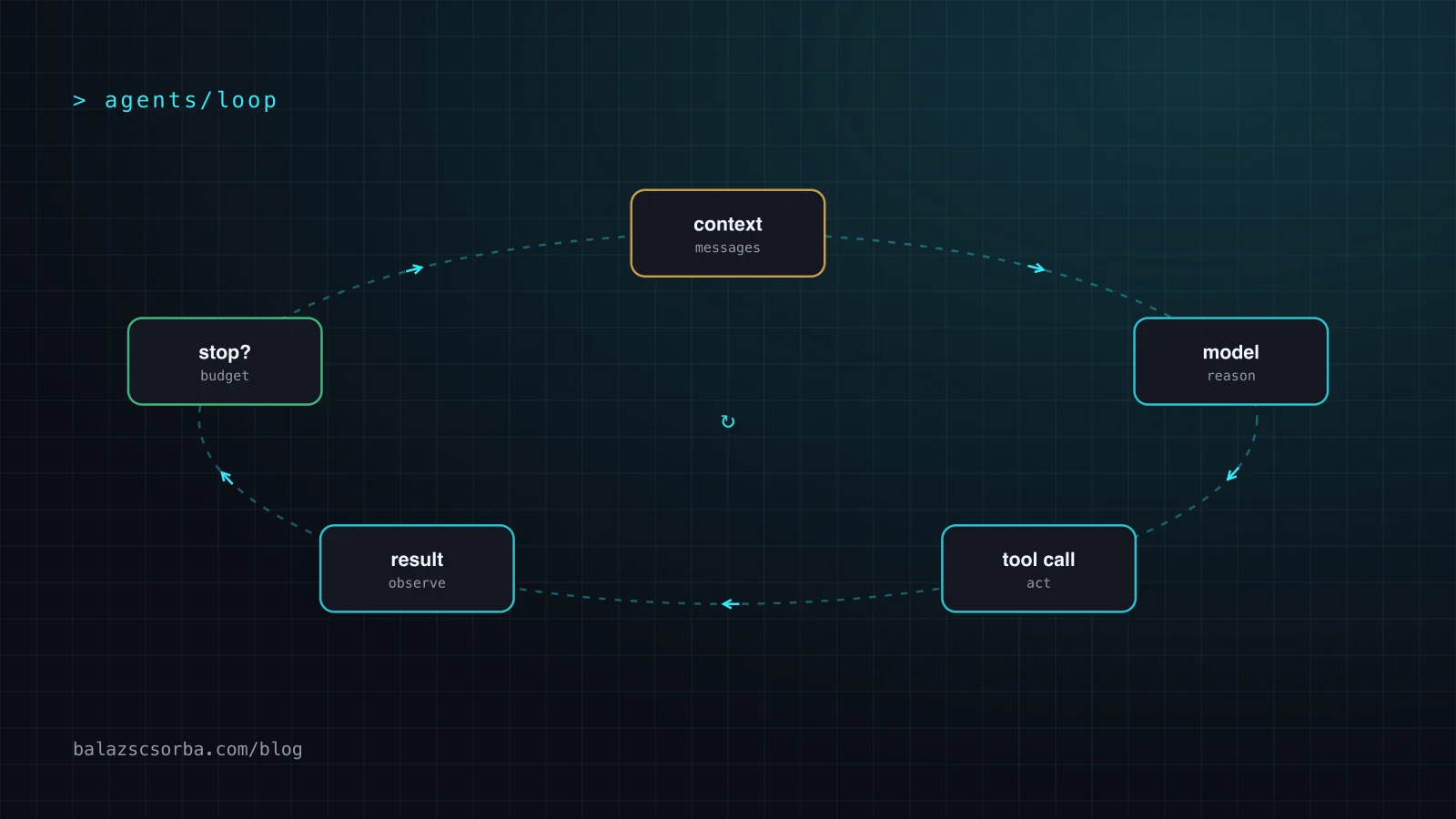
An agent loop is the control loop inside every AI agent: the model reads its context, asks for a tool call, your code runs the tool and appends the result, and the model is called again. That repeats until a stop condition ends the run. Coding agents, research agents and support bots all share it. What separates a useful agent from an expensive one is mostly how the loop checks its own work and when it stops.
This article walks through the loop in code, the stop conditions and budgets worth enforcing, why tests are the loop's ground truth, and the outer loops built on top of it: Geoffrey Huntley's "Ralph" technique and Claude Code's /loop and /goal commands. It ends with the failure modes and a checklist.
What is an agent loop?
An agent loop is a model calling tools repeatedly, using each result to decide the next step, until it decides it's done or something stops it. Anthropic's "Building effective agents" (December 2024) describes agents as "LLMs using tools based on environmental feedback in a loop", and separates them from workflows, where "LLMs and tools are orchestrated through predefined code paths". In an agent, the model directs its own process; in a workflow, your code does.
The idea predates today's coding agents. The ReAct paper by Yao et al. ("ReAct: Synergizing Reasoning and Acting in Language Models", 2022) prompted models to generate "reasoning traces and task-specific actions in an interleaved manner": think, act, observe, think again. On the interactive benchmarks ALFWorld and WebShop it beat imitation and reinforcement learning baselines by 34 and 10 absolute points of success rate, with only one or two in-context examples. Modern tool-calling APIs turned that prompt pattern into a protocol: the model returns a structured tool request instead of text you have to parse.
How does the agent loop work in code?
In code, the agent loop is a while loop around one API call. Each iteration sends the full message history, and the response's stop reason tells you whether to run a tool and go again or to stop.
With the Claude Messages API the contract is explicit. When the model wants a tool, the response has stop_reason: "tool_use" and one or more tool_use blocks, each with an id, a tool name and an input. Your code runs the tool and sends back a user message containing only tool_result blocks whose tool_use_id matches. The stop reason docs list the other values: end_turn (finished), max_tokens, stop_sequence, refusal, model_context_window_exceeded, and pause_turn, which means a server-side tool loop hit its own iteration limit (10 by default) and you should send the content back to continue.
# Simplified sketch of an agent loop (Claude Messages API, Python SDK)
messages = [{"role": "user", "content": task}]

for turn in range(MAX_TURNS):                        # hard stop 1: iterations
    response = client.messages.create(
        model=MODEL, max_tokens=4096, tools=TOOLS, messages=messages)
    messages.append({"role": "assistant", "content": response.content})

    if response.stop_reason != "tool_use":           # end_turn, max_tokens, refusal ...
        break

    results = []
    for block in response.content:
        if block.type == "tool_use":
            output = run_tool(block.name, block.input)   # your code, your sandbox
            results.append({"type": "tool_result",
                            "tool_use_id": block.id,
                            "content": output})
    messages.append({"role": "user", "content": results})

    if budget.exceeded() or no_progress(messages):    # hard stops 2 and 3
        break
Two details matter more than they look. First, run_tool is where all the risk lives: it executes whatever the model asked for, so it belongs in a sandbox with scoped credentials (see sandboxing coding agents in CI). Second, every tool result stays in messages, so the context grows with every iteration. A long loop pays for its whole history on each call.
When should an agent loop stop?
An agent loop should stop when the task is verifiably done, and it must also stop when a budget runs out, whatever the model thinks. Anthropic's guidance puts it plainly: it's "crucial to include stopping conditions (such as a maximum number of iterations) to maintain control."
The model's own end_turn is the natural exit, but it's the weakest one. It only means the model believes it's finished. Everything else in the table below exists because that belief is sometimes wrong, and because a loop that never ends quietly spends money.
| Stop condition | What it catches | Weakness on its own |
|---|---|---|
Model ends its turn (end_turn) | Normal completion | The model can declare victory early |
| Maximum iterations | Runaway loops | Cuts off legitimately long tasks |
| Token or cost budget | Expensive spirals, growing context | Needs per-task numbers you have measured |
| Wall-clock timeout | Hung tools, slow external systems | Says nothing about quality |
| No-progress detection | Going in circles | Needs a definition of "progress" |
| External check (tests, evaluator) | False "done" | Only as good as the check |
No-progress detection is the one teams skip, and it's the one that saves the most. Define progress as something the loop can count: failing tests going down, review threads resolved, a to-do list shrinking. My review-loop skill counts resolved review threads and stops after three rounds without progress, then hands over to a human instead of trying a fourth variation of the same fix. The number is arbitrary; having one is not.
Why tests are the agent loop's ground truth
A loop can only correct itself against something it can't argue with. For coding agents that is a test run, a compiler or a type checker: output from the environment, not the model's opinion of its own work.
"Building effective agents" says agents need "ground truth from the environment at each step (such as tool call results or code execution)". In practice that means two rules. The agent runs the tests itself, inside the loop, and reads the output. And the tests must be able to fail. Simon Willison's red/green TDD pattern makes the point: "If you skip that step you risk building a test that passes already." My own rule for bug fixes is stricter: the regression test must pass with the fix, and fail when only the fix is reverted. A test that passes either way gives the loop nothing to steer by.
Anthropic's "Effective harnesses for long-running agents" (November 2025) shows the same idea at a larger scale: a feature list in JSON where every feature starts with "passes": false, one feature per session, and an instruction that "it is unacceptable to remove or edit tests". The failure modes they list are the ones you'd expect when the check is weak: declaring the project complete too early, and marking features done without end-to-end testing. The broader system of checks around the model is the subject of harness engineering.
Outer loops: Ralph, /loop and /goal
An outer loop restarts the agent loop itself: a fresh session per iteration, a schedule, or a condition checked after every turn. It's how you get hours of work out of an agent whose single run ends after minutes.
The Ralph technique
Geoffrey Huntley's "Ralph" (July 2025) is the minimal version. In his words, "Ralph is a Bash loop":
while :; do cat PROMPT.md | claude-code ; done Each iteration starts a new agent session with the same prompt. State lives on disk, not in the context: specs and a fix_plan.md with the prioritized remaining work, which the agent updates. His central rule is "one item per loop", because "the more you use the context window, the worse the outcomes you'll get". Tests after each change are what keep the loop honest. He is explicit about scope: it suits greenfield projects, and he wouldn't use it in an existing codebase.
Claude Code /loop and /goal
Claude Code ships two session-level outer loops. According to the scheduled tasks docs, /loop is a bundled skill that re-runs a prompt while the session stays open. /loop 5m check the deploy converts the interval to a cron schedule (units s, m, h, d, with one-minute granularity). With a prompt but no interval, Claude picks a delay between one minute and one hour after each iteration and prints why. A bare /loop runs a built-in maintenance prompt: continue unfinished work, tend the current branch's pull request, then cleanup passes. A .claude/loop.md or ~/.claude/loop.md replaces that default prompt.
The stop rules are the interesting part. Scheduled prompts fire only between turns while the session is idle. Esc stops a self-paced loop, and Claude can end it itself once the work is done. Fixed-interval loops run until cancelled, and recurring tasks expire after seven days, which "bounds how long a forgotten loop can run". A session holds up to 50 scheduled tasks.
/goal works on a condition instead of a clock. After each turn, a small fast model checks whether the condition holds; if not, Claude starts another turn. The goal clears when the condition is met, when the evaluator judges it impossible, or on an error you have to fix. If Claude stops using tools for several turns in a row, Claude Code stops the loop and returns control. The docs recommend one measurable end state, a stated check, and a bound such as "or stop after 20 turns".
| Outer loop | Next iteration starts when | Context per iteration | Stops when |
|---|---|---|---|
Ralph (shell while) | The previous session exits | Fresh; state in files | You kill it, or the plan runs out |
Claude Code /loop | An interval elapses | Same session | You stop or cancel it, Claude ends it, or seven days pass |
Claude Code /goal | The previous turn finishes | Same session | Evaluator says met or impossible, or an unrecoverable error |
Sub-agents are the other way to nest loops. An orchestrator, in Anthropic's words, "dynamically breaks down tasks, delegates them to worker LLMs, and synthesizes their results". Each worker runs its own loop in its own context and returns only a summary, which keeps the parent's context small. How that trades against rules files, skills and tools is covered in the context-budget decision matrix.
When not to use an agent loop, and how loops fail
Don't use an agent loop when you already know the steps. A fixed workflow is cheaper, faster and easier to test. Anthropic's advice is to "add multi-step agentic systems only when simpler solutions fall short".
When an agent loop is the right tool, these are the ways it goes wrong:
- Looping forever. Retrying the same fix with small variations. The cure is a hard iteration cap plus no-progress detection, not a better prompt.
- Context bloat. Every tool result stays in the history, and quality drops as the context grows. Huntley's "one item per loop" and fresh sessions per iteration are a direct answer; so are sub-agents and compaction.
- Gaming the check. If the only exit is "tests are green", editing the test is a shortcut to the exit. Forbid it in the instructions, protect test files where you can, and review the test diff separately from the code diff.
- Declaring victory early. The model ends its turn with work left. An outside check (an evaluator, a feature list, CI) decides "done", not the agent.
- Unbounded side effects. Loops that push, deploy or post can repeat an irreversible action. Humans approve anything public or irreversible; the loop prepares it.
Agent loop checklist
- Decide if you need a loop. If the steps are known, write a workflow.
- Set hard limits in code: maximum iterations, a token or cost budget, and a wall-clock timeout.
- Define progress as a number (failing tests, open threads, remaining items) and stop after N rounds without change.
- Give the loop ground truth: tests, types and linters the agent runs itself, and a regression test that fails when the fix is reverted.
- Keep state on disk, not only in the context: a plan file, a progress log, git commits.
- One item per iteration for long runs, with fresh context or sub-agents for exploration.
- Sandbox the tool runner and give it scoped, short-lived credentials.
- Hand over to a human when the loop stalls, and before anything public or irreversible.
This is how the review loop in my coding agent skills is built, and the same loop shows up again in handling agent-written pull requests. If you're designing agent loops for your own team, see AI engineering.
Sources
- Anthropic: Building effective agents (Dec 2024)
- Yao et al.: ReAct: Synergizing Reasoning and Acting in Language Models (2022)
- Claude API docs: Handling stop reasons
- Anthropic: Effective harnesses for long-running agents (Nov 2025)
- Simon Willison: Red/green TDD (Agentic Engineering Patterns)
- Geoffrey Huntley: Ralph Wiggum as a "software engineer" (Jul 2025)
- Claude Code docs: Run prompts on a schedule (/loop)
- Claude Code docs: Keep Claude working toward a goal (/goal)
Frequently asked questions
What is the difference between an AI agent and a workflow?
In a workflow, your code decides the sequence of LLM calls and tool calls in advance. In an agent, the model decides the next step itself, based on the results of earlier tool calls, and keeps going until it stops or a limit stops it. Workflows are cheaper and easier to test, so use an agent only when the steps can't be known in advance.
How do I stop an AI agent from looping forever?
Put hard limits in the code that runs the loop: a maximum number of iterations, a token or cost budget and a wall-clock timeout. Then add no-progress detection, such as stopping after three rounds in which the count of failing tests or open review threads did not go down, and hand the task to a human at that point.
What is the Ralph loop for coding agents?
Ralph is a technique described by Geoffrey Huntley in July 2025: a shell while loop that feeds the same prompt file to a fresh coding agent session again and again. State lives in files such as specs and a prioritized fix plan, each iteration handles one item, and tests keep the work honest. He recommends it for greenfield projects, not existing codebases.
What does the Claude Code /loop command do?
/loop is a bundled Claude Code skill that re-runs a prompt while the session stays open. With an interval such as 5m it runs on a cron schedule; without one, Claude picks a delay between one minute and one hour each time. A bare /loop runs a built-in maintenance prompt or your loop.md. Recurring tasks expire after seven days.
What does pause_turn mean in the Claude API?
pause_turn is a stop reason that means a server-side tool loop, such as web search run by the API, reached its iteration limit, which is 10 by default. It is not an error. Send the assistant content back in a new request and the model continues where it paused.