Blog/Web engineering
Pimcore ERP delta sync: syncing product data between SAP or Infor, PIM and shop
How to sync product data between SAP or Infor, Pimcore and a shop: delta vs full sync, change detection, idempotent imports, Messenger queues, ownership and replays.
Balázs Csorba··12 min read
- Pimcore
- SAP integration
- PIM ERP sync
- Symfony Messenger
Key takeaways
- Decide ownership per attribute before writing any import: the ERP owns commercial and logistics data, the PIM owns content and classification, and nothing is written by two systems.
- Use a delta sync for the daily flow and keep a full sync as a scheduled reconciliation, not as the normal path. Detect changes at the source (SAP change pointers, Infor Sync BODs, CDC) and confirm them with a content hash.
- Messages are delivered at least once, so every handler must be idempotent: a stable key per business event, an upsert instead of an insert, and a hash check before writing.
- Put a queue between ERP and PIM. In Pimcore that is Symfony Messenger with the pimcore_core queue and a failure transport, ideally on RabbitMQ in production.
- Quality gates, a failure queue you actually watch, and a replay command turn a fragile import into an operable pipeline. Check the current Pimcore platform version, edition and support window before you build.
Almost every B2B commerce project I work on has the same backbone: an ERP such as SAP or Infor holds the truth about articles, prices and stock, a PIM such as Pimcore turns that data into something a customer can understand, and a shop sells it. The three systems agree on a Monday and disagree by Friday. When a sales rep asks why the shop shows an old price, the answer is almost never "the sync is broken". It is that nobody decided who owns that field, what counts as a change, or what happens when one message fails.
This article is the design I would use today for the sync between ERP, Pimcore and shop: ownership first, then a delta flow with a full reconciliation next to it, change detection that does not trust a single signal, idempotent handlers behind a queue, quality gates, and the monitoring and replay tooling that makes it operable. At the end is a short list of things to verify about Pimcore versions and editions before you commit, because that landscape has moved in 2026.
If you are weighing an AI layer on top of clean product data, the same foundation matters: structured, trustworthy catalogue data is what agentic commerce protocols and generative engine optimization both depend on.
Why this sync is harder than it looks
On paper it is a pipe: read from the ERP, write to the PIM, publish to the shop. In practice there are four problems hiding in it. The first is volume and cadence: a material master with hundreds of thousands of records cannot be re-read every few minutes, but prices and stock change constantly. The second is that "changed" is ambiguous: an ERP record can be touched without any attribute that matters to the shop changing. The third is that systems fail halfway: a network timeout, a locked object or a validation error leaves you with some records updated and others not. The fourth is that two systems often write the same field, and the last write wins by accident.
Each of these has a boring, well-understood answer. The point of the design below is to apply them consistently, so that the sync can be explained on one page and debugged in ten minutes.
Decide who owns each attribute first
Before any import code, I write down an ownership table: every attribute group, which system is the single writer, and in which direction it flows. A field has exactly one owner. The other systems may read it, display it or cache it, but never write it back. This one rule removes most of the "ping-pong" bugs where an import overwrites a manual edit, or an editor fixes a value that is overwritten again the next night.
| Attribute group | Owner | Direction | Rule |
|---|---|---|---|
| Article number, base unit, status, weights, GTIN | ERP | ERP → PIM | Read-only in the PIM editing UI |
| Prices, stock, availability, customer-specific conditions | ERP | ERP → shop | Often bypasses the PIM, or is looked up live |
| Titles, descriptions, images, documents, translations | PIM | PIM → shop | Never imported from the ERP once maintained |
| Classification, filterable attributes, variants, cross-sell | PIM | PIM → shop | Seeded from the ERP once, owned by the PIM afterwards |
| Sorting, SEO URL, merchandising flags | Shop | Stays in shop | Not synced back |
This split is typical, not universal. Some companies keep long texts in the ERP, some keep dimensions in the PIM. What matters is that your table exists, that it is enforced in code (the import simply has no mapping for fields it does not own), and that the PIM UI marks ERP-owned fields as read-only so editors stop trying to change them. For the shared grey zone, such as a name that starts in the ERP and gets polished in the PIM, make the hand-over explicit: the ERP value seeds the field once, and a flag records that the PIM owns it from then on.
The data flow
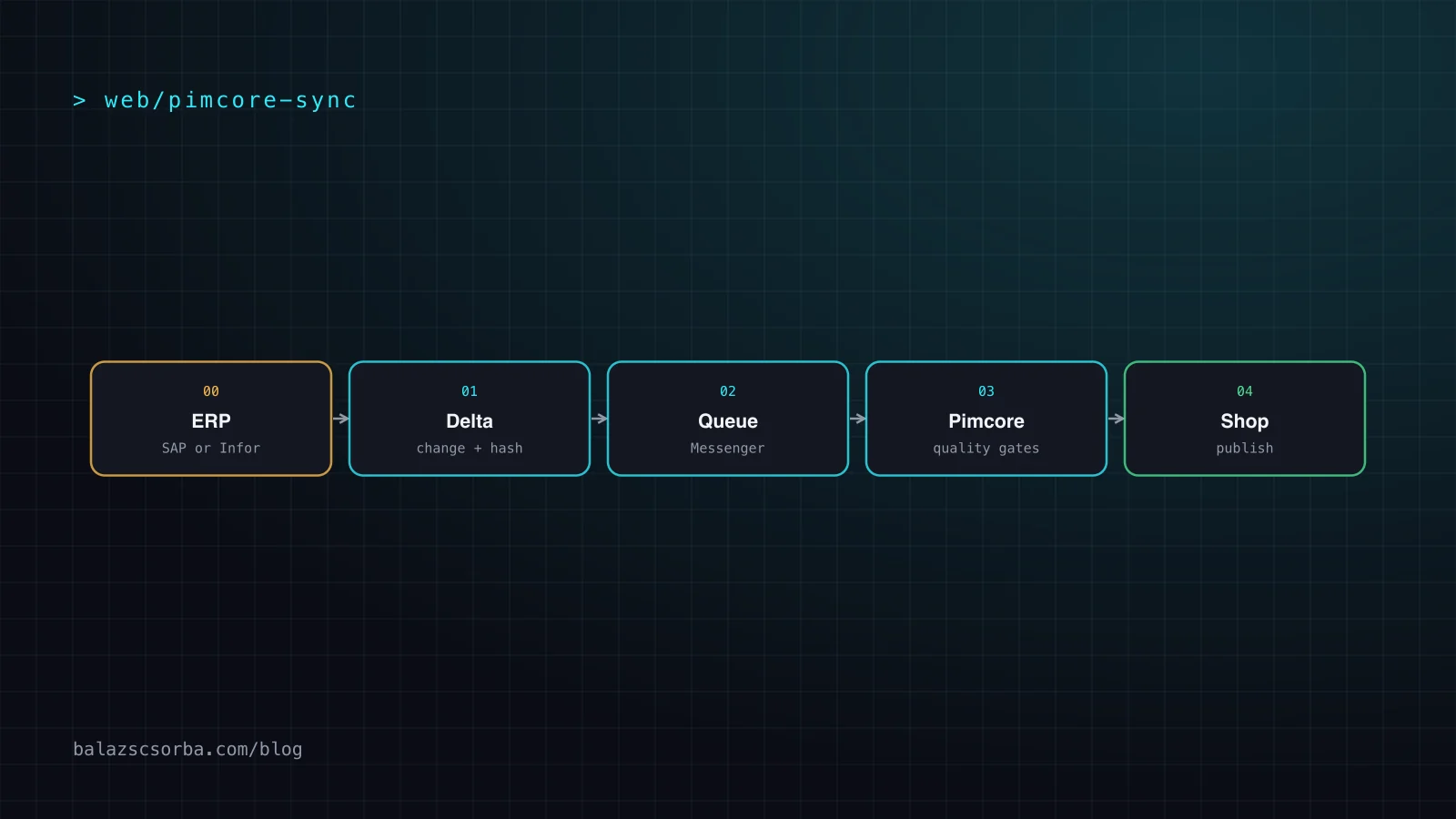
The shape I use is a short chain with a queue in the middle and a failure path next to it. The ERP side produces change events; a thin extract step normalises them; a queue decouples the speed of the ERP from the speed of Pimcore; Pimcore validates, enriches and stores; and the publish step feeds the shop.
Three details make this shape work. First, the extract step is the only place that knows about SAP or Infor: it speaks IDoc, BOD, OData or REST and emits one internal message format. Swapping the ERP, or adding a second one, then touches one component. Second, the queue is a real queue, not a table you poll, so back-pressure and retries are handled by infrastructure you did not write. Third, the PIM does not publish blindly: it holds a record back when it fails a gate, and the shop only sees what passed.
Full vs delta sync, and how to detect a change
A full sync reads every record on every run and compares it with what you have. It is simple, it heals itself, and it is the right tool for the first load and for periodic reconciliation. It is also slow and puts load on the ERP. A delta sync only transfers what changed since the last successful run. It is fast, but it has one failure mode that a full sync does not: if a change is missed, it stays missed. So I use both: delta for the daily flow, a full reconciliation on a schedule to catch drift.
The harder question is how you know something changed. There are four common signals, and none of them is enough alone.
| Signal | How it works | Strength | Weakness |
|---|---|---|---|
| Changed-at timestamp | Query records modified since the last watermark | Easy to build | Clock skew, back-dated edits, no delete information |
| Source events | SAP change pointers produce IDocs; Infor ION publishes Sync BODs from the data owner | Reports the change itself, includes deletes | Needs setup and housekeeping on the ERP |
| Change data capture | A tool such as Debezium streams row-level changes in commit order | Complete and ordered | Operates at table level, not business level |
| Content hash | You hash the normalised, relevant attributes and compare | Ignores irrelevant touches, safe to repeat | You compute and store it yourself |
On the SAP side, change pointers are the classic mechanism for master data. They are activated generally in transaction BD61 and per message type, for example MATMAS for materials. The report RBDMIDOC (transaction BD21) reads unprocessed pointers, generates IDocs and marks the pointers as processed, and RBDCPCLR (BD22) removes processed ones so the tables BDCP and BDCPS stay small. Plan both jobs; a delta feed that is never cleaned up becomes its own performance problem. On the Infor side, ION routes business object documents, and a Sync BOD is sent by the owner of the data to any application that needs the change.
My default is therefore a two-step check: an event or a watermark tells me which records to look at, and a hash of the normalised, owned attributes tells me whether to write. Normalise before hashing: trim whitespace, fix number formats and decimal places, sort lists and drop fields the ERP touches without business meaning. Otherwise a timestamp bump on the ERP side causes thousands of pointless writes and re-indexing in Pimcore.
Idempotent imports
Message systems deliver at least once. Symfony documents this plainly: a message can be delivered more than once, so handlers must be safe to run repeatedly. Add retries, a worker restart and a replay, and every record will eventually be processed twice. Idempotency is not an optimisation, it is a requirement.
- Stable key per business event. Derive the key from the business meaning (article number plus ERP change number or content hash), never from a random id generated at send time.
- Upsert by natural key. Look up the Pimcore object by article number and update it, or create it, in one handler. Never blindly create.
- Hash before write. If the hash of the incoming owned attributes equals the stored one, do nothing. This also stops re-indexing and cache invalidation storms.
- Order tolerance. Carry a version or timestamp from the source and ignore a message older than what you have stored. Queues do not guarantee global order.
- Deletes as state. Model deactivation and deletion as a status change with a source version, not as a missing record, so they survive replays.
- Database constraints as the last line. A unique key on the article number turns a race between two workers into an error you can see.
Pimcore's Data Importer follows the same idea for file-based feeds: its resolver decides whether a record updates an existing object or creates a new one, and a delta check skips unchanged records. If your feed is a CSV or JSON from the ERP, that may be all you need. I reach for custom handlers when the flow is event-driven, when ownership is per attribute and needs logic, or when one ERP message fans out into several Pimcore objects.
Queues: Symfony Messenger in Pimcore
Pimcore uses Symfony Messenger for background work. The documentation defines the queue pimcore_core for background tasks and an optional pimcore_failed_jobs transport for failed messages. The backend is chosen by the PIMCORE_MESSENGER_TRANSPORT_DSN_PREFIX environment variable: Doctrine is the default, and AMQP (RabbitMQ) and Redis are supported. The documentation states that RabbitMQ is the recommended message queue for production, and workers run as `bin/console messenger:consume pimcore_core`, supervised by supervisor or systemd.
For an ERP sync I would add a dedicated transport next to pimcore_core, so a burst of price updates cannot starve the editors' own background jobs, and I would size workers per queue. On the Symfony side, retry behaviour is configured per transport (max_retries, delay, multiplier, max_delay, jitter); by default a message is retried three times with exponential backoff before it goes to the failure transport. Think about which errors deserve a retry: a locked object or a timeout does, a validation error does not, and retrying it only delays the alert.
Keep the queue honest. messenger:stats shows how many messages are waiting per transport, and the failure transport is only useful if someone looks at it, which brings us to monitoring.
Data quality gates
A sync that faithfully copies bad data is worse than one that stops. I put gates between "received" and "published", and a record that fails a gate is held and reported, not dropped and not published.
- Structural gate: required fields present, types and units valid, referenced objects (brand, category, unit) exist.
- Business gate: sensible ranges (price above zero, weight not ten thousand times the median), status transitions that make sense, no sudden mass deactivation.
- Completeness gate: a product is only published to the shop when mandatory content (title, image, translation) exists in every required language.
- Volume gate: if a run would change or delete far more records than usual, pause and ask for confirmation instead of applying it. This catches an ERP misconfiguration before it empties your shop.
Gates give you a clear status model: received, valid, enriched, published, held. If you plan to use an LLM for enrichment, such as drafting descriptions or classifying products, treat its output as just another gate input and test it the way you would test any model feature, as described in LLM evals for product features.
Monitoring and replays
The measure of a sync is not how it behaves on a good day but how fast you recover on a bad one. I want four things in place before go-live.
- A failure queue with an owner. Failed messages land in a separate transport (pimcore_failed_jobs in Pimcore). Inspect with messenger:failed:show, re-run with messenger:failed:retry, discard with messenger:failed:remove. Alert when the count is above zero for longer than a set time.
- Lag and throughput. Queue depth per transport, age of the oldest message, and records per minute. A flat line is as suspicious as a spike.
- A replay command. Given an article number, a time window or an ERP change number, re-extract and re-send. Because handlers are idempotent, replays are safe to run in production.
- A reconciliation report. The full compare between ERP and PIM that lists differences, not just a pass or fail. Run it nightly or weekly and review the trend: a growing difference count means a delta signal is being missed.
Log one structured line per message: key, source version, hash, outcome (written, skipped unchanged, held by gate, failed) and duration. Most support questions then become a search instead of an investigation.
What to verify about Pimcore in 2026
Pimcore changed its release model recently, and some of it affects planning. These are the points I would check against the current documentation before a project starts, not assume from memory.
- Platform version and support window. Pimcore versions are Major.Minor, with minor versions roughly quarterly, and since 2026.1 all modules share the platform version number. The 2026.3 release appeared on 29 September 2026 and is not an LTS. Community support for a platform version ends when the next one is released.
- LTS target. The documentation lists 2025.4 as LTS until December 2028 and 2024.4 until December 2026. For a long-lived B2B shop I would plan on an LTS line, or budget for regular minor upgrades.
- Edition and modules. Data Hub and Data Importer are listed in the Community edition; Professional adds the TinyMCE editor; Enterprise includes all modules, for example Workflow Designer and the E-Commerce Framework. Confirm which modules your design actually relies on and which edition and license they need.
- Release notes, not just version numbers. The 2026.3 notes mention security fixes and the removal of legacy admin controllers in favour of the Studio API. If you have custom admin code or integrations, read the upgrade notes first.
- Messenger setup. Confirm the transport DSN prefix, the failure transport configuration and how workers are supervised in your hosting, because this is where sync reliability is decided.
I deliberately do not quote prices or support-contract details here: those depend on your agreement with Pimcore or your partner, and they change.
How I approach it in projects
This design is how I think about a Pimcore and SAP delta sync, and I have a Pimcore plus SAP delta-sync reference project, which you can find on the references page. If you need a Pimcore developer for an SAP or Infor integration, a PIM and ERP interface (in German, a "PIM ERP Schnittstelle"), or a review of a sync that is drifting, have a look at my B2B e-commerce developer profile.
The shortest version of my advice: write the ownership table first, make every handler idempotent, hash what you own, put a queue and a failure path in the middle, and rehearse the replay before you need it.
Sources
- Pimcore docs: Symfony Messenger
- Pimcore docs: Platform Versions
- Pimcore docs: Pimcore Editions
- Pimcore docs: Data Importer
- Pimcore on GitHub: Release 2026.3.0
- Symfony docs: Messenger, Sync & Queued Message Handling
- SAP Library: Change Pointer (Master Data Distribution)
- SAP Library: Change Pointer (IDoc Interface/ALE)
- Infor docs: Infor ION and M3 BODs
- Infor Developer Portal: Integration with ION
- Debezium: open source distributed platform for change data capture
Frequently asked questions
How do I sync product data from SAP to Pimcore?
Extract changes from SAP as events instead of reading the full material master every time, for example with change pointers (activated in transaction BD61 and processed by report RBDMIDOC) that produce IDocs. Put the messages on a queue, import them into Pimcore with an idempotent handler that upserts by article number and skips records whose content hash is unchanged, and keep a scheduled full reconciliation as a safety net.
What is the difference between a full sync and a delta sync?
A full sync reads and compares all records every run. It is simple and self-healing but slow and heavy on the ERP. A delta sync transfers only what changed since the last run, which is fast and cheap but can silently drift if a change is missed. I run delta for the daily flow and a full reconciliation weekly or nightly to catch drift.
How do I detect changed records between ERP and PIM?
Four options exist: a changed-at timestamp, source-side events such as SAP change pointers or Infor Sync BODs, change data capture on the database, and a content hash that you compute yourself. Timestamps and events tell you what to look at; the hash tells you whether anything relevant actually changed. Combining an event or timestamp with a hash gives the best results.
Can Pimcore use a message queue for imports?
Yes. Pimcore uses Symfony Messenger and defines the pimcore_core queue for background tasks and an optional pimcore_failed_jobs transport for failures. The default backend is Doctrine, and AMQP (RabbitMQ) and Redis are supported. The documentation recommends RabbitMQ for production and workers are started with bin/console messenger:consume pimcore_core.
What does Pimcore Data Importer offer for delta imports?
The Data Importer can read CSV, JSON, XML, XLSX and SQL sources, run on a schedule, from the command line or on push through a queue, and includes a delta check that skips unchanged records plus a cleanup that removes objects that left the source. It is a good fit for file-based feeds. For event-driven ERP flows with per-attribute rules I usually add custom Messenger handlers.
How do I find a Pimcore developer for an SAP or ERP integration?
Look for someone who has shipped a production sync, not only a demo: ask how they handle ownership per attribute, idempotency, failed messages and replays. Experience with Symfony Messenger, the ERP side (IDocs, BODs, OData or REST) and the shop on the other end matters more than any single tool.