Blog/LLMOps & evals
Self-hosting LLMs for GDPR: when it is required and what it costs
Self-hosting an LLM for GDPR: when it is required, GPU memory for open-weight models, EU prices as of October 2026 and break-even per million tokens.
Balázs Csorba··10 min read
- Self-hosting
- GDPR
- vLLM
- GPU cost
- Open-weight models
Key takeaways
- Self-host only when personal data must stay inside a network you control, or when a contract or regulator rules out any processor you cannot audit.
- An EU-hosted API with a data processing agreement, short retention and no training on your data can cover many B2B text workloads.
- A rented GPU does not remove the processor: the hosting company still needs a DPA, so self-hosting moves the processor rather than removing it.
- Weights need about 2 GB per billion parameters at 16 bits, 1 GB at 8 bits and 0.5 GB at 4 bits, before the KV cache.
- At EU API prices, one rented H100 beats the API only at high utilisation, and operations cost comes on top.
- Measure throughput on your own prompts with vllm bench serve before you buy or rent hardware, because published figures vary widely.
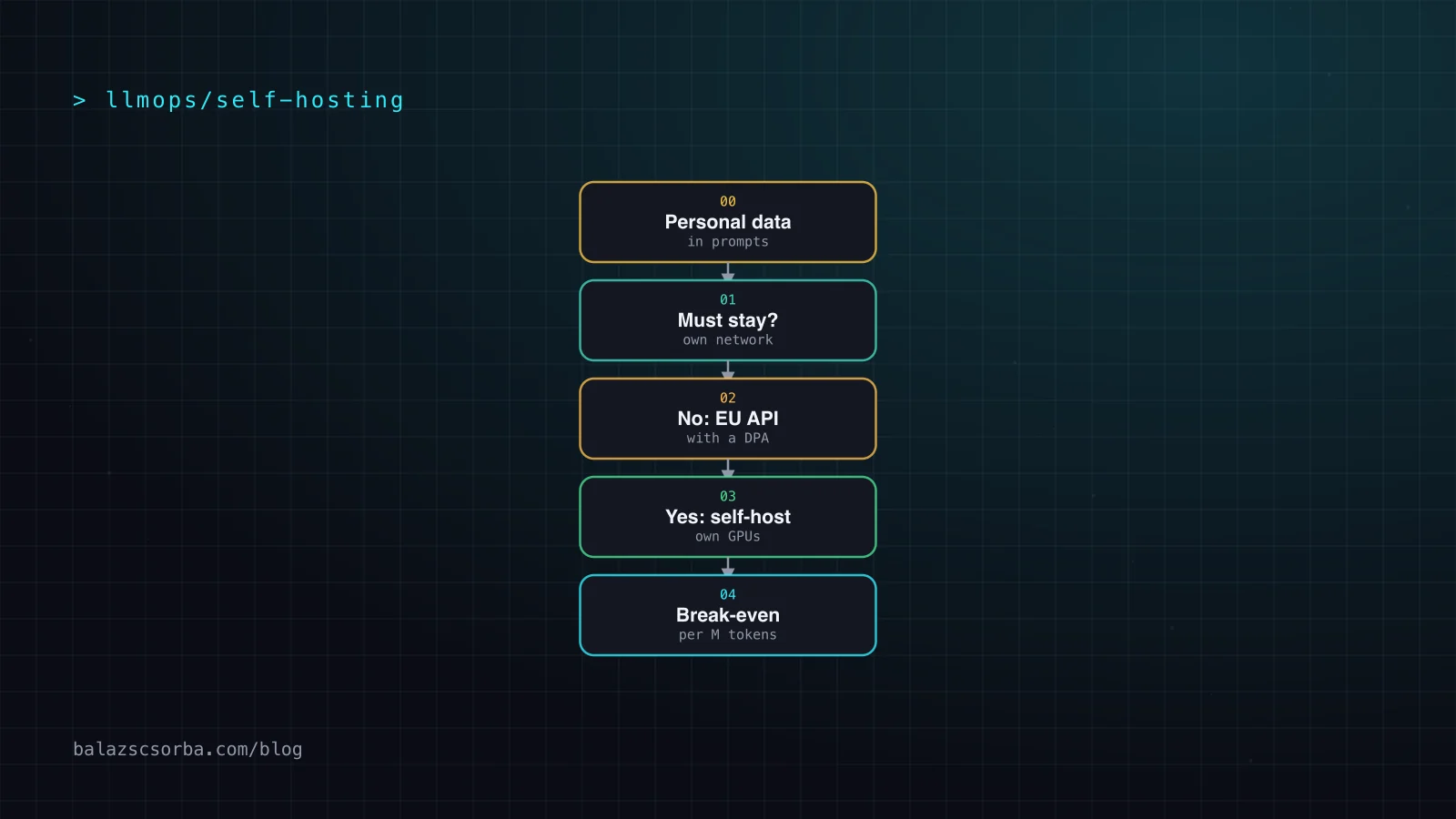
Self-hosting a language model is often justified with data protection, but for most B2B text workloads it is not required. The GDPR does not forbid third-party processors. It asks for a contract with each processor, a lawful basis for any transfer and, for risky processing, a documented risk assessment. An EU-hosted API with a data processing agreement can meet those requirements. Self-hosting is the right answer when personal data must stay inside a network you control, or when a contract or a regulator rules out any processor you cannot audit. Then the GPU bill is the easy part to budget – the operations are where the money goes.
This article checks the figures on 10 October 2026, using only pages I could open. It covers when self-hosting is required, how much GPU memory open-weight models need at each precision, what EU-based GPUs cost, what vLLM delivers, a break-even per million tokens against EU-hosted APIs, and the costs that appear after go-live.
When self-hosting is actually required
The question is not whether a model can run on your hardware, but whether personal data has to stay there. Three situations push me towards a self-hosted model:
- A contract forbids it. Some client contracts and internal policies rule out sub-processors you do not control, or require that data never leaves a defined network.
- Your impact assessment says no. The data protection impact assessment for the use case finds the risk of a processor chain too high, for example for health data or employee records.
- No suitable provider exists. No EU-hosted provider offers the model on the terms you need, or the system must run offline, on a plant floor or at the edge.
Everything else is a processor question, and an EU-hosted API answers it. Article 28 requires a contract that sets out the subject matter and duration of the processing, its nature and purpose, the types of personal data and data subjects, and the controller's obligations and rights. It also requires prior written authorisation for sub-processors, specific or general, with the same obligations passed down to them. Article 44 makes any transfer to a third country subject to the conditions of the regulation's transfer chapter. For US companies certified under the EU-US Data Privacy Framework, the Commission's adequacy decision of 10 July 2023 provides the basis for the transfer.
Self-hosting does not settle the model question either. The EDPB's Opinion 28/2024, adopted on 17 December 2024, says that AI models trained with personal data cannot in all cases be considered anonymous. Anonymity claims therefore have to be assessed case by case, so ask the provider for documentation on the training data before you rely on such a claim.
Model sizes and GPU memory with quantisation
Weight memory is simple arithmetic: parameters times bits per weight, divided by eight. A 70-billion-parameter model needs about 140 GB at 16 bits, 70 GB at 8 bits and 35 GB at 4 bits (my calculation). That excludes the KV cache, which grows with context length and concurrent requests, and the runtime's own overhead. By default vLLM may use 92 per cent of GPU memory (gpu_memory_utilization, 0.92 in the current docs), and the KV cache gets what the weights leave.
| Model | Size, total / active | Precision | Weights, GB | Hardware it needs |
|---|---|---|---|---|
| gpt-oss-20b | 21B / 3.6B | MXFP4, as released | under 16, per the card | 16 GB of GPU memory, per the card |
| Mistral Small 3.2 | 24B, dense | bf16 | 48 (my calculation); about 55 per the card | One 80 GB card, with room for the cache (my calculation) |
| Llama 3.3 70B | 70B, dense | bf16 / FP8 / 4-bit | 140 / 70 / 35 (my calculation) | Two 80 GB cards at bf16; one 96 GB card at FP8; one 48 GB card at 4-bit (my calculation) |
| gpt-oss-120b | 117B / 5.1B | MXFP4, as released | not stated on the card | One 80 GB GPU, per the card |
| Mistral Large 3 | 675B, total | FP8 / 4-bit | 675 / about 340 (my calculation) | More than 8 × 80 GB at FP8; about 340 GB at 4-bit fits 8 × 80 GB (my calculation) |
Two lessons from the table. On one 80 GB card, a 70B model at 8 bits leaves only a few gigabytes for the cache once vLLM has taken its share (my calculation), so plan for two cards or a 96 GB card. And the model you can run depends on the memory you can rent, so check memory before you read a benchmark.
GPU options and prices on 10 October 2026
These are the prices I could read on provider pages, with their dates. Where a provider gives a monthly figure, I quote it; where it does not, I calculate at 730 hours a month and say so.
| Option | GPU memory | Price as listed | Per month | Date and source |
|---|---|---|---|---|
| Scaleway L4-1-24G, Paris | 24 GB | €0.79 an hour, before tax | about €575 (Scaleway) | 10 Oct 2026, GPU pricing page |
| Scaleway H100-1-80G | 80 GB | €2.868 an hour from 1 June 2026 | about €2,094 (my calculation) | 27 Apr 2026, Scaleway blog post |
| OVHcloud l40s-1-gpu | not on the price list | $1.69 an hour, excl. VAT | about $1,237 (OVHcloud) | 10 Oct 2026, public cloud price list |
| OVHcloud h100-1-gpu | 80 GiB | $3.39 an hour, excl. VAT | about $2,473 (OVHcloud) | 10 Oct 2026, public cloud price list |
| RTX 5090, bought | 32 GB | $1,999 launch price | about $56 over 36 months (my calculation) | NVIDIA, available from 30 January |
| Hetzner GEX63 or GEX131 | 96 GB | not readable on the static page | n/a | 10 Oct 2026, GPU server matrix |
Hetzner describes its GPU servers as GDPR compliant and located in Europe. Its matrix page lists RTX PRO 6000 Blackwell cards with 96 GB of GDDR7 in the GEX63 and GEX131. Its monthly prices appear only in the configurator, which I could not read, so the table leaves them out. Check them there before you compare.
Two things to watch. Scaleway raised its H100 price from €2.73 to €2.868 an hour on 1 June 2026, so older comparison pages are out of date. OVHcloud displays its prices in dollars, so convert them on the day you compare them with the euro rows.
Throughput with vLLM: the numbers and how to measure them
vLLM's own benchmarks report relative gains rather than absolute tokens per second. In its September 2024 post on v0.6.0, the team reported 2.7 times the throughput of v0.5.3 for Llama 3 8B on one H100, and 1.8 times for Llama 3 70B on four H100s, on the ShareGPT dataset with 500 prompts. For the server I would start with vLLM; my vLLM review covers the trade-offs.
Absolute numbers depend on the model, on prompt and output lengths, and on the speed each user should get. The SemiAnalysis InferenceX benchmark shows that trade-off for Llama 3.3 70B on H100. Per GPU it reaches about 1,850 tokens per second when each user gets 38 tokens per second, about 1,170 at 58 tokens per second per user, and about 880 at 78. These three values are interpolated from the page's data points (my reading), and the benchmark uses 8K/1K sequence lengths. The page does not state the precision or the serving engine consistently, so I treat the numbers as an order of magnitude.
# serve gpt-oss-120b on one 80 GB GPU (model card)
vllm serve openai/gpt-oss-120b

# a 70B model at bf16 needs two 80 GB GPUs (my calculation)
vllm serve meta-llama/Llama-3.3-70B-Instruct --tensor-parallel-size 2

# from a second terminal, send 500 random prompts at 4 requests per second
vllm bench serve --model openai/gpt-oss-120b --dataset-name random --num-prompts 500 --request-rate 4
Measure your own numbers with vllm bench serve. Its defaults send 1,000 random prompts with an infinite request rate, so set the prompt count and the rate yourself, and use prompts that look like yours where you can. Then sweep the rate and record time to first token and time per output token at each step. The --goodput option counts only the requests that meet your latency targets, which is the number that matters for a user-facing feature.
Break-even per million tokens
The formula fits on one line. Cost per million tokens equals the monthly GPU cost divided by the tokens produced that month, times one million. Tokens per month equal tokens per second, times 2,628,000 seconds (730 hours), times the share of time the GPU is busy. I treat each token served as one billable token at the API's output price, which keeps the comparison simple (my method, not a benchmark result).
Cost per million tokens for one rented H100 at €2,094 a month, using the InferenceX rates (my calculation):
| Tokens per second (per-user speed) | 25% busy | 50% busy | 100% busy |
|---|---|---|---|
| 877 (78 tokens/s per user) | €3.63 | €1.82 | €0.91 |
| 1,171 (58 tokens/s per user) | €2.72 | €1.36 | €0.68 |
| 1,848 (38 tokens/s per user) | €1.72 | €0.86 | €0.43 |
Against the EU APIs, Llama 3.3 70B is the closer case. OVHcloud charges €0.67 per million tokens and Scaleway €0.90. At 58 tokens per second per user, one rented H100 would have to sustain about 1,190 tokens per second around the clock to match OVHcloud (my calculation). The benchmark gives 1,171 at that speed, so it cannot get there. Against Scaleway's €0.90, the break-even is about 885 tokens per second, roughly three-quarters of that benchmark rate.
gpt-oss-120b sets a higher bar. The API charges €0.60 per million output tokens at Scaleway and €0.40 at OVHcloud. One rented H100 at €2,094 a month therefore needs an average of about 1,330 output tokens per second to match Scaleway, and about 1,990 to match OVHcloud (my calculation). I found no verified H100 figure for gpt-oss-120b, so measure it before you decide. Input tokens are cheaper again, at €0.15 and €0.08 per million.
Operating costs come on top. Each €1,000 a month of operations cost raises the gpt-oss-120b break-even at €0.60 per million tokens by about 1.7 billion output tokens a month, or roughly 630 tokens per second around the clock (my calculation). So price alone rarely justifies self-hosting when an EU-hosted API already offers the model. The case appears when the hardware is already yours, when the workload keeps a GPU busy all month, or when no EU provider offers the model you need.
On-premise hardware: the card is cheap, the power and the licence are not
A card you buy looks cheap next to a rented one. NVIDIA priced the GeForce RTX 5090 at $1,999 at its launch, with 32 GB of GDDR7 and a total graphics power of 575 W. Spread over 36 months, the card costs about $56 a month (my calculation). Run flat out, 24 hours a day, the card alone draws about 420 kWh a month (575 W times 730 hours, my calculation), which at an example assumption of 30 ct/kWh is about €126 a month (my calculation, not a quoted tariff). Over three years the power alone comes to about €4,500, more than twice the $1,999 launch price.
The costs that show up after go-live
Once the service is live, the GPU rent is usually the smallest line. The rest is labour and risk. The planning figures in the table are my own assumptions, not measured data, so replace them with your team's numbers.
| Cost | What it looks like | Planning assumption (mine) |
|---|---|---|
| Operations | Serving, monitoring, GPU faults, restarts, capacity planning | 0.1 to 0.2 of one engineer's time |
| Updates | New vLLM, CUDA and driver versions, OS patches, model swaps | Two to five engineer-days per model swap |
| Evals | A regression set run before every model or serving change | Two to five days to build, then about a day per run |
| On-call | Someone answers when the endpoint fails out of hours | At least two people for a 24/7 service |
| Redundancy | A second GPU node for failover | Roughly doubles the rent |
| Compliance | DPA with the host, DPIA update, records of processing, logs you now own | A few days a year |
What I would do first
- Write down the data and the rules. List which data classes reach the model and which contracts or DPIA conclusions apply. If none rules out a processor, start with an EU API that has a DPA.
- Get the hosting facts in writing. Ask for the hosting region, the sub-processor list and the retention settings. Mistral's pricing page links a DPA but does not say where its API runs, so that answer has to come from the contract.
- Pick the smallest model that passes your evals. Then check its memory at the precision you can actually serve, not at the precision on the model card.
- Benchmark on your own prompts. Run vllm bench serve with your real prompt lengths and a latency target before you commit to any hardware.
- Redo the break-even with your numbers. Use your measured tokens per second, your real utilisation and your operations budget. If it does not clear, stay on the API and keep self-hosting written down as a fallback.
- Budget for operations before go-live. Set the eval suite, the on-call rota and the update policy first. The GPU is the easy part.
For the data side of the pipeline, read my notes on EU data residency, region controls and zero retention and on PII redaction. For the regression set, see LLM evals for product features.
Sources
- openai/gpt-oss-120b model card (Hugging Face)
- mistralai/Mistral-Small-3.2-24B-Instruct-2506 model card (Hugging Face)
- meta-llama/Llama-3.3-70B-Instruct model card (Hugging Face)
- mistralai/Mistral-Large-3-675B-Instruct-2512 model card (Hugging Face)
- vLLM blog: v0.6.0 performance update (September 2024)
- vLLM documentation: engine arguments
- vLLM documentation: vllm bench serve
- SemiAnalysis InferenceX: Llama 3.3 70B on H100 vs H200
- Scaleway GPU instances pricing
- Scaleway blog: a transparent update on Scaleway pricing (27 April 2026)
- Scaleway Generative APIs pricing
- OVHcloud public cloud price list
- OVHcloud AI Endpoints
- OVHcloud AI Endpoints model catalogue
- Hetzner dedicated GPU servers
- NVIDIA newsroom: GeForce RTX 50 Series launch
- NVIDIA GeForce RTX 5090
- NVIDIA GeForce software licence
- GDPR Article 28: processor
- GDPR Article 44: general principle for transfers
- European Commission: EU-US data transfers (Data Privacy Framework)
- EDPB Opinion 28/2024 on AI models (adopted 17 December 2024)
- Mistral AI pricing
Frequently asked questions
Does self-hosting an LLM make GDPR compliance automatic?
No. It removes one processor, but you still need a lawful basis, a risk assessment, records of processing, retention rules and a DPA with the company that hosts your servers. The EDPB also says that AI models trained on personal data cannot in all cases be considered anonymous.
How much GPU memory does a 70B model need?
About 140 GB of weights at 16 bits, 70 GB at 8 bits and 35 GB at 4 bits, before the KV cache (my calculation). At 8 bits on one 80 GB card little is left for context, so plan for two cards or one 96 GB card.
When is an EU-hosted API with a DPA enough?
When no special category of personal data is involved and no client contract or impact assessment rules out a processor. Check the sub-processor list, the hosting region, the retention settings and whether the provider trains on your data.
What does one rented H100 cost per million tokens?
At €2,094 a month (my calculation: Scaleway's €2.868 per hour over 730 hours), about €0.68 per million output tokens at 1,171 tokens per second all month (58 tokens per second per user), and about €1.36 at half that load (my calculation).