Tools/LLMOps & evals
DSPy review: compile your prompts against a metric, not by hand
DSPy compiles prompts from signatures, a metric and examples. What the optimisers cost in model calls, when they pay off, and when a hand-written prompt wins.
- Type
- Prompt optimisation framework
- Pricing
- MIT · free, you pay the model API
Balázs Csorba··8 min read
- Prompt optimisation
- LLM programs
- MIPROv2
- GEPA
- Python
Key takeaways
- DSPy replaces hand-written prompts with signatures, modules and optimisers that search for better prompts against a metric you write.
- An optimisation run is paid for in model calls. On MIPROv2's light setting, a one-predictor program makes roughly 750 of them before bootstrapping.
- Write the metric first. An optimiser can only improve what the metric measures, and that function is where most of the work sits.
- A compiled program is a JSON file of instructions and demonstrations, so it needs version control, and its demonstrations are your training data.
- For one prompt on a stable model, a reviewed prompt and an eval suite are simpler. DSPy earns its place in multi-call pipelines that change.
DSPy is an open-source Python framework that treats an LLM pipeline as code. You declare inputs and outputs, pick a module, and let an optimiser search for the instructions and examples that score best on a metric you wrote. The verdict up front: use it for a multi-call pipeline you can measure and expect to change. Skip it for one prompt on a stable model – a reviewed prompt and an eval suite are simpler.
What it is
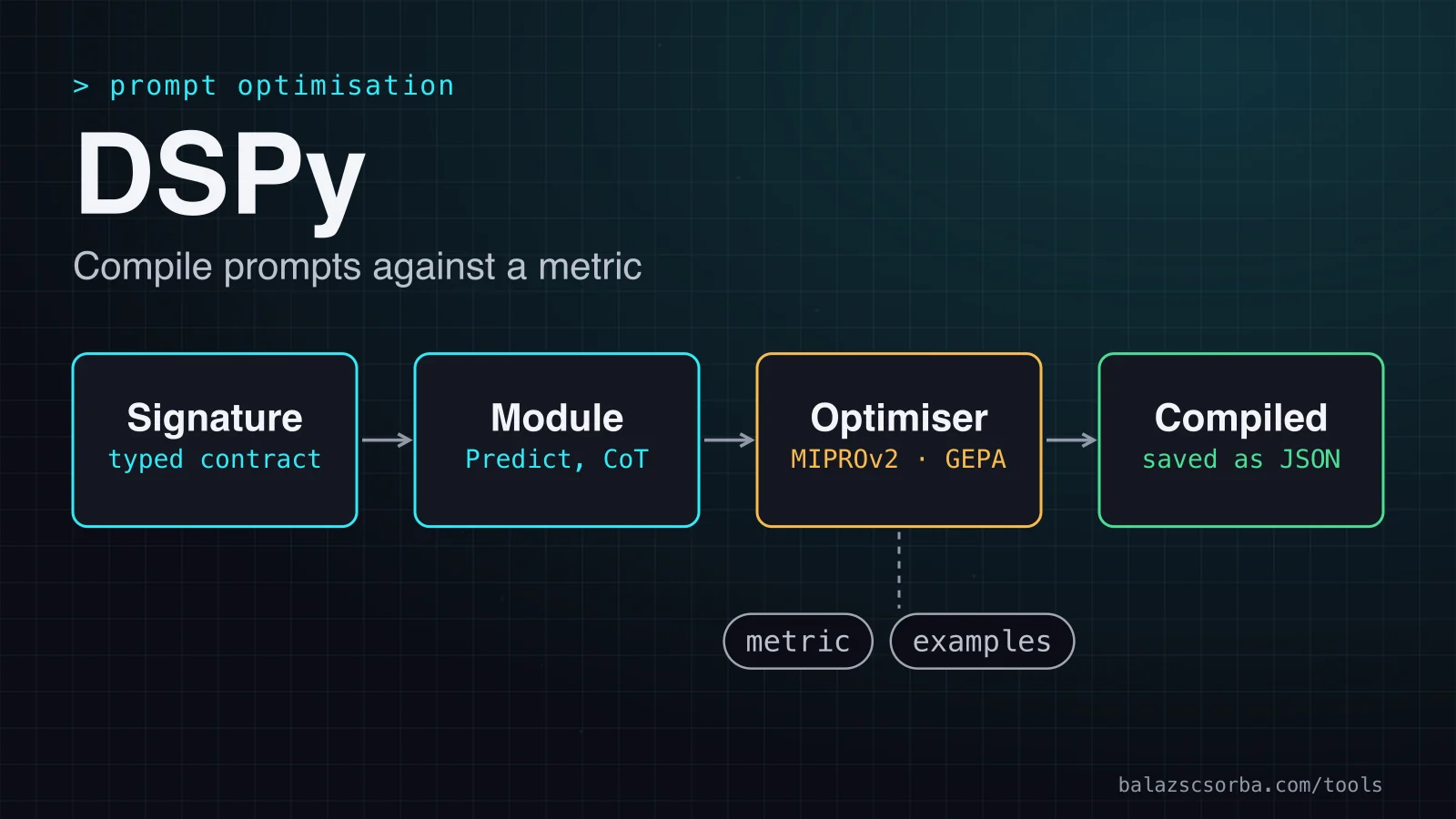
DSPy calls itself the framework for programming, not prompting, language models. Signatures declare inputs and outputs. Modules decide how the model is asked, from a plain prediction to step-by-step reasoning or a tool loop. Optimisers compile a program against a metric by changing its instructions and examples. It sits between prompt engineering and fine-tuning: the prompt becomes an artefact the optimiser writes. For the wider choice, read my decision guide on prompting, retrieval and fine-tuning.
- MIT licence, free to use. It installs with
pip install dspyand needs Python 3.10 or newer. - Latest release 3.4.0, published on 25 September. The repository showed 38.6k stars when I checked.
- 14 optimisers in the API reference, from BootstrapFewShot to MIPROv2, GEPA and BootstrapFinetune.
- No hosted service that I could find. It runs in your process and calls the provider you configure.
How it works
A module is built from a signature. At run time the adapter turns the signature into the system message, the model answers, and DSPy parses the output fields. Without an optimiser, the program is only as good as its wording. The optimiser adds a metric, a Python function that scores one prediction, usually from 0.0 to 1.0, and example inputs. It runs the program over the examples, proposes new instructions and demonstrations, keeps the best combination and returns a compiled program.
Getting started
import os
import dspy

lm = dspy.LM("openai/gpt-5-nano", api_key=os.environ["OPENAI_API_KEY"])
dspy.configure(lm=lm)


class ExtractIntent(dspy.Signature):
    """Classify the customer's intent in one short email."""

    email: str = dspy.InputField()
    intent: str = dspy.OutputField(desc="one of: order, return, invoice, other")


extract = dspy.ChainOfThought(ExtractIntent)


def intent_metric(example, prediction, trace=None):
    return float(prediction.intent.strip().lower() == example.intent.strip().lower())


trainset = [
    dspy.Example(email="Where is my parcel 4411?", intent="order").with_inputs("email"),
    dspy.Example(email="I want my money back for the shoes.", intent="return").with_inputs("email"),
    # more labelled emails from your own inbox
]

optimizer = dspy.MIPROv2(metric=intent_metric, auto="light")
compiled = optimizer.compile(extract, trainset=trainset)
compiled.save("intent_v1.json")
The metric compares predicted and labelled intents, so this example needs labels. The compile call is where the cost sits: light makes hundreds of model calls, so run it on a small set, check the saved file, then scale up.
Signatures and modules
A signature is the contract. The string form, such as question -> answer, is shorthand. The class form adds a docstring, which becomes the instruction, and typed fields. Field order matters, because reordering inputs or outputs changes the prompt. Test every signature edit as a prompt change.
- dspy.Predict maps inputs to outputs with a language model. Its keyword arguments go to that model.
- dspy.ChainOfThought reasons step by step first. It adds a reasoning field you can customise.
- dspy.ReAct runs a reason-and-act loop over tools. Its max_iters defaults to 20.
The homepage sums this up as 'same interface, different strategy'. The strategy also sets the bill: reasoning fields add output tokens to every call, and each ReAct step is another model call.
Optimisers and what they need
DSPy ships 14 optimisers, from BootstrapFewShot, which collects demonstrations, to GEPA, which rewrites instructions from the metric's feedback. All of them need a metric. The FAQ asks for a task, a metric and a few example inputs, with labels only where the metric needs them. The table covers the four I looked at most closely.
| Optimiser | Changes | Needs | Main cost |
|---|---|---|---|
| BootstrapFewShot | Few-shot demonstrations | Metric and training examples | Program runs, one attempt per example |
| MIPROv2 | Instructions and demonstrations | Metric and training set | Trials of 35 examples, plus full validation passes |
| GEPA | Instructions, rewritten by a reflection model | Metric with feedback and a reflection model | Budget set by validation size and predictor count |
| BootstrapFinetune | Fine-tuned model per predictor | Traces and a model you can fine-tune | One job per model, or per predictor |
MIPROv2 is the usual starting point, so its arithmetic matters. Its auto setting fixes the search. For a one-predictor few-shot program, light runs about ten trials and validates on at most 100 examples, medium runs 18 trials on 300 and heavy runs 27 on 1,000. Each trial scores a 35-example minibatch, and a full validation pass runs every sixth trial, at the last trial and for the unoptimised program.
- light: about 750 runs, 350 for trials and 400 for full passes.
- medium: about 2,100 runs, 630 for trials and 1,500 for full passes.
- heavy: about 7,900 runs, 945 for trials and 7,000 for full passes.
Tokens follow the calls. The FAQ, flagged as possibly out of date for DSPy 2.5 and 2.6, reports about six minutes, 3,200 calls, 2.7 million input tokens and 156,000 output tokens, for about $3 at the OpenAI pricing of the time. That is roughly 850 input and 50 output tokens per call, so the 750 calls of a light run come to about 0.6 million input tokens and 40,000 output tokens. The homepage's current example, GEPA with auto set to medium on 200 examples and gpt-5.4-mini, is listed at $2.18.
GEPA spends its budget differently. Its metric returns a score and feedback text, and a reflection model reads the examples and their scores and proposes rewritten instructions. The guide recommends a larger reflection model than the one you optimise, and the constructor requires one unless you pass a custom proposer. Light targets about six candidate prompts, and the code turns that into a metric-call budget with several full validation passes inside it.
The papers make the strongest case, each on its authors' own tasks. The DSPy paper reports pipelines beating standard few-shot prompting by over 25% and 65% for GPT-3.5 and llama2-13b-chat respectively. The MIPROv2 paper reports wins on five of seven multi-stage programs, with gains up to 13% accuracy. The GEPA paper reports 6% on average over GRPO, a reinforcement-learning baseline, with up to 35 times fewer rollouts.
Cost, deployment and data
| Item | Price | What it covers |
|---|---|---|
| DSPy library | MIT · free | Installed with pip, runs in your process |
| Model calls at run time | Your provider's rate | Every call the program makes, billed per token |
| Vendor example run | $2.18 | GEPA, auto medium, 200 examples, gpt-5.4-mini |
| Older FAQ run | About $3 | 3,200 calls, 2.7 million input and 156,000 output tokens |
Treat the compiled program as a build artefact. Save it as JSON, which the docs call safer and readable, beside the signatures in the same repository, with a version in the file name and the DSPy version pinned. It holds the signature, the demonstrations and the model for each predictor. Loading needs the same program built in code first.
Model changes trigger a recompile, because the compiler maps the program onto new prompts for the new model. Keep the old file, run the metric on both, and promote the new one only if it wins. Pin the version too: the LM page describes an auto engine that prefers a newer backend, so an upgrade can change behaviour.
The data path is the one you configure, so the processor and region questions match those for any model API. Three things also keep copies of your data. The LM cache is on by default, in memory and on disk. A saved program carries demonstrations drawn from your training data, so its JSON can hold personal data. A GEPA reflection model reads your examples and their scores, which makes it a second processor. For EU options, see my GDPR article on EU data residency.
Where it falls short
Most tasks do not need an optimiser. The FAQ concedes that for extremely simple settings a plain prompt might work just fine, and you still write the tools, retries and parsing. If you cannot write a metric that matches what a user would call correct, the optimiser improves whatever you did measure, which is not the same thing.
It beats hand-written prompts most clearly when several calls depend on each other, the model changes often, and the output can be scored. Against fine-tuning it is the cheaper and more reversible option for most teams. BootstrapFinetune compiles the program into fine-tuning jobs, but then you serve and version fine-tuned models, one per model or per predictor.
The bill and the metric are the other weak points. A light run makes hundreds of calls, heavy runs thousands, and the validation set drives most of the price. The vendor line that a small, cheap model can often match or beat a hand-prompted frontier one is a hypothesis to test on your own data.
The API is still moving. The 3.4.0 release notes list a breaking change to rlm(...) and remove the old dspy.LMRequest and dspy.LMResponse exports, so read them before each upgrade.
Verdict
Adopt DSPy when a pipeline is multi-step, measurable and changing. For one prompt on a model you never change, a reviewed prompt and a regression suite do the job. If you cannot write the metric, do not compile anything yet.
- Adopt it if several model calls must agree and their output can be scored automatically.
- Adopt it if the model or the data changes often, since recompiling beats rewriting prompts.
- Do not adopt it if the task is one prompt on a stable model.
- Do not adopt it if nobody will write and maintain the metric.
Three alternatives cover most of the rest. If you want prompts kept in code and changes gated by evals, Promptfoo is the closer fit. If the problem is explicit state and control flow, look at LangGraph, and combine the two if you need both. If the model must learn a format or a style, fine-tuning is the lever, as the decision guide explains.
Sources
- DSPy home and cost example
- DSPy installation
- DSPy: program, don't prompt
- DSPy signatures
- DSPy metrics
- DSPy Example API
- DSPy Predict API
- DSPy ChainOfThought API
- DSPy ReAct API
- DSPy optimizers index
- DSPy MIPROv2 API
- MIPROv2 source code
- DSPy BootstrapFewShot API
- DSPy BootstrapFinetune API
- DSPy GEPA guide
- GEPA source code
- DSPy saving programs
- DSPy caching
- DSPy LM API
- DSPy FAQ
- DSPy GitHub repository
- DSPy 3.4.0 release
- DSPy paper, arXiv
- MIPRO paper, arXiv
- GEPA paper, arXiv
Frequently asked questions
Is DSPy free to use?
The library is MIT-licensed and free. You pay for every model call, including the calls the optimiser makes while it searches. The docs' own example runs cost a few dollars.
How many examples does DSPy need?
I found no fixed minimum in the docs. The FAQ asks for a few example inputs, with labels only when the metric needs them. MIPROv2's light setting uses at most 100 examples for validation.
Can I point DSPy at a local model?
dspy.LM takes LiteLLM-style provider and model strings, so a local endpoint may work if LiteLLM can call it. I did not test one for this review, so check it on your own setup first.
Do I need to re-optimise when I change models?
Yes. The FAQ names a change of target LM as a reason to recompile, because the compiler maps the program onto new prompts. Keep the previous compiled file so you can compare and roll back.