Tools/LLMOps & evals
llama.cpp review: the local engine under Ollama and LM Studio
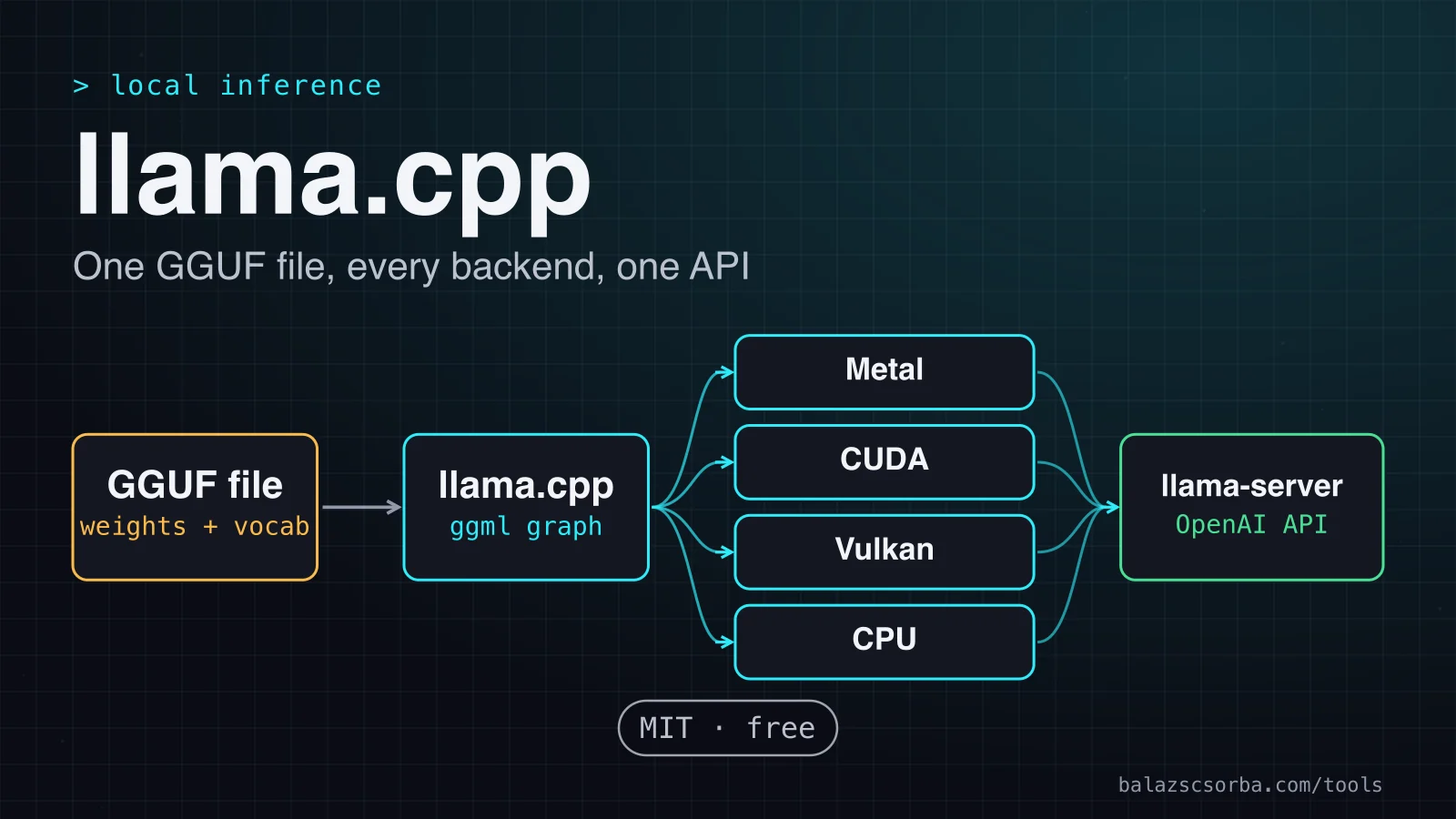
llama.cpp runs open models in plain C and C++ on Metal, CUDA, Vulkan or the CPU. I cover GGUF quants, llama-server and where it falls short.
- Type
- Local inference runtime
- Pricing
- MIT · free
Balázs Csorba··8 min read
- llama.cpp
- GGUF
- Quantisation
- Local inference
- llama-server
Key takeaways
- llama.cpp is the MIT-licensed engine under Ollama and LM Studio. Use it directly when you want the model file, the quant and every server flag under your control.
- A GGUF file carries the weights, the tokeniser and the metadata. The build flag picks the backend, so one file runs on Metal, CUDA, Vulkan or the CPU.
- Q4_K_M is the sensible starting quant, but the quantisation table measures size and speed only, so the quality check is yours to run.
- Speed on Apple chips follows memory bandwidth, though not in a straight line. A high-end chip generates tens of tokens a second on a 7B model, and a data-centre GPU is roughly three times faster in the same kind of test.
- Local inference keeps prompts on hardware you control, which takes a processor out of the inference step, but it does not remove your GDPR duties for logs, access and retention.
llama.cpp is the C and C++ engine that runs open-weight language models on hardware you control, and several friendlier local tools sit on top of it, Ollama and LM Studio among them. The verdict up front: use it directly when you want to choose the model file, the quantisation and every server flag yourself, on a laptop or a server you run. Skip it if you want one command that downloads and manages models for you, and skip it as the serving layer for a busy multi-user GPU service, where vLLM is the better fit.
What it is
The project states its goal as LLM and VLM inference with minimal setup and state-of-the-art performance on a wide range of hardware. It is a plain C and C++ implementation with no external dependencies, built on the ggml tensor library. The newest build on the releases page is b11541, published on 10 October 2026.
- MIT licence for the whole project, so you can use and ship it without a licence fee.
- Backends for Apple Metal, NVIDIA CUDA, AMD HIP, Vulkan, OpenCL, SYCL and WebGPU, plus x86 and ARM CPU code paths.
- llama-server, an OpenAI-compatible HTTP server with a built-in web UI.
- Quantisation from 1.5 to 8 bits, with GGUF as the model format.
- Hugging Face support through the -hf flag, plus conversion scripts such as convert_hf_to_gguf.py.
How it works
The GGUF file does most of the work. The specification calls GGUF “a file format for storing models for inference with GGML and executors based on GGML”, designed for fast loading and saving. Each file holds a header with the tensor and metadata counts, typed key-value metadata, a description of every tensor (name, shape, type and offset) and the tensor data, padded to an alignment boundary. The spec lists memory-map compatibility as a goal, so the operating system can map the weights rather than copy them. The tokeniser travels in the file as well, under tokenizer.ggml keys. The spec warns that the embedded vocabulary may be less accurate than the original tokeniser, so check output quality after you convert a model.
Getting started
The build documentation enables Metal by default on macOS, so a plain build on a Mac already includes the Apple backend. The other backends need a flag when you configure the build.
| Backend | Hardware | How to enable |
|---|---|---|
| Metal | Apple Silicon | On by default on macOS |
| CUDA | NVIDIA GPUs | -DGGML_CUDA=ON |
| Vulkan | GPUs with a Vulkan driver | -DGGML_VULKAN=ON |
| CPU | x86 (AVX2, AVX512, AMX) and ARM (NEON) | In the default build |
# macOS includes Metal by default; for NVIDIA GPUs use cmake -B build -DGGML_CUDA=ON
cmake -B build
cmake --build build --config Release
./build/bin/llama-server -m models/Llama-3.1-8B-Instruct-Q4_K_M.gguf -c 8192 -np 4 --host 127.0.0.1 --port 8080
Three flags carry most decisions. -m names the GGUF file, -c sets the context size in tokens (0 means the value stored in the model), and -np sets the number of parallel slots. The server listens on 127.0.0.1 by default, so other machines cannot reach it until you change --host.
Quantisation and speed
A quant is the number of bits each weight gets, traded against file size and quality. The _K names mark k-quants, and the IQ types are i-quants that reach down to about 2 bits per weight; IQ1_S is 2.00 bits in the README’s table. The README’s example command is a naive Q4_K_M quantisation with default settings, which makes Q4_K_M the sensible place to start.
| Quant | Bits per weight | Size (GiB) | Generation (tokens/s) |
|---|---|---|---|
| Q2_K | 3.16 | 2.95 | 79.85 |
| Q4_K_M | 4.89 | 4.58 | 71.93 |
| Q5_K_M | 5.70 | 5.33 | 67.23 |
| Q6_K | 6.56 | 6.14 | 58.67 |
| Q8_0 | 8.50 | 7.95 | 50.93 |
| F16 | 16.00 | 14.96 | 29.17 |
Read the table as a trade-off. Size falls with the bit count, and generation gets faster as the file shrinks, because each token has to read the weights again. F16 generates 29.17 tokens a second against 71.93 for Q4_K_M, and needs more than three times the memory. The README measures Llama 3.1 8B but does not say which machine produced the numbers, so read them as relative. The table has no quality column, since the README reports no perplexity or KL divergence. I would run the same evaluation set on each candidate before choosing, as I describe in my post on evals for LLM product features.
On Apple chips, speed follows memory bandwidth. In the Apple Silicon thread, LLaMA 7B at Q4_0 generates 83.06 tokens a second on the M4 Max, which has 546 GB/s of memory bandwidth, and 36.41 on the M1 Pro, which has 200 GB/s. The M2 Ultra reaches 94.27 at 800 GB/s. The relation is not a straight line: the M1 Pro has a quarter of the M2 Ultra’s bandwidth and gets less than half its speed.
The CUDA thread collects llama-bench results on Llama 2 7B at Q4_0: 186.21 tokens a second for an RTX 4090, 267.81 for an H100 80 GB and 290.02 for an RTX 5090. For planning, one user on a high-end Apple chip gets tens of tokens a second on a 7B model, and a data-centre GPU is roughly three times faster in the same kind of test. The models and builds differ between the threads, so compare orders of magnitude. Neither thread tests a server under concurrent load, which is where a GPU server earns its price.
llama-server: the API, slots and structured output
llama-server is where most applications meet llama.cpp. Its OpenAI-compatible routes sit under /v1: chat completions, completions, responses, models and embeddings. Native routes cover tokenising, template rendering, slot state and health. A Prometheus metrics endpoint exists, but it stays off until you pass --metrics, which is worth knowing before you publish a port.
Parallel slots work like this. With -np on its default of auto, the slots share one KV-cache buffer, which the README switches on in that mode, so a long request can use memory an idle slot would otherwise hold. Continuous batching is on by default too. The README documents the switch (--kv-unified) and a per-slot limit (--kv-unified-per-slot), but it does not spell out how the budget divides when you set the slot count by hand, so measure memory before you size a multi-user server.
Structured output has two routes. --json-schema constrains generation to a JSON schema, and --grammar takes a BNF-like grammar; the README describes both as ways to constrain generations. The chat endpoint also accepts a response_format of type json_schema, as in this request.
curl -s http://127.0.0.1:8080/v1/chat/completions \
  -H "Content-Type: application/json" \
  -d '{"messages": [{"role": "user", "content": "Extract the author from: Written by Balázs Csorba."}], "response_format": {"type": "json_schema", "schema": {"type": "object", "properties": {"author": {"type": "string"}}, "required": ["author"]}}}'
Cost and deployment
| Cost item | What you pay | Note |
|---|---|---|
| llama.cpp | Nothing | MIT licence, no usage fee |
| Your hardware | Purchase and electricity | Memory sets the largest model and quant you can load |
| Rented GPU server | The host’s price | Pick an EU region and sign a data processing agreement |
| Model weights | Each model’s own terms | The model card states the licence |
Data protection is the strongest argument for local inference. If the model runs on hardware you own, prompts, retrieved documents and answers stay on that machine, and no model vendor receives them, so the inference step has no processor. GDPR Article 28 says processing by a processor must be governed by a binding contract that limits the processor to documented instructions. A rented GPU host that handles personal data for you is a processor wherever it sits in the EU, so it needs that contract.
Local does not mean compliant by default. Article 32 asks controllers and processors for appropriate technical and organisational measures, and lists encryption and pseudonymisation among the examples. On a llama.cpp server the settings that matter are the bind address (127.0.0.1 unless you change --host), the API key (--api-key accepts one or more keys), the metrics endpoint (off unless you pass --metrics) and your own logs, which need the same retention rules as any prompt store. The GDPR and LLM data residency notes cover the rest of the checklist.
Where it falls short
- It is a runtime, not a platform. You choose the file, the quant, the context size and the flags, and you update the binary yourself. The pace is part of the deal: the releases page showed four builds on 9 and 10 October 2026.
- No model management. You download the GGUF file yourself. The -hf flag fetches a Hugging Face repository and defaults to Q4_K_M, or to the first file in the repo when that quant is missing.
- No quality measurement. The quantisation table gives size and speed only, so the quality check is yours.
- Concurrency is a memory question. Slots and continuous batching exist, but the benchmark threads do not test a server under concurrent load, and the README does not spell out the memory split for hand-set slot counts.
- GGUF in vLLM is not a serving shortcut. vLLM calls its GGUF support highly experimental and under-optimised, and says that for now GGUF is mainly a way to reduce the memory footprint.
Verdict
Take llama.cpp when you want the engine itself, with the file, the quant and the flags under your control, and when the data should never leave the machine. It is the right base for your own tooling and for a small private server. It is not the first tool for someone who wants one command to pull a model, and it is not the serving layer for a busy GPU service. If you are choosing between local options, LM Studio runs llama.cpp on Mac, Windows and Linux and uses MLX on Apple Silicon, so it suits people who want an app with a user interface.
- Adopt it if you want to choose the GGUF file, the quant and every flag on hardware you control.
- Adopt it if you want a server you can reason about line by line, with every setting visible in your own command.
- Do not adopt it if you want one command that downloads and manages models. Use Ollama, which lists llama.cpp among its supported backends.
- Do not adopt it for a shared GPU service with many users at once. Benchmark vLLM first, because its core is PagedAttention and continuous batching.
Sources
- llama.cpp repository: goals, backends, licence
- llama.cpp releases: builds b11538 to b11541
- llama.cpp build documentation: CMake flags
- llama.cpp server README: endpoints, slots and grammars
- llama.cpp quantisation README: bits, size and speed
- GGUF specification in the ggml repository
- Performance of llama.cpp on Apple Silicon M-series
- Performance of llama.cpp on Nvidia CUDA
- Ollama README: supported backends and REST API
- LM Studio documentation: app overview
- vLLM README: features, hardware and licence
- vLLM documentation: GGUF support
- GDPR Article 28: processor
- GDPR Article 32: security of processing
Frequently asked questions
Is llama.cpp free for commercial use?
The project is MIT-licensed, so you can use and ship it without a licence fee. The model weights you load keep their own licences, which can restrict commercial use, so check each model card before you ship a product on top of it.
What is the difference between llama.cpp and Ollama?
Ollama lists llama.cpp among its supported backends and adds a REST API for running and managing models. llama.cpp is the engine itself: you choose the GGUF file, the quant and every flag, and you update the binary yourself.
Which GGUF quant should I start with?
Q4_K_M. The quantisation README uses a naive Q4_K_M quantisation as its example. Move up to Q5_K_M or Q6_K if your own evals show a quality gap, because the speed table says nothing about quality.
Does a local llama.cpp server help with GDPR?
It helps because no model vendor receives the prompts, so that processor drops out of the chain. Access control, log retention and a lawful basis still apply. A rented GPU host that handles personal data for you is a processor and needs an Article 28 contract.