Claude skills: how to write a SKILL.md that loads at the right moment
How to write a Claude skill: directory layout, frontmatter fields and limits, progressive disclosure, descriptions that trigger, scripts and testing.
Balázs Csorba··12 min read
- Claude skills
- SKILL.md
- Claude Code
- Agent Skills
- Progressive disclosure

Key takeaways
- A skill is a folder whose SKILL.md frontmatter tells Claude when to use it; the instructions and bundled files load later, only when a task needs them.
- The name is 1 to 64 characters of lowercase letters, numbers and hyphens; the description may run to 1,024 characters and should say what the skill does and when to use it.
- Claude Code silently ignores unknown frontmatter fields, while claude.ai uploads and the Skills API reject them, so validate the file on the surface where you ship it.
- Write the description in the third person with the words users actually type; the skill listing cuts long text at 1,536 characters, so put the use case first.
- Test each skill in fresh sessions with and without it, starting from at least three evaluations for the gaps you found.
A Claude skill is a folder with a SKILL.md file at its root. The file opens with YAML frontmatter that says what the skill does and when to use it, followed by Markdown instructions. Claude reads the frontmatter at startup, loads the instructions when a request matches the skill, and opens bundled files only when a step needs them. Claude Code, the Claude API and claude.ai all support skills built on this format; Claude Code adds fields beyond the open Agent Skills standard.
Demand for the topic is large. In the Ahrefs data that SkillGild analyzed, “claude skills” and “claude code skills” each draw about 10,000 US searches a month, as of the 6 October 2026 export. The site already explains why skills are worth using, in the coding-agent skills workflow post. This guide covers authoring: the directory layout, every frontmatter field and its limits, how the description decides when a skill loads, where skills live, how arguments and tool permissions work, and how to test a skill. Each limit is taken from the Claude documentation or the open standard it cites.
What is a skill, and how does it differ from a prompt?
A skill is a reusable, filesystem-based resource that gives Claude domain-specific expertise. A prompt is conversation-level guidance for one task. A skill loads on demand, so you do not repeat the same guidance in every conversation (Agent Skills overview). To choose between skills, project rules and MCP tools, read the decision matrix post.
Interest has moved from explanation to practice. SkillGild reports that volume for “claude skills” rose after Anthropic launched Agent Skills in October 2025, peaked in January 2026 and has since fallen about 62 percent. The practical queries kept growing: “how to create a claude skill” and its variants add up to about 10,200 searches a month (SkillGild analysis). For my own setup, I keep about 20 agent skills in ~/.agents/skills, and jev-decide is one of them.
What does a skill directory contain?
Only SKILL.md is required. The open standard defines three optional directories: scripts/ for executable code, references/ for documentation that Claude reads on demand, and assets/ for templates, images and data files. A skill can add other files and directories (Agent Skills specification).
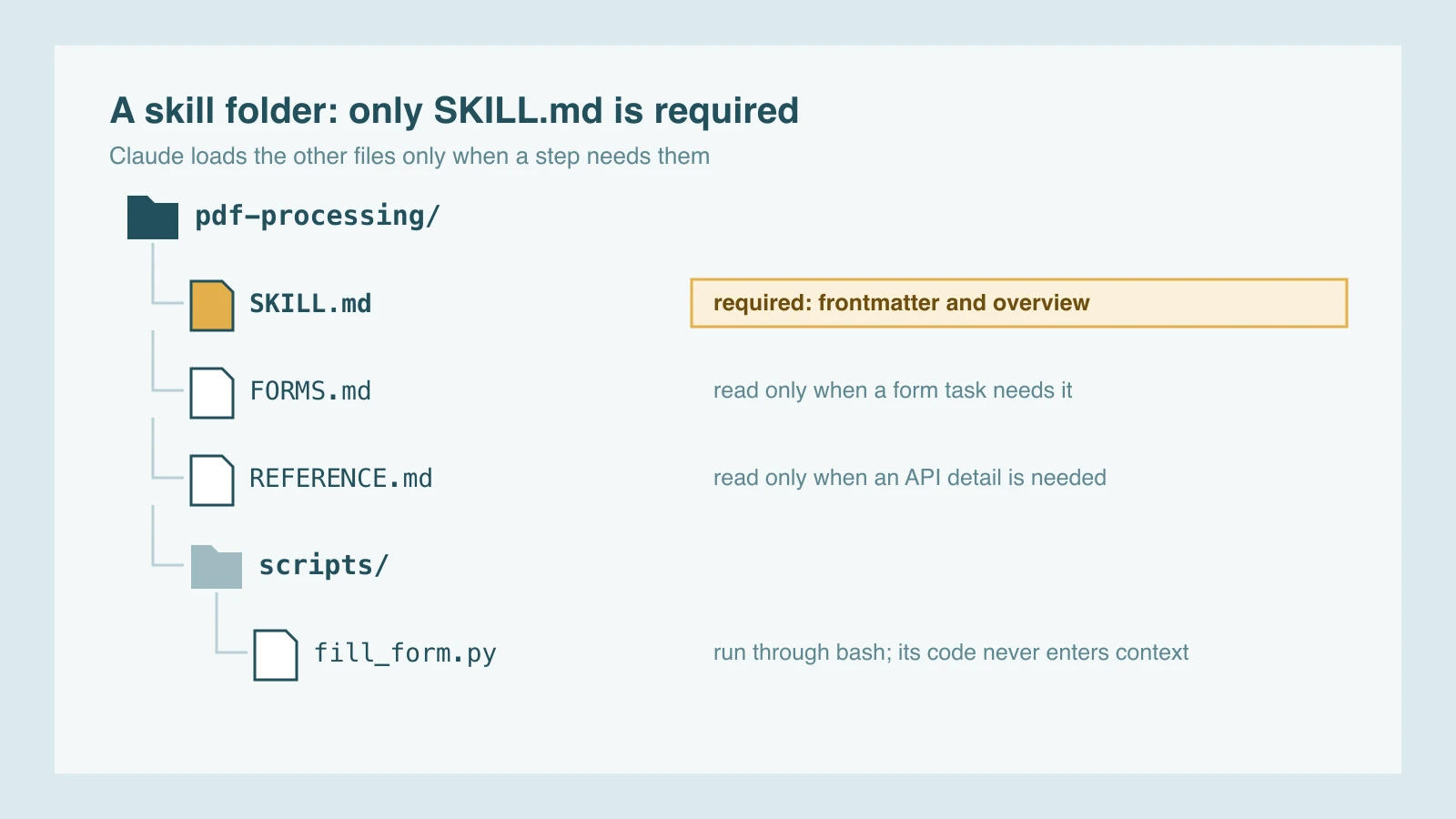
Three rules from the docs shape the layout. Keep each reference file focused, because agents load them on demand and smaller files use less context. Keep file references one level deep from SKILL.md, since Claude may only preview a file that another referenced file points to, which can leave information out. Use forward slashes in paths, even on Windows, and name files for their content, such as form_validation_rules.md rather than doc2.md (best practices).
Which frontmatter fields exist, and what are their limits?
The open standard requires two fields, name and description, and makes the rest optional. Claude Code treats every field as optional, recommends description, and adds fields for invocation, arguments and subagents. The table lists the fields you will use most, with the limits from the spec and the docs.
| Field | Required? | What it does | Limits |
|---|---|---|---|
name | Yes in the standard; optional in Claude Code | Identifier; in Claude Code, the command name, defaulting to the directory name | 1–64 characters: lowercase letters, numbers, hyphens; no leading, trailing or doubled hyphen; no reserved words such as “anthropic” or “claude” |
description | Yes in the standard; recommended in Claude Code | What the skill does and when Claude should use it | 1–1,024 characters; no XML tags |
when_to_use | No | Extra trigger phrases or example requests, appended to the description | Counts toward the 1,536-character listing cap (Claude Code) |
license | No | License name or a bundled license file | Keep it short (spec) |
compatibility | No | Environment needs: products, system packages, network access | Up to 500 characters (spec) |
metadata | No | Key-value map for your own tooling | String keys and string values (spec) |
allowed-tools | No | Tools the skill may use without a permission prompt | Experimental in the standard; space-separated |
disable-model-invocation | No | true means only you can invoke the skill | Claude Code only; default false |
user-invocable | No | false hides the skill from the / menu, so only Claude invokes it | Claude Code only; default true |
argument-hint | No | Autocomplete hint, such as [issue-number] | Claude Code only |
The name rules are strict: 1 to 64 characters of lowercase letters, numbers and hyphens, with no leading, trailing or doubled hyphen. The spec also requires the name to match the parent directory. Claude Code is looser. A directory called deploy-staging with name: deploy is invoked as /deploy, so the field sets the command name (Claude Code docs).
Two details cause most silent failures. Claude Code ignores an unrecognized field without an error, so a misspelled allowed-tools does nothing. It reads frontmatter only when the opening --- is the first line, and if the YAML does not parse, the skill loads with empty metadata and cannot be matched by its description. The spec’s reference library, run as skills-ref validate ./my-skill, checks the frontmatter and naming rules.
How does progressive disclosure keep skills cheap?
Claude loads a skill in three stages, and each stage costs context only when it is needed. The metadata, about 100 tokens per skill, loads at startup. The SKILL.md body, recommended under 5,000 tokens, loads when the skill is triggered. Bundled files cost nothing until a task reads or runs them (Agent Skills overview).

So installed skills are cheap, and long skills are not. Keep the body under 500 lines and move detail into reference files, as the spec and the best-practices guide both advise. Anthropic’s engineering post on Agent Skills covers the architecture and real-world uses in more depth.
Two behaviors matter in long sessions. Claude Code does not re-read the file on later turns, so a rule that must hold for the whole task belongs in standing instructions. After a conversation is compacted, Claude Code re-attaches the latest invocation of each skill, keeping the first 5,000 tokens of each within a combined budget of 25,000 tokens. Put the critical instructions near the top (Claude Code docs).
The skill listing has a budget of its own, scaled at 1 percent of the model’s context window. When many skills overflow it, Claude Code drops the descriptions of the skills you invoke least first, and it cuts the combined description and when_to_use text at 1,536 characters in any case.
How should the description be written so the skill triggers?
The description is the one part of a skill that Claude reads before deciding to load the rest, so it must say what the skill does and when to use it. Write it in the third person, and include the words a user would type. Claude chooses among potentially 100 or more skills using these descriptions, so each one needs enough detail to make that choice (best practices).
The third-person rule exists because the description is injected into the system prompt, and an inconsistent point of view can hurt discovery. The guide’s examples show the contrast. “Processes Excel files and generates reports” works; “I can help you process Excel files” and “You can use this to process Excel files” do not. Vague lines such as “Helps with documents”, “Processes data” and “Does stuff with files” give Claude nothing to match. Its PDF example names both the actions and the triggers: “Extract text and tables from PDF files, fill forms, merge documents. Use when working with PDF files or when the user mentions PDFs, forms, or document extraction.”
When a skill does not trigger, check that the description contains the words users say, confirm the skill appears when you ask what skills are available, rephrase the request, and invoke it as /skill-name to rule out a naming problem. Put the key use case first, because the listing cuts long text. The same rule applies to agent tools; see designing tools for AI agents.
Where do skills live, and which sessions load them?
Where a skill is saved decides which sessions load it. A personal skill in ~/.claude/skills/ loads in every project on that machine. A project skill in .claude/skills/ loads in its repository, so commit it to share it. A plugin skill loads wherever the plugin is enabled. Claude Code reads project skills from the directory where you start and from each parent up to the repository root.
| Location | Path | Loads in |
|---|---|---|
| Enterprise | .claude/skills/<skill-name>/SKILL.md in the managed settings directory | All users on machines where the organization deploys it |
| Personal | ~/.claude/skills/<skill-name>/SKILL.md | All your projects on this machine, but not Cowork or cloud sessions |
| Project | .claude/skills/<skill-name>/SKILL.md | Sessions in this repository; commit it so the team gets it too |
| Nested | <subdir>/.claude/skills/<skill-name>/SKILL.md | Sessions started in or below that subdirectory |
| Plugin | <plugin>/skills/<skill-name>/SKILL.md | Wherever the plugin is enabled, as /plugin-name:skill-name |
| claude.ai account | Skills enabled for the account | Cowork, cloud and terminal sessions signed in with that account |
Nested skills load the first time Claude reads or edits a file in their subdirectory, and edits made during a session take effect without a restart. Two folder names are reserved: synced and anthropic-skills.
The other surfaces have their own rules. On claude.ai you upload a zip file through Settings > Features. This needs a Pro, Max, Team or Enterprise plan with code execution enabled, and the skills belong to each user, not the organization. The Claude API takes skills through the /v1/skills endpoints and shares them across the workspace. Skills do not sync between surfaces, so upload each one where you want it (Agent Skills overview).
How do invocation, arguments and tool permissions work?
By default, you and Claude can both invoke a skill. disable-model-invocation: true makes a skill manual-only, user-invocable: false makes it Claude-only, allowed-tools pre-approves tools for the turn that invokes it, and context: fork runs it in a subagent. The example below uses three features: an argument-hint, pre-approved git commands and a $ARGUMENTS placeholder.
---
name: summarize-changes
description: Summarizes uncommitted changes and flags risks. Use when the user asks what changed, wants a commit message, or asks to review their diff.
argument-hint: [focus-area]
allowed-tools: Bash(git diff *) Bash(git status *)
---

## Current changes

!`git diff HEAD`

## Instructions

Summarize the changes above in two or three bullet points. Focus area, if one was given: $ARGUMENTS

List the risks you notice, such as missing error handling, hardcoded values, or tests that need updating.

If the diff is empty, say there are no uncommitted changes.
Arguments arrive through $ARGUMENTS, or through $0, $1 and so on for single positions. Quote a multi-word value to keep it as one argument, so /my-skill "hello world" second sets $0 to hello world. If the skill has no placeholder for the input, Claude Code appends it as ARGUMENTS: <value>, so Claude still sees it.
allowed-tools grants permission only for the turn that invokes the skill, and the grant clears when you send your next message. It does not restrict tools; your permission settings still govern everything the list does not name. Workspace trust does not gate the field, so a project skill’s allowed-tools applies even in a folder you have never trusted. Review that field in any skill you take from a repository.
The shell-injection line in the example runs git diff HEAD before Claude sees the skill, and the output replaces the placeholder. Injected commands skip the prompt but still pass your permission rules. Outside auto mode, a command whose check does not come back as allowed aborts the invocation, and one failed command aborts the whole skill, not just its own line. That is why the example pre-approves the git commands.
context: fork starts a subagent of the type named in agent and passes it the skill as its prompt. The subagent does not see your conversation, so the skill has to stand on its own. The docs note that the setting suits skills with explicit instructions; a skill that holds only guidelines returns nothing useful. Forked skills run in the background unless you set background: false.
To control which skills Claude may call, use rules such as Skill(commit) for one exact name or Skill(deploy *) for a name with any arguments. Denying the Skill tool in /permissions disables every skill.
How should scripts and reference files be bundled?
Bundle a script when the result must be identical every time, and let Claude run it rather than read it. Claude executes bundled scripts through bash and sees only their output (Agent Skills overview).
The best-practices guide sets the bar. Handle the error case rather than failing and leaving Claude to guess, and justify every constant: a 30-second timeout with a comment explaining it is documented, while an unexplained number is a “voodoo constant”. The spec adds that scripts should be self-contained or document their dependencies, print useful error messages and handle edge cases (spec).
Refer to the script with ${CLAUDE_SKILL_DIR}, which expands to the directory holding the skill’s SKILL.md. Using the same variable in the instructions and in allowed-tools lets the script run without a permission prompt. The docs use this pattern:
---
name: render-chart
description: Render a chart from a CSV file
allowed-tools: Bash(${CLAUDE_SKILL_DIR}/scripts/render.sh *)
---

Run `${CLAUDE_SKILL_DIR}/scripts/render.sh <csv-file>` to render the chart.
Where a skill runs decides what it can reach. On the Claude API, skills have no network access and cannot install packages at runtime, so every dependency must already be present. On claude.ai, network access depends on user and admin settings. In Claude Code, a skill has the same network access as any other program on the machine, though global package installs are discouraged.
Treat a skill like installed software. Use only skills you wrote or got from Anthropic, read every bundled file, and take extra care with skills that fetch external content, because fetched text can carry instructions. The overview also warns that a trustworthy skill can be compromised when its external dependencies change.
How do you test and iterate on a skill?
Test two things separately: whether Claude loads the skill for the prompts it should, and whether the output is right when it does. Seeing a skill trigger shows only the first. Run a few realistic prompts in fresh sessions, with the skill and without it, because leftover context from writing the skill hides gaps (Claude Code docs).
The best-practices guide asks for evaluations before documentation. Find where Claude fails without the skill, write at least three evaluations for those gaps, record a baseline, then add the smallest instructions that pass. Test with every model you plan to use. The guide’s checklist names Haiku, Sonnet and Opus, and notes that what works for Opus may need more detail for Haiku.
For a personal or project skill, set it to "off" in skillOverrides to get the baseline run. The skill-creator plugin automates the loop: it stores cases in evals/evals.json, runs each in its own subagent, grades assertions into grading.json, rolls pass rate and tokens into benchmark.json, and can tune the description with should-trigger and should-not-trigger prompts. Its format differs from the one claude plugin eval uses for plugins. The evaluation guide on agentskills.io explains the iteration workflow.
Two commands catch problems that are otherwise hard to see. claude plugin validate reports SKILL.md files whose frontmatter does not parse (Claude Code v2.1.233 or later). /skill-doctor shows what each skill costs in the listing and flags skills that are never invoked (v2.1.252 or later).
Finally, watch how Claude navigates the skill. The best-practices guide lists four signals: unexpected reading orders, links Claude never follows, a reference file it reads on every task, and bundled files it never opens. Each points to a structural fix, such as a more explicit link or a file moved into SKILL.md. If you are building skills or agent workflows for a team, see my AI engineering work.
Sources
- Claude Code documentation: skills
- Agent Skills overview, Claude API documentation
- Skill authoring best practices, Claude API documentation
- Agent Skills specification
- Evaluating skill output quality, Agent Skills documentation
- Equipping agents for the real world with Agent Skills, Anthropic engineering blog
- The state of Claude skills in 2026, SkillGild analysis of Ahrefs data
Frequently asked questions
What is the difference between a Claude skill and a prompt?
A prompt is guidance for one conversation or task. A skill is a folder that Claude loads on demand: the name and description are always available, the SKILL.md body loads when the skill is triggered, and bundled files load only when a task reads them.
Which fields does a SKILL.md file need?
The open Agent Skills standard requires name and description. The name is 1 to 64 characters of lowercase letters, numbers and hyphens. The description is 1 to 1,024 characters and says what the skill does and when to use it. Claude Code makes every field optional and adds fields for invocation, arguments and subagents.
Where should a skill file be saved?
Save a personal skill at ~/.claude/skills/<skill-name>/SKILL.md to use it in every project on that machine, and a project skill under .claude/skills/ to share it through the repository. Plugin skills load wherever the plugin is enabled. On claude.ai you upload a zip file through Settings > Features, and the API uses the /v1/skills endpoints.
Why does my skill not trigger?
Check that the description contains the words users actually type, ask Claude which skills are available, rephrase the request, and invoke the skill with /skill-name. Malformed frontmatter leaves the skill without its description, so run claude plugin validate on the skills folder.
Should a skill call a script or contain the logic itself?
Put deterministic steps in a bundled script that Claude runs, and keep judgment calls in the instructions. Claude runs the script through bash and sees only its output, which saves context and gives repeatable results. Allow the script in allowed-tools so the run does not stop at a permission prompt.