Blog/AI agents
Top 20 ways to cut coding-agent tokens: rtk, lean-ctx, Serena and more, ranked by evidence
rtk, lean-ctx, context-mode, Serena and 16 more token savers for coding agents, ranked by evidence, with my own measurements on a real Nuxt codebase.
Balázs Csorba··17 min read
- Claude Code
- token usage
- context engineering
- developer tools
Key takeaways
- Most token-saver percentages are output reduction on the commands a tool is best at, not bill reduction, so treat them as upper bounds.
- The free built-in habits come first: measure with /usage and ccusage, /clear between tasks, keep the cached prefix stable, trim MCP servers and lower effort.
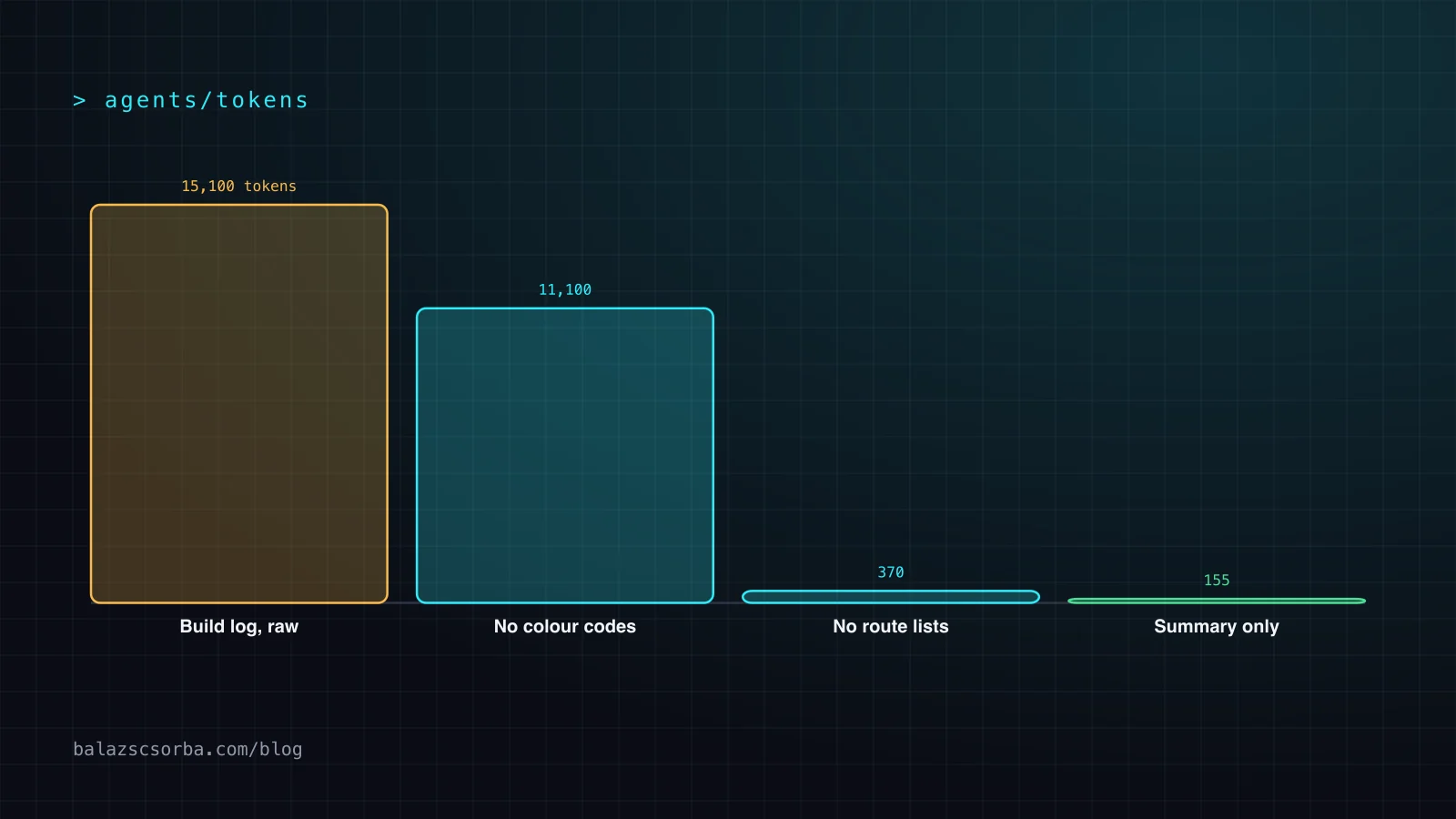
- Shell output was the biggest leak I measured: a 15,100-token build log shrank to about 370 tokens, with every useful line kept, by dropping colour codes, warnings and route lists.
- On the read side, symbol navigation (code intelligence plugins, Serena, lean-ctx) beats reading whole files. Repomix --compress cut TypeScript by 79% in my run but made Vue files 30% larger.
- The one independent head-to-head test I found put token-savior, claude-token-efficient and caveman in front at 38–43%, on a single repository.
Most advice on cutting coding-agent costs comes down to a screenshot of a counter that says 90% saved. I wanted to know which of these tools hold up, so I went through the READMEs and benchmarks of more than twenty token savers, compared them with the one independent head-to-head test I could find, and measured two of the ideas on this site’s own codebase. This is the ranking that came out of it.
The ranking is written for Claude Code, because that is where I work and where the official documentation is most specific, but most tools on the list also plug into Cursor, Codex, OpenCode or any other agent that speaks MCP or runs shell hooks. For the background on why context size drives both cost and quality, start with context engineering for coding agents and prompt caching and model routing.
Where the tokens in an agent turn come from
Every request an agent sends carries four kinds of tokens, and each tool on this list works on one of them. The prefix is the system prompt, the tool definitions and CLAUDE.md. Reads are the files and search results the agent pulls in to understand the code. Tool output is what shell commands, test runners and MCP servers print back. Model output is the thinking and the answer. All four pile up in the history, which is sent again on every turn.
The prices are not symmetric, and that decides where savings matter. On Claude Opus 5.5 a cached input token costs $0.20 per million, a fresh one $4 and an output token $20, according to the prompt caching docs. A stable, cached prefix is almost free after the first request. What costs money is new content: fresh reads, fresh tool output and everything the model writes, thinking included. Claude Code’s own cost guide puts the average at about $13 per developer per active day, and below $30 for 90% of users, so the problem is rarely one big bill. It is a steady leak across many turns.
What I measured on this site
Two of the claims were cheap to test here. This site is a Nuxt 4 app with about 110 Vue, TypeScript and script files, and its build prints a lot. I ran Repomix 1.18.1 with its default o200k_base tokenizer on the source, once plain and once with --compress, which uses tree-sitter to keep signatures and drop function bodies. The README puts the reduction at about 70%.
On the TypeScript and script files the claim holds and then some: 133,146 tokens became 28,402, a 79% cut. On the Vue single-file components it went the other way: 72,298 tokens became 94,096, 30% more, and 46 of the 49 files grew. Looking at the output, the compressed Vue files kept the full template and then repeated fragments of it as extra chunks between ⋮---- markers. Across the whole codebase the saving was 40%, not 70%.
The second test was the use case behind rtk and every other output filter on this list: a noisy command. A full npm run generate of this site writes 501 lines. I stripped the log in stages and estimated tokens as bytes divided by four, the same rough heuristic rtk uses.
| Stage | Bytes | Tokens (bytes/4) | Lines |
|---|---|---|---|
| Raw log, as written to a file | 60,311 | ~15,100 | 501 |
| Without ANSI colour codes | 44,426 | ~11,100 | 501 |
| Without Node experimental warnings | 42,144 | ~10,500 | 481 |
| Without the per-route and per-chunk lists | 1,479 | ~370 | 46 |
| Only summary and error lines | 620 | ~155 | 12 |
Colour codes alone were a quarter of the log, even though it was redirected to a file. The lists of prerendered routes and built chunks were 96% of what remained, and on a green build none of it tells a model anything. Dropping those three things keeps every line a person would act on and removes 97.5% of the tokens. On a red build you need the error lines and a few lines around them, which is exactly what a good filter keeps.
The top 20, ranked
I ranked by four things, in this order: whether the saving is backed by something other than the author’s own benchmark, how much of a real session it touches, how long setup takes, and what it risks, from lossy output to a restrictive license. Built-in habits come first because they are free and documented; third-party tools follow, ordered by evidence.
| # | Tool or habit | Layer | Evidence | Setup |
|---|---|---|---|---|
| 1 | /usage, /context, ccusage | all | the measurement itself | minutes |
| 2 | /clear and a focused /compact | history | official docs | none |
| 3 | A stable prefix for prompt caching | prefix | official pricing | none |
| 4 | Tool search, fewer MCP servers, CLIs | prefix | official: over 85% of tool definitions | minutes |
| 5 | Effort and model choice | model output | official docs | none |
| 6 | rtk | tool output | claimed 60–90%; measured 0–90% | 5 minutes |
| 7 | context-mode | tool output | claimed up to 98%; measured 20–98% | 10 minutes |
| 8 | Your own filter hooks, MAX_MCP_OUTPUT_TOKENS | tool output | my build log: −97.5% | an hour |
| 9 | lean-ctx | reads | claimed 98% in map mode | 10 minutes |
| 10 | Serena | reads | mechanism; no neutral number | 15 minutes |
| 11 | Code intelligence plugins | reads | official docs | minutes |
| 12 | A lean CLAUDE.md, skills for the rest | prefix | official: under 200 lines | an hour |
| 13 | Subagents for verbose work | history | official docs | none |
| 14 | token-savior | reads | measured −43% | 15 minutes |
| 15 | Repo maps: Aider, code-review-graph | reads | claimed large; measured −5% on a small repo | varies |
| 16 | repomix --compress | reads | my run: −79% TS, +30% Vue | minutes |
| 17 | Context7 | reads | mechanism; no number | minutes |
| 18 | claude-context | reads | claimed about 40%; measured 30–60% on monorepos | an hour, needs a vector DB |
| 19 | Terse output rules: caveman, claude-token-efficient | model output | 4–12% of output tokens | minutes |
| 20 | claude-code-router | price, not tokens | 3–5x cheaper on routed turns | an hour |
The only independent head-to-head test I found is by ComputingForGeeks, from April 2026: one repository (sindresorhus/ky), Claude Code 2.1.116 and Sonnet 4.5, against a baseline of 284,473 tokens and $0.27. One repository is thin evidence, so I use it as a tiebreaker, not a verdict.
| Tool | Change in total tokens | Note |
|---|---|---|
| token-savior | −43% | symbol index and memory over MCP |
| claude-token-efficient | −40% | CLAUDE.md rules |
| caveman | −38% | output style |
| token-optimizer-mcp | −23% | MCP server |
| alexgreensh/token-optimizer | −18% | PolyForm Noncommercial license |
| code-review-graph | about −5% | small repo, the graph overhead eats the gain |
| rtk | 0% on clean output, 60–90% on noisy logs | depends on the commands |
| context-mode | −20% to −98% | depends on the workload |
Ranks 1–5: built-in habits that cost nothing
1. Measure first: /usage, /context and ccusage
/usage shows the session’s tokens and, in current versions, a prompt cache line with the share of input served from cache, the number of misses and a likely cause for the last one. /context shows what fills the window right now: system prompt, tools, memory files and messages. For history across sessions, ccusage (npx ccusage@latest, MIT) reads the local JSONL logs and prints daily, monthly, per-session and five-hour-block reports. Without a baseline you cannot tell a 40% tool from a placebo.
2. /clear between tasks, /compact with instructions
The whole history is sent on every turn, so stale context from the last task is paid for again with every new message. /clear starts fresh and costs nothing. /compact Focus on the failing test and the diff keeps continuity, but it has to read the whole conversation to summarise it, so it is a large request of its own. Use /rename before clearing if you want to come back later with /resume.
3. Keep the prefix stable so caching works
Caching is the biggest discount on this list and it is on by default, which is why it is easy to break without noticing. The cache follows the order tools, system prompt, messages: change a tool definition and everything after it is written again, at the higher cache-write price. In practice that means not toggling MCP servers in the middle of a session and not editing CLAUDE.md halfway through a long task. The cache lifetime is an hour on a subscription and five minutes by default on an API key, so on the API a coffee break costs a full re-read of the context.
4. Fewer MCP servers, deferred tools, CLIs where they exist
Anthropic’s tool search documentation gives a concrete number: five common servers (GitHub, Slack, Sentry, Grafana and Splunk) take about 55,000 tokens of definitions before any work starts, and deferred loading typically cuts that by more than 85%. It also notes that tool selection gets worse beyond 30 to 50 loaded tools. Claude Code defers MCP tools by default, but its MCP docs list setups where tool search is off, including ENABLE_TOOL_SEARCH=false and a custom ANTHROPIC_BASE_URL. Beyond that, disable servers you are not using in /mcp, and prefer gh, aws or gcloud over an MCP wrapper for the same API, because a CLI adds no tool listing at all.
5. Match effort and model to the task
Thinking tokens are billed as output tokens, the most expensive kind. /effort lowers the reasoning budget on adaptive models and /model switches to a cheaper one; subagents can run on Haiku with model: haiku in their definition. The Opus 5.5 leaderboard numbers show the scale: at medium effort the model matched its predecessor’s max-effort score for about a quarter of the cost per task.
Ranks 6–8: filter tool output before the model reads it
6. rtk
rtk is a Rust CLI that sits in front of shell commands through a PreToolUse hook (rtk init -g) and filters, groups, truncates and deduplicates the output of more than a hundred commands. The README reports about 70% for ls and tree, about 80% for git diff and 90% for cargo test. The independent test found 0% on commands that were already quiet and 60–90% on noisy logs, which matches my build log. Two limits: the figures are output reduction, not bill reduction, and the hook only sees shell commands, so Claude Code’s built-in Read, Grep and Glob tools pass through untouched. Apache 2.0.
7. context-mode
context-mode takes a different route: tool output goes into a sandbox and a SQLite FTS5 index, and the agent searches it with BM25 instead of reading it whole. The project reports 315 KB of output shrinking to 5.4 KB, a Playwright snapshot going from 56 KB to 299 bytes and an access log from 45 KB to 155 bytes, and it keeps a session guide of at most 2 KB that survives compaction. The independent test measured 20–98% depending on the workload. It is licensed under the Elastic License 2.0, which is fine for your own use but is not an OSI open-source license.
8. Your own filter hooks, and a cap on MCP output
The official cost guide shows a PreToolUse hook that rewrites test commands so only failures reach the model. The same idea fits any command you run often. This is the version I would write for the build above:
#!/bin/bash
# ~/.claude/hooks/quiet-build.sh: a PreToolUse hook with "matcher": "Bash".
# Rewrites the site build so the model sees summary and error lines, not 500 lines of routes.
input=$(cat)
cmd=$(echo "$input" | jq -r '.tool_input.command')

if [[ "$cmd" =~ ^npm\ run\ generate ]]; then
  quiet="set -o pipefail; $cmd 2>&1 | perl -pe 's/\e\[[0-9;]*m//g' | grep -vE 'ExperimentalWarning|trace-warnings|├─|└─|node_modules/.cache'"
  echo "$input" | jq --arg c "$quiet" \
    '{hookSpecificOutput: {hookEventName: "PreToolUse", permissionDecision: "allow", updatedInput: (.tool_input + {command: $c})}}'
else
  echo "{}"
fi
Run against the log from the table, it leaves exactly the 46 lines of the fourth row, and with pipefail a failing build still exits non-zero. Register it in settings.json under hooks.PreToolUse with "matcher": "Bash", as in the official example, and check it with /hooks. Like that example it answers allow, which also skips the permission prompt for the rewritten command, so keep the pattern narrow. For MCP servers the equivalent lever is MAX_MCP_OUTPUT_TOKENS: Claude Code warns when a single tool result passes 10,000 tokens and allows 25,000 by default, and a lower cap stops one chatty server from flooding the window.
Ranks 9–11: read symbols, not whole files
9. lean-ctx
lean-ctx is a local Rust binary and MCP server that gives the agent ten ways to read a file, from the full text to a map of its structure or only its signatures, plus compression patterns for more than 95 shell commands. On the project’s own 50-file repository, counted with the GPT-4o tokenizer, 533,200 raw tokens became 8,000 in map mode and 14,000 in signatures mode, and re-reading an unchanged file from its cache costs about 13 tokens. It is the most ambitious tool here and the numbers are the author’s own, but the idea of reading structure first and bodies on demand is sound. lean-ctx wrap claude, Apache 2.0.
10. Serena
Serena wraps language servers for more than 40 languages in MCP tools such as find_symbol, find_referencing_symbols and replace_symbol_body. Instead of grepping and reading three candidate files, the agent asks for one symbol and edits it in place. I found no neutral benchmark, but the mechanism is the same one Anthropic recommends in the next item, and it works in any MCP client. Install with uv tool install -p 3.13 serena-agent and serena init; GPL-3.0.
11. Code intelligence plugins
Claude Code’s own code intelligence plugins bring the same idea without a third-party server: go to definition and find references through an installed language server. The cost guide puts it plainly: one definition lookup replaces a grep followed by reading several candidate files, and the language server reports type errors after edits, which saves a compile round trip. For TypeScript, Python, Go or Rust projects this is the first read-side change I would make.
Ranks 12–13: keep the main context small
12. A lean CLAUDE.md, with skills for the rest
CLAUDE.md is loaded into every session, so every line in it is paid for on every request, cached or not. The official advice is to keep it under 200 lines and move workflow-specific instructions, such as how to review a PR or run a migration, into skills, which load only when they are used. A short skill that describes the architecture also saves the exploratory reads an agent does at the start of every task.
13. Subagents for verbose work
A subagent runs tests, reads logs or fetches documentation in its own context and returns a summary, so the verbose part never enters the main history. It still costs tokens, just not again on every later turn, and it can run on a small model. The opposite warning is in the same docs: agent teams use roughly seven times the tokens of a normal session when teammates run in plan mode, because each teammate keeps its own full context.
Ranks 14–18: indexes, maps and documentation
14. token-savior
token-savior combines a symbol index over MCP, a memory store and compaction of bash output. It made the largest cut in the independent test, 43% of total tokens. The project’s own headline, 80% fewer active tokens across 96 tasks with Opus 4.7, is marked unverified by the author, and an earlier figure was withdrawn. I read that as a sign of honesty, not as a reason to trust the bigger number. MIT.
15. Repo maps: Aider and code-review-graph
A repo map gives the agent a ranked outline of the codebase instead of whole files. Aider’s repo map builds it with tree-sitter and a graph ranking and fits it into a budget set by --map-tokens, 1,000 tokens by default. code-review-graph stores a call graph in SQLite and answers blast-radius questions about a change. It reports a median of about 63 times fewer tokens per question, but says itself that this compares a graph query with the whole corpus, which is an upper bound. In the independent test on a small repository it saved about 5%, because the graph overhead ate most of the gain. Worth it on large repositories, not on small ones. MIT.
16. Repomix --compress
Repomix packs a repository into one file for a model, with --token-count-tree to show where the tokens are, --remove-comments and an MCP mode. --compress is useful for giving a model a signature-level overview of a TypeScript, Python or Go codebase in one go, as my run showed. Check the output on template-heavy formats such as Vue before you rely on it. MIT.
17. Context7 for library docs
Context7 fetches current, version-specific documentation for a library on request, either through ctx7 CLI commands with a skill or through an MCP server (npx ctx7 setup). The saving is indirect and I have no number for it: a focused snippet instead of a web page, and fewer rounds of fixing an API the model remembered from an older version. MIT.
18. claude-context
claude-context indexes the codebase for hybrid search, BM25 plus vectors, so the agent can ask for the code that handles authentication and get the relevant chunks. It reports about 40% fewer tokens at the same retrieval quality, and the independent test saw 30–60% on monorepos. The cost is infrastructure: an embedding provider (OpenAI, VoyageAI, Gemini or a local Ollama) and a Milvus or Zilliz Cloud vector database. It pays off on large monorepos and is overkill below that. MIT.
Ranks 19–20: output style and routing
19. Terse output rules: caveman and claude-token-efficient
These tools change how the model writes, not what it reads. caveman is a skill with lite, full and ultra modes of clipped prose; claude-token-efficient is an eight-rule CLAUDE.md. The careful numbers are small. For caveman, a JetBrains lab run over 86 tasks found 8.5% fewer output tokens with flat quality, the project’s own eval shows a 50% median on short questions and answers, and agentic sessions see high single digits, while its rule file adds about 1,000 input tokens. claude-token-efficient measured 4% fewer output tokens on Haiku, 12% on Sonnet and 7% on Opus. The −38% and −40% from the independent test are far above that, and I would not generalise from one repository. Cheap to try, and most useful when you pay for a lot of output.
20. claude-code-router
claude-code-router is a local gateway that sends Claude Code’s requests to other providers and models, such as DeepSeek, Gemini, Kimi or OpenRouter, by rule. It does not reduce tokens; it makes some of them cheaper, and the independent test reported three to five times lower cost on the turns it routed. It is last on this list for a reason: a router means a custom ANTHROPIC_BASE_URL, which is one of the setups where Claude Code turns MCP tool search off, and every switch to another model starts that model’s cache from zero. Measure the whole session, not just the routed turns. MIT.
What I would skip, or use with care
- LLMLingua and other prompt compressors. LLMLingua drops tokens that a small model judges unimportant and reports up to 20 times compression with little loss on prose, retrieval and reasoning prompts. For code an agent has to edit exactly, lossy compression is the wrong trade.
- Tools whose license does not fit. alexgreensh/token-optimizer saved 18% in the independent test, but it is under PolyForm Noncommercial, which rules it out for client work.
- Anything without a before and after. The independent test did not recommend nadimtuhin/claude-token-optimizer and found the effect of claude-mem variable. Memory tools can save re-explaining, or they can inject stale notes into every session.
- Three tools on the same layer. rtk, context-mode and lean-ctx all intercept shell output. Pick one per layer, or you end up debugging which hook rewrote what.
A starter stack for one afternoon
- Run
npx ccusage@latest dailyand one normal session with/usageat the end. Write the numbers down. - Open
/context, disable the MCP servers you did not use this week, and replace any that have a CLI (ghinstead of a GitHub server). - Cut CLAUDE.md to under 200 lines and move the workflows into skills.
- Install the code intelligence plugin for your main language, or Serena if you use several agents.
- Add one output filter: rtk if you want it ready-made, a 15-line hook like the one above if you want to see exactly what it drops.
- Repeat the same kind of session and compare. Keep what moved the number and uninstall the rest.
For the reasoning behind this order, harness engineering covers how guides and sensors keep an agent’s context useful, not only small.
Sources
- rtk: a CLI proxy that filters shell output for coding agents (GitHub)
- lean-ctx: context read modes and shell compression for coding agents (GitHub)
- context-mode: sandboxed tool output with SQLite FTS5 search (GitHub)
- Serena: semantic code retrieval and editing over MCP (GitHub)
- token-savior: symbol index, memory and bash compaction over MCP (GitHub)
- code-review-graph: a code graph for blast-radius reviews (GitHub)
- Aider documentation: repository map
- Repomix: pack a repository into one AI-friendly file (GitHub)
- Context7: up-to-date library documentation for LLMs (GitHub)
- claude-context: hybrid code search MCP (GitHub)
- caveman: terse output modes for coding agents (GitHub)
- claude-token-efficient: an eight-rule CLAUDE.md (GitHub)
- claude-code-router: a local model gateway for coding agents (GitHub)
- ccusage: token and cost reports from local agent logs (GitHub)
- LLMLingua: prompt compression (Microsoft, GitHub)
- ComputingForGeeks: tools that reduce Claude Code token usage, tested (April 2026)
- Claude Code docs: manage costs effectively
- Claude Code docs: MCP, output limits and tool search
- Claude API docs: tool search tool
- Claude API docs: prompt caching
Frequently asked questions
What is the best tool to reduce Claude Code token usage?
There is no single one, because each tool works on a different part of a turn. Start with the free built-ins: /clear between tasks, a stable prefix for caching, fewer MCP servers and lower effort. Then add one output filter such as rtk or context-mode and one read-side tool such as a code intelligence plugin or Serena, and measure before and after.
Does rtk really save 90% of tokens?
On noisy commands such as test runs and build logs it removes 60–90% of the output, and an independent test confirmed that range. On commands whose output is already short it saves close to nothing, and it does not touch Claude Code’s built-in Read, Grep and Glob tools, so the effect on a whole session is much smaller than the headline.
Is it safe to compress context for a coding agent?
Methods that keep structure are safe: filtering noise out of logs, reading signatures before bodies and looking up symbols through a language server. Lossy prompt compression that drops individual tokens, such as LLMLingua, suits prose and retrieval, but not code the agent has to edit exactly.
How do I measure my token usage in Claude Code?
Use /usage for the current session, including its prompt cache hit rate, and /context to see what fills the context window. For history across sessions, ccusage reads the local logs and reports usage by day, month, session or five-hour block.