Blog/Web engineering
Multilingual SEO with Nuxt i18n: URL strategy, hreflang, canonicals and sitemaps
How to set up Nuxt i18n so search engines index every language: routing strategy, useLocaleHead, hreflang rules, partial translations and sitemaps.
Balázs Csorba··8 min read
- Nuxt
- i18n
- SEO
- hreflang
- Multilingual
Key takeaways
- Give every language its own URL; Google recommends this over cookies or browser settings, and Googlebot sends no Accept-Language header.
- In @nuxtjs/i18n, set language on every locale and a production baseUrl, then call useLocaleHead to get lang, hreflang, og:locale and canonical tags.
- hreflang sets must be identical on every version, include the page itself, use fully-qualified URLs and valid ISO language codes.
- For pages that exist in fewer languages, list only the real translations and point untranslated copies' canonical at the original.
- Do not redirect by browser language; offer a language switcher with real links and let hreflang send searchers to the right version.
A multilingual Nuxt site can look perfect to visitors and still be half invisible to search engines: the German pages are not indexed, Google shows the English page to Hungarian searchers, or two language versions compete for the same query. Almost always the cause is in the head of the page: missing or inconsistent hreflang links, a canonical that points at the wrong language, or a URL strategy that hides languages behind a cookie.
This article walks through a setup with @nuxtjs/i18n that search engines understand, using this site as the example: it is generated statically in English, German and Hungarian. It covers the routing strategy, useLocaleHead, the hreflang rules from Google's documentation, pages that exist in only some languages, sitemaps, and why automatic language redirects hurt.
Which URL strategy should a multilingual Nuxt site use?
Google's guidance on multilingual sites is direct: use different URLs for each language version rather than cookies or browser settings. If content changes by language on one URL, Google might not find all variants, because Googlebot usually crawls from the USA and sends requests without an Accept-Language header. Nuxt i18n offers four routing strategies:
| Strategy | URLs | SEO verdict |
|---|---|---|
prefix_except_default | /blog, /de/blog, /hu/blog | Good default; the main language keeps clean URLs |
prefix | /en/blog, /de/blog, /hu/blog | Good; symmetric, needs a root redirect or language selector |
prefix_and_default | /blog and /en/blog, /de/blog | Works, but creates duplicates; the canonical goes to the unprefixed URL |
no_prefix | /blog for all | Avoid for public content; one URL can only be indexed in one language |
Subdirectories on one domain are also the cheapest option to run. Separate country domains make sense when the business is genuinely separate per country; they are not needed just to serve a second language.
How do you configure @nuxtjs/i18n for SEO?
Two settings are required for the SEO features to produce correct output: each locale needs a language tag, which becomes the hreflang value and the <html lang>, and baseUrl must be the production origin, because hreflang and canonical URLs have to be fully qualified. This is the configuration of this site:
// nuxt.config.ts
export default defineNuxtConfig({
  modules: ['@nuxtjs/i18n'],
  i18n: {
    baseUrl: 'https://balazscsorba.com',
    strategy: 'prefix_except_default',
    defaultLocale: 'en',
    locales: [
      { code: 'en', language: 'en-US', name: 'English', file: 'en.json' },
      { code: 'de', language: 'de-AT', name: 'Deutsch', file: 'de.json' },
      { code: 'hu', language: 'hu-HU', name: 'Magyar', file: 'hu.json' },
    ],
    // No automatic redirect by browser language; the switcher links to every version.
    detectBrowserLanguage: false,
  },
})
What does useLocaleHead put into the page head?
useLocaleHead() returns head metadata that you pass to useHead: the lang attribute for <html>, an alternate link with hreflang for every configured locale, og:locale and og:locale:alternate meta tags, and a canonical link. Call it once in app.vue so every page gets it.
<!-- app.vue -->
<script setup lang="ts">
const i18nHead = useLocaleHead({ dir: true, seo: true })

useHead(() => ({
  htmlAttrs: { lang: i18nHead.value.htmlAttrs?.lang },
  link: [...(i18nHead.value.link ?? [])],
  meta: [...(i18nHead.value.meta ?? [])],
}))
</script>
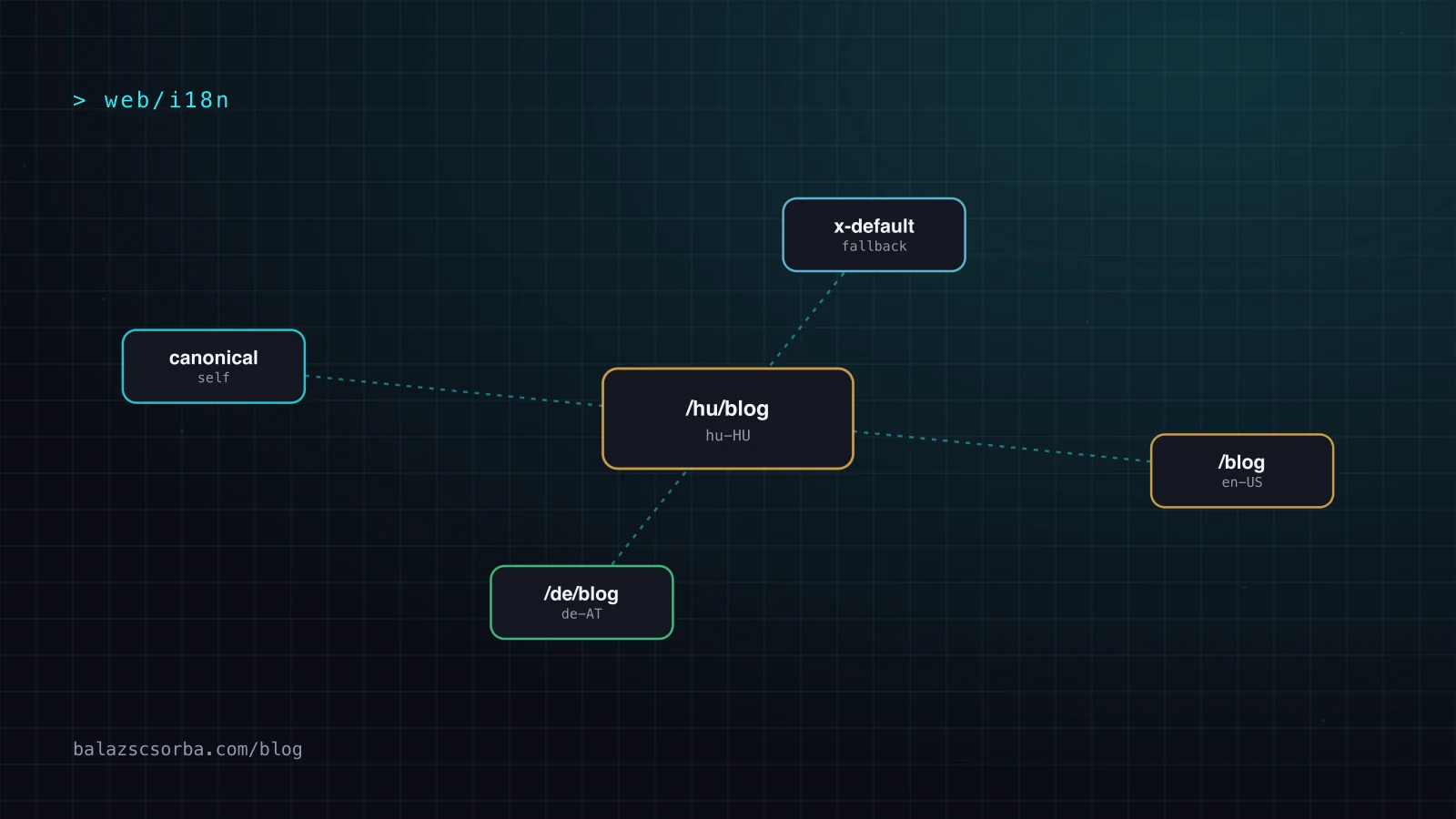
For a page at /de/blog/post, the rendered head then contains <html lang="de-AT">, a canonical link to the German URL, and alternate links for en-US, de-AT and hu-HU. The module also adds a catch-all link per language group, such as hreflang="en", and an x-default. Check the generated HTML once per page type; it is easy to assume the head is right because the module is installed.
Which hreflang rules do sites get wrong?
Google's hreflang documentation is short, and most of the bugs I find in audits break one of these rules:
- Include the page itself. Each version lists one link per variant, including itself, and the set is identical on every version.
- Use fully-qualified URLs, with protocol and host. Relative hrefs are the usual result of a missing
baseUrl. - Use valid codes: an ISO 639-1 language, optionally followed by an ISO 3166-1 region (
de-AT). A region alone does not work, and codes likees-419are not supported. - Add
x-defaultfor users whose language matches none of your versions, usually the default-language page. - Make the canonical self-referencing on each language version. A German page whose canonical points at the English page tells Google to drop the German one.
One more fact worth knowing: Google says it does not use hreflang or the lang attribute to detect a page's language; it detects language from the content. A translated template with untranslated body text is still an English page.
What about pages that exist in only some languages?
With prefix_except_default, Nuxt generates a route for every locale, so an English-only article still renders at /de/blog/post with German navigation and an English body. Left alone, useLocaleHead advertises it as a German translation, and the canonical of the German copy points at itself. This site fixes both in app.vue: a page that exists in fewer languages registers them, hreflang then lists only those, and untranslated copies point their canonical at the English original.
// app.vue (excerpt): pageLocales is set by pages that exist in fewer languages
const headLinks = computed(() => {
  const links = i18nHead.value.link ?? []
  const only = pageLocales.value
  if (!only || only.path !== route.path) return links
  return links
    .filter((l) => l.rel !== 'alternate' || !l.hreflang || l.hreflang === 'x-default'
      || only.locales.some((c) => l.hreflang.startsWith(c)))
    .map((l) => (l.rel === 'canonical' && !only.translated
      ? { ...l, href: `${siteUrl}${switchLocalePath('en')}` }
      : l))
})
The alternative is not to generate untranslated routes at all and to return a 404 or a redirect to the original. That is cleaner for search engines but worse for a visitor who switched the interface to German and wants to keep it. Either works, as long as the head tells the truth about which translations exist.
Should hreflang also go into the sitemap?
Google accepts hreflang in three places, HTML tags, HTTP headers and the sitemap, treats them as equivalent, and says using several brings no benefit in Search but makes maintenance harder. HTTP headers are mainly useful for non-HTML files such as PDFs. This site emits both head tags and sitemap entries because both are generated from the same post data at build time, so they cannot drift apart. If yours come from different code paths, pick one.
<url>
  <loc>https://balazscsorba.com/de/blog/agent-loop-explained</loc>
  <xhtml:link rel="alternate" hreflang="en" href="https://balazscsorba.com/blog/agent-loop-explained"/>
  <xhtml:link rel="alternate" hreflang="de" href="https://balazscsorba.com/de/blog/agent-loop-explained"/>
  <xhtml:link rel="alternate" hreflang="hu" href="https://balazscsorba.com/hu/blog/agent-loop-explained"/>
  <xhtml:link rel="alternate" hreflang="x-default" href="https://balazscsorba.com/blog/agent-loop-explained"/>
</url>
Why not redirect visitors by browser language?
Google advises against redirecting users to a language version based on what you think their language is, because it can stop users and search engines from reaching all versions. Nuxt i18n's detectBrowserLanguage can redirect on the first visit; for a public site I turn it off and rely on two things instead: hreflang, which sends searchers to the right version directly from the results page, and a language switcher made of real links, so crawlers can follow it too.
What else needs translating for multilingual SEO?
- Titles and meta descriptions per locale. They are what searchers read in results; a German page with an English title loses clicks.
- Structured data with
inLanguagethat matches the page, so AI search and rich results quote the right version. I cover this in the GEO audit of this site. - Image alt text and Open Graph images with localized text, if the image contains words.
- Internal links that stay in the language. Use
localePath()everywhere, so a German article links to German pages and does not leak visitors back to English.
Performance matters as much in every language; the same rules as in Core Web Vitals for Nuxt apply, and lazy-loading the message files per locale keeps the bundle small.
How do you verify the setup?
Fetch the generated HTML of one page per type and language and compare the link sets; a short script catches the common mistakes before Search Console does, weeks later.
// check-hreflang.mjs: every version must list the same set, including itself
const pages = ['/blog/agent-loop-explained', '/de/blog/agent-loop-explained', '/hu/blog/agent-loop-explained']
const base = 'https://balazscsorba.com'
const sets = await Promise.all(pages.map(async (p) => {
  const html = await (await fetch(base + p)).text()
  const attr = (tag, name) => tag.match(new RegExp(` ${name}="([^"]+)"`))?.[1]
  const tags = html.match(/<link[^>]*>/g) ?? []
  const links = tags.filter((t) => attr(t, 'rel') === 'alternate' && attr(t, 'hreflang'))
    .map((t) => [attr(t, 'hreflang'), attr(t, 'href')])
  const canonical = attr(tags.find((t) => attr(t, 'rel') === 'canonical') ?? '', 'href')
  if (canonical !== base + p) console.warn(`${p}: canonical is ${canonical}`)
  if (!links.some(([, href]) => href === base + p)) console.warn(`${p}: does not list itself`)
  return links.map(([lang, href]) => `${lang} ${href}`).sort().join('\n')
}))
console.log(new Set(sets).size === 1 ? 'hreflang sets match' : 'hreflang sets differ')
Sources
Frequently asked questions
Which Nuxt i18n routing strategy is best for SEO?
prefix_except_default and prefix both give every language its own URL, which is what Google recommends. prefix_except_default keeps the default language unprefixed. Avoid no_prefix for public content, because all languages share one URL and search engines can only index one of them.
Does useLocaleHead generate hreflang automatically?
Yes. It returns the html lang attribute, an alternate link with hreflang for every configured locale, og:locale tags and a canonical link. It needs a language value on each locale and a baseUrl so that the URLs are fully qualified.
Do I need x-default?
It is recommended. Google uses x-default for users whose language matches none of your versions. On most sites it points at the default-language version or at a language selector page.
Should hreflang go in the HTML head or in the sitemap?
Either. Google treats HTML tags, HTTP headers and sitemap entries as equivalent and says using several brings no extra benefit. Pick the one you can keep correct; for static sites generated from one data source, both can come from the same code.
Does Google use hreflang to detect the page language?
No. Google says it detects the language from the content with its own algorithms; hreflang only tells it which URLs are localized versions of the same page. A German page full of English text is still English to Google.