Blog/Web engineering
Denial of wallet: protecting public LLM endpoints in a Nuxt app
How to stop abuse and runaway cost on a public LLM route in Nuxt: auth, per-user rate limits, prompt caps, token budgets, Turnstile and spend limits.
Balázs Csorba··14 min read
- Nuxt
- LLM security
- Rate limiting
- OWASP
- Cost control
Key takeaways
- A public LLM route is a pay-per-use API with your card behind it; OWASP files the risk under LLM10:2025 Unbounded Consumption.
- Put a session in front of the model call and never expose a generic proxy: the server picks the model, the system prompt and max_tokens.
- Limit requests per user and per IP in a shared store, and limit tokens separately, because one request can cost a thousand times another.
- Reserve a token budget before the call and settle it with the real usage afterwards, using an atomic counter.
- Provider spend limits are the last fuse, not the control: they switch the feature off for every user at once and are not enforced instantly.
An LLM feature on a public website is a pay-per-use API with your payment details behind it. A contact assistant, a product finder or a "summarize this page" button all end in a server route that forwards text to a model and pays per token. If that route answers anyone, any number of times, with any input, the question is not whether someone will use it as a free model API, only when.
This article is the cost and abuse side of shipping LLM features in Nuxt. It maps the OWASP LLM10:2025 Unbounded Consumption risk to concrete layers in a Nuxt and Nitro app: sessions, request and token limits, prompt-size caps, per-user budgets, Cloudflare Turnstile and the spend limits that OpenAI and Anthropic offer, with code you can adapt.
What is denial of wallet?
OWASP describes Unbounded Consumption as an LLM application allowing users to run "excessive and uncontrolled inferences", which leads to denial of service, economic losses, model theft and degraded service. Denial of wallet is the cost-focused variant: an attacker generates excessive operations to exploit the pay-per-use model of cloud AI services, causing unsustainable costs for the provider. Nothing has to go down for the attack to succeed; the bill is the damage.
LLM routes are more exposed than ordinary API routes for two reasons. Cost per request is variable and large: a request that sends a long conversation and asks for a long answer can cost orders of magnitude more than a one-line question. And the output is directly useful to the attacker, so an open chat endpoint is worth scripting even when it has nothing to do with your product.
Which abuse patterns hit public LLM routes?
The OWASP entry lists seven examples. Mapped onto a typical Nuxt feature, they reduce to a handful of patterns, each with a primary control:
| Pattern | What it looks like | Primary control |
|---|---|---|
| Free-riding proxy (denial of wallet) | Scripts use your route as a free model API; prompts unrelated to your product | Session, fixed system prompt, per-user token budget |
| Repeated requests | High request rate from a few accounts or IPs | Rate limits at the edge and per user |
| Variable-length input flood, continuous input overflow | Huge bodies, pasted documents, ever-growing histories | Body size limit, schema validation, token count cap |
| Resource-intensive queries | Requests for very long outputs, tool loops, heavy reasoning | Server-side max_tokens, step limits, timeouts |
| Model extraction and functional replication | Systematic queries that harvest outputs as training data | Volume caps, no logprobs, anomaly monitoring |
There is a sixth pattern OWASP does not name but every team meets: self-inflicted consumption. A retry loop without a cap, an agent that keeps calling tools, or a client bug that resends the full history on every keystroke burns budget exactly like an attacker. The same limits catch it.
What does a layered defence look like?
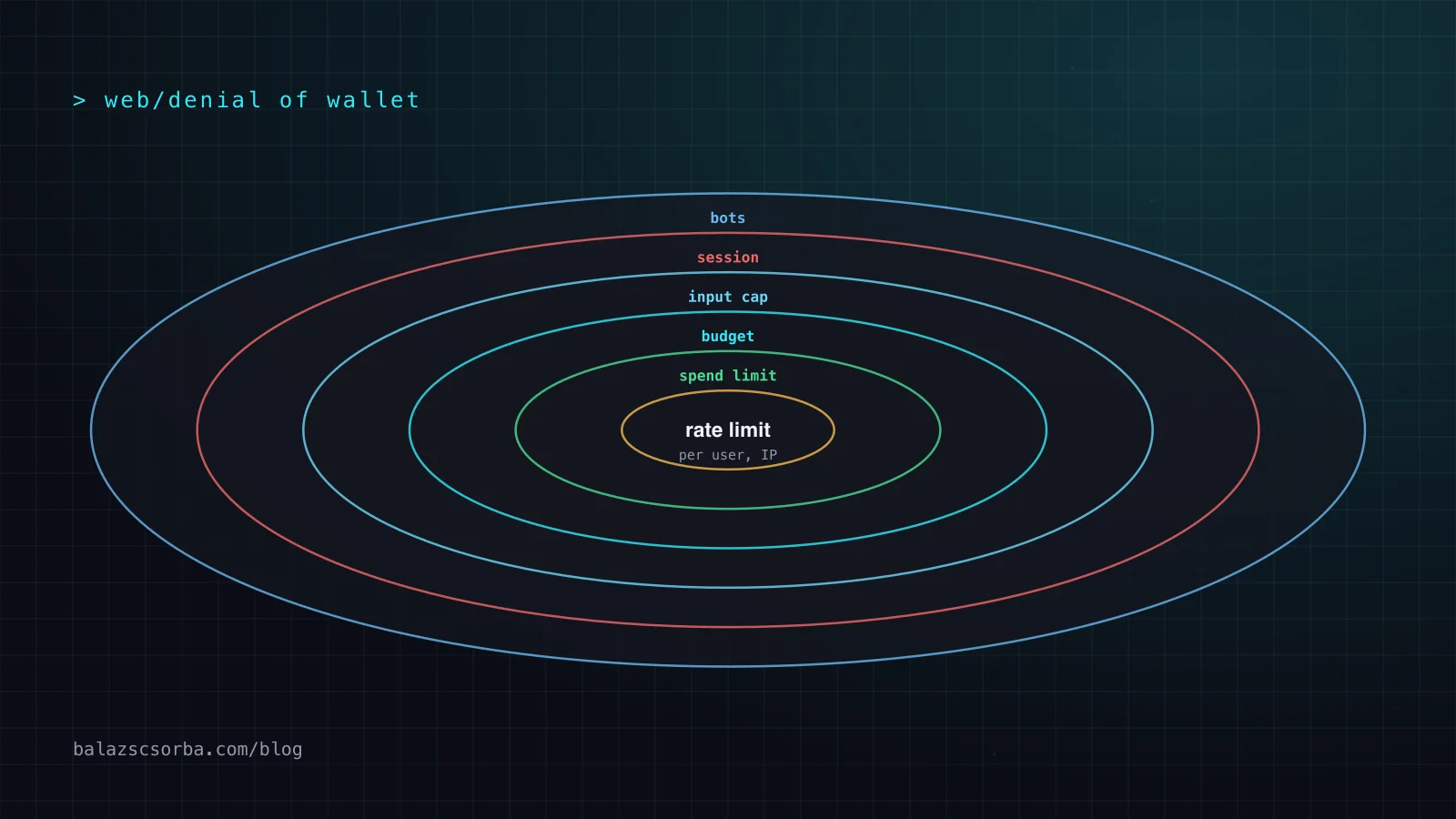
No single control is enough, because each one measures something different. A rate limiter counts requests, a size limit counts bytes, a budget counts tokens and a spend limit counts money. I order them from cheapest to most expensive to evaluate, so that rejected traffic costs as little as possible:
Why does authentication come first?
Every other limit needs an identity to attach to. Without a session, the only key you have is the IP address, and that is weak. With nuxt-auth-utils, requireUserSession(event) returns the session or responds with 401, so the first line of the handler decides whether the model call can happen at all. For a feature that must work before login, such as a product finder, issue a lightweight anonymous session after a bot check and give it a much smaller budget than a logged-in customer.
The second rule is to never ship a generic proxy. If the client can choose the model, the system prompt, max_tokens or tools, your endpoint is an open model API with extra steps. The client sends a message and maybe a conversation id; the server decides everything else. That also keeps the API key on the server, as described in shipping LLM features in Nuxt.
How should you rate-limit per user and per IP?
The nuxt-security module ships a rate limiter that is enabled globally by default: 150 requests per 300,000 ms per IP, stored in an LRU cache, answering 429 Too Many Requests when exceeded. It can be tuned per route through routeRules, and its storage can be any unstorage driver. Its own documentation is honest about the limits: the built-in rate limiter "is not suitable for complex production applications", and it recommends solutions on the infrastructure layer.
For an LLM route that means three adjustments. Use a shared store, because an in-memory LRU cache is per instance and resets on every deploy. Set a much tighter limit on the model route than on the rest of the site. And resolve the client IP correctly: h3's getRequestIP only reads X-Forwarded-For when you opt in, because the leftmost entry is client input; behind Cloudflare, nuxt-security's ipHeader option can point at cf-connecting-ip instead.
// nuxt.config.ts (illustrative)
export default defineNuxtConfig({
  modules: ['nuxt-security', 'nuxt-auth-utils'],
  security: {
    rateLimiter: {
      driver: { name: 'redis', options: { url: process.env.REDIS_URL } },
      ipHeader: 'cf-connecting-ip', // only if Cloudflare sits in front
    },
  },
  routeRules: {
    '/api/chat': {
      security: {
        rateLimiter: { tokensPerInterval: 20, interval: 60_000 },
        requestSizeLimiter: { maxRequestSizeInBytes: 32_000 },
      },
    },
  },
})
This limiter is keyed by IP. The per-user limit belongs in the handler, after requireUserSession, keyed by the user id. Which algorithm you use there matters less than using one consistently; the trade-offs as Upstash documents them:
| Algorithm | Strength | Weakness |
|---|---|---|
| Fixed window | Very cheap in storage and computation | Bursts leak through at window boundaries; stampedes when a new window starts |
| Sliding window | Fixes the boundary problem | More storage and computation; an approximation |
| Token bucket | Smooths bursts; allows a higher initial burst | More state to reason about |
Anthropic's own API uses a token bucket, continuously replenished up to the limit rather than reset at fixed intervals, which is a reasonable default to copy for a chat feature where users type in bursts.
How do you cap prompt size and output?
A request limit says nothing about what each request costs. Cap the input in three steps. First bytes: nuxt-security's request size limiter answers 413 Payload Too Large above maxRequestSizeInBytes, which defaults to 2,000,000; a chat message needs a few kilobytes. Then shape: validate the body with readValidatedBody and a schema that limits message length. Then tokens: count before you call.
The biggest hole is usually conversation history. If the client sends the whole conversation on every turn, an attacker can send a fabricated history of any length. Keep the history on the server, keyed by conversation id, and trim it to a fixed number of turns or tokens. Anthropic's token counting endpoint is free, has its own rate limit separate from message creation, and returns an estimate of input tokens, which is enough for a cap.
Output is capped by max_tokens, set on the server. Note what it does and does not do: for Anthropic's rate limits, output tokens are counted as they are produced and max_tokens does not factor into the output-tokens-per-minute calculation. It is a cost ceiling per request, not a rate control, so you still need the budget in the next section.
// server/api/chat.post.ts (illustrative)
import { z } from 'zod'

const Body = z.object({
  conversationId: z.string().uuid(),
  message: z.string().min(1).max(4000),
})
const MAX_INPUT = 12_000   // tokens, after history trimming
const MAX_OUTPUT = 800     // the server decides, never the client

export default defineEventHandler(async (event) => {
  const { user } = await requireUserSession(event)          // 401 without a session
  const body = await readValidatedBody(event, Body.parse)    // 400 on bad or long input

  const history = await loadHistory(user.id, body.conversationId, { maxTurns: 10 })
  const messages = [...history, { role: 'user', content: body.message }]

  const { input_tokens } = await anthropic.messages.countTokens({ model: MODEL, system: SYSTEM, messages })
  if (input_tokens > MAX_INPUT) throw createError({ statusCode: 413, statusMessage: 'Conversation too long' })

  const reserved = input_tokens + MAX_OUTPUT
  const key = await reserveTokens(user.id, reserved)          // null when the daily budget is spent
  if (!key) throw createError({ statusCode: 429, statusMessage: 'Daily limit reached' })

  let used = 0
  try {
    const res = await anthropic.messages.create({ model: MODEL, system: SYSTEM, messages, max_tokens: MAX_OUTPUT })
    const u = res.usage
    used = u.input_tokens + (u.cache_creation_input_tokens ?? 0) + (u.cache_read_input_tokens ?? 0) + u.output_tokens
    await saveTurn(user.id, body.conversationId, body.message, res.content)
    return res.content
  } finally {
    await settleTokens(key, reserved, used)                   // refund the unused part
  }
})
How do you enforce token budgets per user?
A budget is the control that actually bounds cost: tokens per user per day, or per anonymous session per hour. The pattern I use is reserve, then settle. Before the call, reserve the worst case, which is the counted input plus max_tokens. If the reservation would exceed the budget, reject with 429. After the call, settle with the real usage from the response and refund the difference. Concurrent requests from the same user then cannot overspend, because each one has already claimed its share.
The counter must be atomic. A getItem followed by setItem through Nitro storage is a read-modify-write, and two parallel requests can both read the old value. Redis INCRBY returns the new total in one step, so the check and the reservation cannot race:
// server/utils/budget.ts (illustrative, ioredis)
const DAILY_TOKENS = 200_000

export async function reserveTokens(userId: string, n: number) {
  const key = `llm:budget:${userId}:${new Date().toISOString().slice(0, 10)}`
  const total = await redis.incrby(key, n)
  if (total === n) await redis.expire(key, 60 * 60 * 48)
  if (total > DAILY_TOKENS) { await redis.decrby(key, n); return null }
  return key
}

export async function settleTokens(key: string, reserved: number, used: number) {
  if (reserved > used) await redis.decrby(key, reserved - used)
}
Count all input tokens when you settle. With prompt caching, Anthropic's input_tokens only covers tokens after the last cache breakpoint; the total input is cache_read_input_tokens + cache_creation_input_tokens + input_tokens. Whether you weigh cached tokens at their lower price is a product decision; a plain token budget is easier to explain to users. For the cost side of caching and routing, see prompt caching and model routing.
Where do CAPTCHAs and Turnstile fit?
A bot check raises the price of automation; it does not cap cost. I use it at the point where an identity is created, for example before issuing an anonymous chat session, not on every message. With Cloudflare Turnstile, server-side validation through the Siteverify API is mandatory, because the client widget alone protects nothing: tokens can be forged, each token is valid for 300 seconds, and each can be validated only once, with a replay rejected as timeout-or-duplicate.
// server/api/session/anonymous.post.ts (illustrative)
export default defineEventHandler(async (event) => {
  const { token } = await readBody<{ token: string }>(event)
  const r = await $fetch<{ success: boolean }>('https://challenges.cloudflare.com/turnstile/v0/siteverify', {
    method: 'POST',
    body: { secret: useRuntimeConfig().turnstileSecret, response: token, remoteip: getRequestIP(event) },
  })
  if (!r.success) throw createError({ statusCode: 403 })
  await setUserSession(event, { user: { id: crypto.randomUUID(), tier: 'anonymous' } })
  return { ok: true }
})What do provider spend limits catch?
Both large providers let you cap monthly spend, and you should set a cap below the amount that would hurt. But read the behaviour: these limits stop all traffic in their scope, for every user, until the month resets or you raise them.
| Aspect | Claude API (Anthropic) | OpenAI API |
|---|---|---|
| Limit you set | Spend limit per organization, below the tier cap; custom spend and rate limits per workspace | Hard spend limit per organization or per project; spend alerts that only notify |
| Response when reached | HTTP 400 invalid_request_error, "You have reached your specified API usage limits" | HTTP 429 with organization_spend_limit_exceeded or project_spend_limit_exceeded |
| Built-in ceiling | Monthly tier cap: Start 500, Build 1,000, Scale 200,000 USD; 429 enforced_spend_limit_reached without retry-after | Monthly usage limits per usage tier |
| Caveat | Workspace limits cannot be set on the default workspace | "Enforcement is not instantaneous"; recorded spend can slightly exceed the limit |
Two practical consequences. Give each public feature its own Anthropic workspace or OpenAI project with its own key and limit, so a runaway chatbot cannot stop your internal tools. And handle the spend-limit responses explicitly: the SDKs retry 429s automatically, and Anthropic notes that retries fail until access resumes. Map them to a friendly "temporarily unavailable" state and page someone.
What should you monitor and alert on?
OWASP's mitigations include comprehensive logging with anomaly detection and graceful degradation. In a Nuxt app that translates into a few numbers per feature, logged with the user id and the conversation id:
- Tokens per user per day, with an alert when the top user is far above the median. Free-riders show up here first.
- Rejections by layer: 401, 413 and 429 counts per hour. A sudden rise in 429s from the budget means someone is probing.
- Input tokens per request, as a distribution, not an average. A long tail means the history or size caps are too loose.
- Daily cost per feature against a baseline, with a provider spend alert set well below the hard limit.
Degrade before you shut down. When spend crosses a threshold, switch anonymous users off first, then move logged-in users to a smaller model, and keep the feature alive for paying customers. That is a far better failure mode than the provider limit switching everything off at once. For tracing the calls behind these numbers, see observability for LLM agents.
A checklist for a public LLM route
- The API key lives only in server runtime config; the client never sees it.
- The route requires a session; anonymous sessions are issued only after a server-validated bot check.
- Model, system prompt, tools and
max_tokensare fixed on the server. - Request rate limits per IP at the edge and per user in the handler, in a shared store.
- Body size limit, schema validation, server-side history and a token count cap before the call.
- A daily token budget per user with atomic reserve and settle.
- Bounded retries, tool steps and timeouts, so your own code cannot loop.
- A separate provider workspace or project per feature, with a spend alert and a hard limit.
- Alerts on per-user token outliers, rejection spikes and daily cost, plus a degradation plan.
Cost abuse is one half of the risk; the other is what the model does with hostile input. For that, see prompt injection defense.
Sources
- OWASP GenAI Security Project: LLM10:2025 Unbounded Consumption
- Nuxt Security: Rate Limiter middleware
- Nuxt Security: Request Size Limiter middleware
- nuxt-auth-utils: README (GitHub)
- h3: request utilities (getRequestIP, readValidatedBody)
- Upstash: Ratelimiting algorithms
- Cloudflare Turnstile: Validate the token
- Claude Platform Docs: Rate limits and spend limits
- Claude Platform Docs: Token counting
- OpenAI API Docs: Spend limits
- OpenAI API Docs: Rate limits
Frequently asked questions
What is denial of wallet?
Denial of wallet is an attack on a pay-per-use service where the goal is cost rather than downtime. OWASP lists it as an example of LLM10:2025 Unbounded Consumption: an attacker generates so many operations that the bill for the provider becomes unsustainable.
Is the nuxt-security rate limiter enough for an LLM endpoint?
It is a good first layer, but its own documentation says the built-in rate limiter is not suitable for complex production applications. It counts requests, not tokens, and its default LRU cache is per server instance. Pair it with an edge limit and a per-user token budget in a shared store such as Redis.
Should I rate-limit by IP or by user?
Both. IP limits protect the routes that work before login and blunt simple floods. Per-user limits are the ones that matter for cost, because many legitimate users can share an IP and one attacker can rotate through many.
How do I limit the length of prompts?
Cap the request body size, validate the message length with a schema, keep the conversation history on the server instead of accepting it from the client, and check the token count before calling the model. Set max_tokens on the server to cap the output.
Do provider spend limits protect me from abuse?
Only as a last resort. OpenAI hard limits and Anthropic spend limits stop all traffic on the organization, project or workspace once reached, so an attacker who hits them takes the feature down for everyone. OpenAI also notes that enforcement is not instantaneous and spend can slightly exceed the limit.