Blog/Web engineering
WebMCP in practice: making a website agent-ready with declared tools
How WebMCP works in code: the declarative form attributes, document.modelContext.registerTool, tool annotations, the security gates, local testing and a checklist.
Balázs Csorba··10 min read
- WebMCP
- Chrome
- AI agents
- Origin trial
- Permissions Policy
- JSON Schema
Key takeaways
- WebMCP is a proposed web standard, an Intent to Experiment in Chrome from version 149, that lets a page register tools with an AI agent instead of leaving the agent to read the DOM.
- The declarative API turns an ordinary form into a tool with the toolname and tooldescription attributes, plus toolparamdescription per field and toolautosubmit for agent-driven submission.
- The imperative API is one call: document.modelContext.registerTool() with a name, description, JSON Schema inputSchema and an async execute function.
- All four tool annotations default to false: readOnlyHint, untrustedContentHint, consequentialHint and, from Chrome 156, debugging.
- WebMCP only works in origin-isolated documents and is gated by the tools Permissions Policy, which defaults to self and needs allow=tools on a cross-origin iframe.
WebMCP is a proposed web standard that lets a page declare its own tools to AI agents running in the browser, instead of leaving them to read the DOM and guess what a button is for. Chrome ships it as an origin trial from Chrome 149, and Google announced it at I/O on 19 May 2026. As of September 2026 it is an Intent to Experiment incubated in the W3C Web Machine Learning Community Group, not a Recommendation, so the details below are labelled by the Chrome version they were checked against.
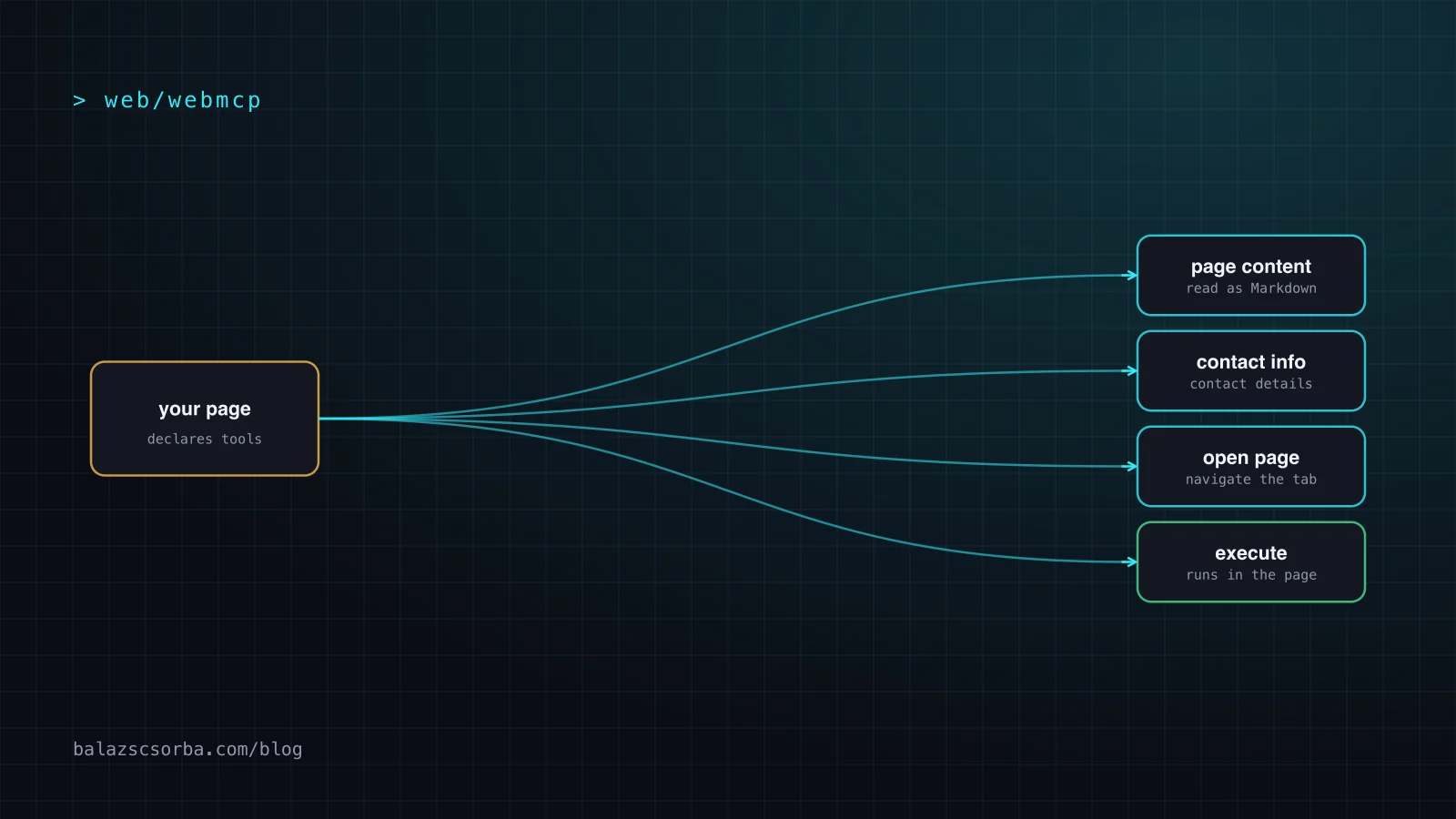
This article works through both WebMCP APIs in code: the declarative attributes you put on a form, the imperative document.modelContext.registerTool() call, tool annotations, the two preconditions that gate the whole thing (origin isolation and the tools Permissions Policy), how to test it locally, and a checklist. The worked example is the plugin on this site, which registers three page tools: get_page_content, get_contact_details and open_page.
What is WebMCP?
WebMCP lets a web page register named tools, each with a JSON Schema for its input and a function the browser can call. The agent running in that browser sees the tool list, decides which tool fits the user's task, fills the input and reads the result. The three things it gains are described in the Chrome documentation as discovery (a standard way to register tools such as checkout or filter_results), JSON Schemas for the inputs, and state, so the agent knows what the current page offers.
The deployment model matters. These tools are registered by the page and executed by the page, in that origin. That is a different thing from an MCP server, which the agent reaches over the network and which lives in your backend. The explainer in webmachinelearning/webmcp is where the design is argued out, and the ChromeStatus entry shows where the implementation stands. Google's I/O post said Gemini in Chrome would "soon" support the WebMCP APIs, and showed a wall of consumer brands working with it, including Expedia, Booking.com, Shopify, Etsy and Target.
Why scraping is a bad interface for agents
The default way an agent uses a website is what the Chrome docs call actuation: "the act of an agent simulating manual mouse clicks and text input, as though it were the human user engaging with your website." That is the worst interface you can offer, because every step is an interpretation the agent has to get right by itself. Class names change, a label says "Continue" when it means "pay", and a six-field form has six chances to guess wrong.
Declared tools remove the guess. The agent does not need to work out that a button labelled "Find flights" submits a search form; you told it, in a schema it can read. The documentation makes a second point that is easy to miss: tools "execute on your webpage visibly, so users gain trust that tasks are completed as expected", and your brand and human-centred design choices stay intact instead of being replaced by a script that clicks through a stripped-down checkout.
WebMCP is also not a replacement for making your content readable. The documentation lists its own first limitation: "Clients and browsers must visit a site directly to know if it has callable tools." An agent that never loads your page still needs a Markdown copy, an llms.txt or a plain API, which is the subject of llms.txt versus Accept: text/markdown. Tools cover the part a static document cannot: actions, state and the user's current page.
How does the declarative API work?
The declarative API needs no JavaScript. You add attributes to an ordinary HTML <form> and the browser derives a tool from it. Two attributes on the form are mandatory: toolname and tooldescription. Remove either one and the tool is unregistered.
<form toolname="searchFlights"
      tooldescription="Search available flights between two airports for a date range."
      action="/flights">

  <label for="from">Departure airport</label>
  <input id="from" name="from" required>

  <label for="to">Arrival airport</label>
  <input id="to" name="to" required>

  <select name="cabin"
    toolparamdescription="Cabin class; economy is the default.">
    <option value="economy">Economy</option>
    <option value="premium_economy">Premium economy</option>
    <option value="business">Business</option>
  </select>

  <button type="submit">Search</button>
</form>
The form fields become tool parameters. A <select> turns into an enum, and the text of each <option> becomes that value's title in the generated schema, so the agent knows whether a choice means "Return my purchase" or "Where is my package"; required on the input ends up in the schema's required array. Use toolparamdescription whenever the field name alone is not enough. Without it the browser falls back to the text of the associated <label>, and then to aria-description, which is a thin description for an agent that has never seen your page.
Submission is your choice. Without toolautosubmit, the agent fills the fields, brings the form into focus and leaves the Submit button to the person. With it, the agent also submits and the page navigates. Either way the form stays visible while the agent works, and two window events tell you what happened: toolactivated fires once the fields are pre-filled, toolcancel fires when the user cancels or the form is reset. Both are non-cancelable and carry a toolName.
When you do want a result back, use respondWith() on the submit event. SubmitEvent gains an agentInvoked boolean that tells you an agent triggered the submission, so the same handler can behave differently for a person. You must call preventDefault() first, and the promise you pass is serialized and returned to the model as the tool's output.
form.addEventListener('submit', (event) => {
  event.preventDefault()
  if (event.agentInvoked) event.respondWith(runSearch())   // resolves to the tool output
})| Criterion | Declarative attributes | Imperative registerTool |
|---|---|---|
| Where it lives | HTML attributes on a form | JavaScript, usually in a client plugin |
| What you write | Tool name, description, per-field descriptions | Name, description, JSON Schema, execute function |
| Input schema | Derived from labels, options and required | Yours, verbatim |
| Result | Submit and navigate, or respondWith | Whatever execute returns |
| Good for | Plain forms a person also fills in | Computed, stateful, cross-page actions |
| Weakness | Only what a form can express | More code, more ways to get it wrong |
How does document.modelContext.registerTool() work?
The imperative API is one call: you pass a tool object with a name, a description, an inputSchema in JSON Schema and an async execute function, and the browser makes it callable. This is the plugin on this site, trimmed. target() resolves the page name and language to a path and to the Markdown copy of that path.
const pageInput = {
  type: 'object',
  properties: {
    page: { type: 'string', enum: Object.keys(PAGES), description: 'home, about, references, blog, game …' },
    language: { type: 'string', enum: ['en', 'de', 'hu'], description: 'en, de or hu. Defaults to the shown language.' },
  },
  required: ['page'],
}

await document.modelContext.registerTool({
  name: 'get_page_content',
  description: 'Returns the full text of a page of this site as Markdown.',
  inputSchema: pageInput,
  annotations: { readOnlyHint: true },
  async execute(input) {
    const response = await fetch(target(input).markdown, { headers: { accept: 'text/markdown' } })
    if (!response.ok) throw new Error(`Could not load the page (${response.status}).`)
    return { content: [{ type: 'text', text: await response.text() }] }
  },
})
Three details in that snippet are what make this a tool rather than a fetch wrapper. First, the tool returns Markdown, not HTML: it asks for the page's .md copy with Accept: text/markdown, so the agent gets a few kilobytes of clean text instead of a script-heavy document. Second, enum in the schema keeps the agent from inventing page names, and the description tells it what each one is for. Third, open_page on this site uses the Nuxt router rather than navigateTo, because tools execute long after setup, outside the Nuxt context.
Reading tools back is symmetric. document.modelContext.getTools() returns an alphabetically ordered list of what the calling document is allowed to see, and executeTool(tool, input) runs one, returning null when the tool triggered a navigation instead of a result. A toolchange event on document.modelContext tells a frame that the list moved. Tools can be unregistered with an AbortSignal, and from Chrome 153 unregistering no longer breaks executions that are already running. Your execute receives that signal as a second argument, so pass it to any fetch it starts.
What runs inside execute is an ordinary loop around a model call, the same loop a server-side agent would run, except that the state is the DOM. That is described in the agent loop, explained.
What do tool annotations tell the agent?
Annotations are optional booleans in a tool's annotations object. All of them default to false, they are advisory signals rather than a security boundary, and they exist so an agent can decide what to do before it calls.
| Annotation | Set it to true when | What it buys you |
|---|---|---|
readOnlyHint | The tool only reads and changes nothing | The agent can call it freely, for example to search a catalog |
untrustedContentHint | The output contains user-generated or fetched data | Clients treat the result as data to sanitize and delimit, not as instructions |
consequentialHint | Running it has real-world, non-reversible effects | Agents and browsers can require a mandatory confirmation |
debugging | The tool is developer tooling, not user-facing | General-purpose agents filter it out; available from Chrome 156 |
The plugin on this site sets readOnlyHint: true on the two tools that return text, and leaves it off open_page, because navigating is a state change even though it destroys nothing. That is the bar I would hold: annotate honestly, because a wrong readOnlyHint is a lie the agent acts on, and an unannotated consequential tool is a purchase an agent can make without asking. Anything that renders content your users wrote should carry untrustedContentHint; why that is a security decision rather than a label is covered in prompt injection as an architecture problem.
What security preconditions does WebMCP have?
Two, and both are checked by the browser before your code runs. The first is origin isolation: WebMCP is only available in origin-isolated documents, so that the document's origin stays stable for the tool's lifetime. If document.domain is enabled, for example because a response sends Origin-Agent-Cluster: ?0, the WebMCP APIs are disabled. Check your own headers before you spend an afternoon on a tool that never registers.
The second is the tools Permissions Policy, which defaults to self. Top-level and same-origin documents may register tools; cross-origin iframes may not, unless the embedding page adds allow="tools". Registration is also gated separately from visibility: a tool has to be listed in exposedTo to be visible cross-origin, and the caller still has to ask for it in getTools({ fromOrigins }).
The rest is your own design. Consequential actions need a human, and the API gives you two ways to get one: the declarative path, where the form stays visible and the Submit button stays with the user, and consequentialHint, which lets the browser require confirmation. My own rule, and the one I apply to agents that write code, is the same here: the tool prepares it, the person commits it. Nothing that spends money, sends a message or cannot be undone should complete on a model's say-so alone.
How do you test WebMCP locally?
With a flag. The documentation's local setup is chrome://flags/#enable-webmcp-testing: set it to Enabled, relaunch, and the APIs are available on your machine without enrolling. For testing on real users' machines, enroll the origin trial; the Chrome team describes it as time-limited early access with usage limits, which is the trade for shipping an experiment to live traffic.
For inspection, install the Model Context Tool Inspector extension. It shows which tools a page registered, calls them by hand, verifies that the browser can parse your input schema, and shows the structured output or the error message, which is where most schema mistakes become obvious. It is a separate thing from Gemini in Chrome.
Know the limits before you commit. The documentation says the API is "primarily designed for local browser workflows with a human in the loop", so headless runs are not the target. Complex interfaces may need refactoring, or extra JavaScript, before their state can be exposed. Discoverability needs a visit. And the documentation's own status line applies: WebMCP "is under active discussion and subject to change in the future". Frameworks are filling in: Angular has experimental support, React has a usewebmcp package.
Which raises the question of when to wait. If your agents are shopping agents rather than browser agents, the server-side protocols are further along, and UCP, ACP, AP2 and WebMCP compared works through that. WebMCP earns its place when the thing you want an agent to do needs the page you are already on.
WebMCP checklist
- Decide whether you need tools at all. If an agent only has to read, a Markdown copy of the page is cheaper and works without a browser.
- Get access first: the local Chrome flag for development, the origin trial for real users.
- Use attributes for plain forms, registerTool() for everything else. The imperative API is the only one that can reach application state.
- Describe every parameter with
toolparamdescriptionor a real<label>, and prefer enums to free strings. - Decide submission deliberately. Leave Submit to the human, or add
toolautosubmitand return a result withrespondWith(). - Annotate honestly:
readOnlyHintonly when nothing changes,untrustedContentHinton user content,consequentialHinton anything irreversible. - Check your headers. Keep origin isolation, and remember the
toolspolicy is the gate for iframes. - Keep the human in the loop for money, messages and deletions. Prepare, then ask.
- Feature-detect the API and tolerate its renames, so a browser that drops it costs you nothing.
If you are building this into an application rather than a marketing site, the same shape of work comes up in Vue and Nuxt development.
Sources
- Chrome for Developers: WebMCP (get started)
- Chrome for Developers: WebMCP Imperative API
- Chrome for Developers: WebMCP Declarative API
- Chrome for Developers: Join the WebMCP origin trial (9 Jun 2026)
- Chrome for Developers: 15 updates from Google I/O 2026 (19 May 2026)
- WebMCP explainer: webmachinelearning/webmcp
- ChromeStatus: WebMCP feature entry
Frequently asked questions
What is WebMCP?
WebMCP is a proposed web standard, incubated in the W3C Web Machine Learning Community Group, that lets a web page register its own tools with an AI agent running in the browser. Each tool has a name, a description, a JSON Schema for its input and an executable function, so the agent can discover and call it instead of scraping the DOM and guessing which element does what. Chrome runs it as an origin trial from Chrome 149.
What is the difference between navigator.modelContext and document.modelContext?
navigator.modelContext was the earlier shape, used in the first drafts and blog posts. The current imperative API lives on the document, so you call document.modelContext.registerTool(), getTools() and executeTool(). Chrome renamed the entry point while the API was still experimental, which is why production code reads both and falls back. Treating a browser-experimental API as a hard dependency is how a rename becomes an outage.
Should I use the declarative or the imperative WebMCP API?
Use the declarative attributes when a plain form already does the job: toolname and tooldescription on the form, toolparamdescription on fields whose meaning is not obvious, and toolautosubmit only if the agent should submit. Use document.modelContext.registerTool() for anything computed, stateful or cross-page, because only the imperative API can reach application state or return a result without navigating.
Is WebMCP safe to ship on a production site?
It can be, with the browser's own gates respected. WebMCP only runs in origin-isolated documents, so any header that enables document.domain disables it, and the tools Permissions Policy defaults to self, which means a cross-origin iframe needs allow=tools. Beyond that, your execute function is the boundary: mark irreversible tools with consequentialHint so a confirmation can be required, and keep the human in the loop for anything that spends money or cannot be undone.
How do I test WebMCP tools locally?
Enable chrome://flags/#enable-webmcp-testing, relaunch Chrome, and the APIs are available locally with no enrollment. Use the Model Context Tool Inspector extension to see which tools a page registered, call them by hand and check that the browser can parse your input schema. For real-user testing, enroll the origin trial, which is time-limited early access with usage limits.