Claude pricing explained: Free, Pro, Max, Team and the API, and how usage limits work
Claude plan prices as of October 2026, how the five-hour and weekly usage limits work, Team seats, API token prices and how to pick a plan.
Balázs Csorba··11 min read
- Claude
- Pricing
- Usage limits
- Claude Code
- LLM costs

Key takeaways
- As of October 2026, Free is $0, Pro is $20 a month ($17 billed annually), Max is $100 or $200 a month, and Standard Team seats are $25 a month or $20 billed annually.
- Paid plans have a session limit that resets every five hours and a weekly limit across all models, and claude.ai, Claude Code and Claude Desktop share both.
- Max 5x and 20x give five and twenty times Pro’s per-session allowance; Team Standard seats give 1.25x and Premium seats 6.25x, and limits are per member.
- The API bills per token: Haiku 5.5 lists at $0.10 input and $0.50 output per million tokens for prompts up to 100K, while Opus 5.5 lists at $4 input and $20 output.
- The sources give no token equivalent for a subscription allowance, so measure your own token counts before you choose between a plan and the API.
As of October 2026, the Free plan costs $0, Pro costs $20 a month or $17 a month on an annual subscription, and Max costs $100 or $200 a month. Standard Team seats cost $25 per member per month, or $20 billed annually. The API is billed separately, per token. These are the US prices as the sources state them, excluding tax, and Anthropic can change them at its discretion.
Price is only part of the decision. Every paid plan has a session limit that resets every five hours and a weekly limit that applies across all models, and claude.ai, Claude Code and Claude Desktop all draw from the same allowance. This article explains what each plan costs and includes, how those limits work, how Claude Code uses them, and how a subscription compares with pay-per-token API pricing.
What does each Claude plan cost?
Free costs nothing. Pro is $20 a month when billed monthly and $17 a month when billed annually, with the annual subscription paid up front at $200. Max is $100 a month for Max 5x and $200 for Max 20x, and it is sold as a monthly subscription only. Anthropic does not offer standing discounts on Pro or Max; it runs occasional promotions and announces them through its official channels. Monthly pricing varies by region, and some regions add tax at checkout.
- Free: $0. Chat, web search, file creation, code execution and Artifacts, but no Claude Code.
- Pro: $20 a month, or $17 billed annually. Adds Claude Code, Projects and more usage than Free.
- Max 5x and Max 20x: $100 and $200 a month. Both include monthly API credits.
- Team: Standard seats at $25 a month billed monthly, or $20 billed annually. Premium seats at $125 or $100.
- Enterprise: $20 per seat a month, billed annually with a 20-seat minimum, plus usage at API rates.
- API: no subscription. You pay per million tokens (MTok) on the Claude Platform.
How do the plans compare on usage?
The table sets out what each plan includes. The multiples are relative to Pro’s per-session allowance, as Anthropic states them.
| Plan | Price (US) | Session allowance | What it adds | Best fit |
|---|---|---|---|---|
| Free | $0 | Less than Pro | Chat, web search, files, code execution | Trying Claude |
| Pro | $20 a month, or $17 billed yearly | Baseline (1x) | Claude Code, Projects, more models | Everyday individual work |
| Max 5x | $100 a month | 5x Pro | Higher output limits, priority at peak times, $100 monthly API credits | Frequent users |
| Max 20x | $200 a month | 20x Pro | As Max 5x, with $200 monthly API credits | Daily users who rely on Claude for most tasks |
| Team Standard | $25 a seat a month, or $20 billed yearly | 1.25x Pro | Admin, SSO, connectors, pooled API credits up to $500 a month | Teams of 2 to 150 |
| Team Premium | $125 a seat a month, or $100 billed yearly | 6.25x Pro | All Standard features, mixed with Standard seats | Power users on a team |
| Enterprise | $20 a seat a month, billed yearly, 20-seat minimum | Usage at API rates | SCIM, audit logs, data retention controls | Large organizations |
Cowork, built for bigger tasks that keep running after you close your laptop, is merging into Claude’s chat. Anthropic says the change is rolling out to Pro and Max first, with Team and Free to follow. Only Max and Team include the monthly API credits described later in this article.
How do the five-hour and weekly limits work?
Paid plans have two usage limits. The session limit resets every five hours. The weekly limit applies across all models and resets once a week at a fixed time assigned to your account. That reset time stays the same whenever you started using Claude or your subscription began, and you receive your full weekly allowance each cycle. Settings > Usage shows the time left in the current session and your next weekly reset.

Both limits count everything you do on claude.ai, Claude Code and Claude Desktop. Anthropic lists the factors that move them: message length, attachment size, conversation length, tools such as research or web search, the model, the effort level, artifacts, and multi-step tasks such as running code, creating files or browsing. Anthropic also says it may apply other limits, such as weekly and monthly caps or limits on specific models and features, to manage capacity.
Some things give relief. Content in a project is cached, so reused documents count for less than new ones, although caches expire after a period of inactivity. If you have a limit reset, you can use it to bring your session or weekly limit back to full. When you do reach a limit, you can wait for the reset or move to a higher plan, whose limits apply right away. On a paid plan you can also turn on usage credits to keep working at standard API rates.
How does Claude Code count against a plan?
On a paid plan, Claude Code draws from the same pool as chat. Anthropic’s pricing FAQ says Claude Code is included in all paid plans and shares the usage limits of the rest of the plan. The Claude Code guide describes two sign-in modes: an Enterprise seat signed in through /login draws from a pool that resets on a rolling window, while an API key is billed per token with no hard stop, and /cost shows the running spend for the session. In my own work I use Claude Code alongside opencode and Codex.
Model choice changes how fast the quota moves. The guide describes Sonnet as the right choice for most coding work, Opus for deeper reasoning on hard problems at a meaningfully higher quota cost, and Haiku as the fastest and cheapest option for quick, mechanical jobs. It also says Opus costs several times more per turn than Sonnet, and Sonnet more than Haiku. Switch with /model, which keeps the conversation, and use /model opusplan to plan with Opus and execute with Sonnet.
The conversation so far is the largest cost driver. Each turn resends the whole conversation, your CLAUDE.md and the files Claude has already read, so a session that has moved through several unrelated tasks pays for all of them on every new message. The guide’s rule of thumb is simple: /clear when you start a new task, /compact when you continue a long one.
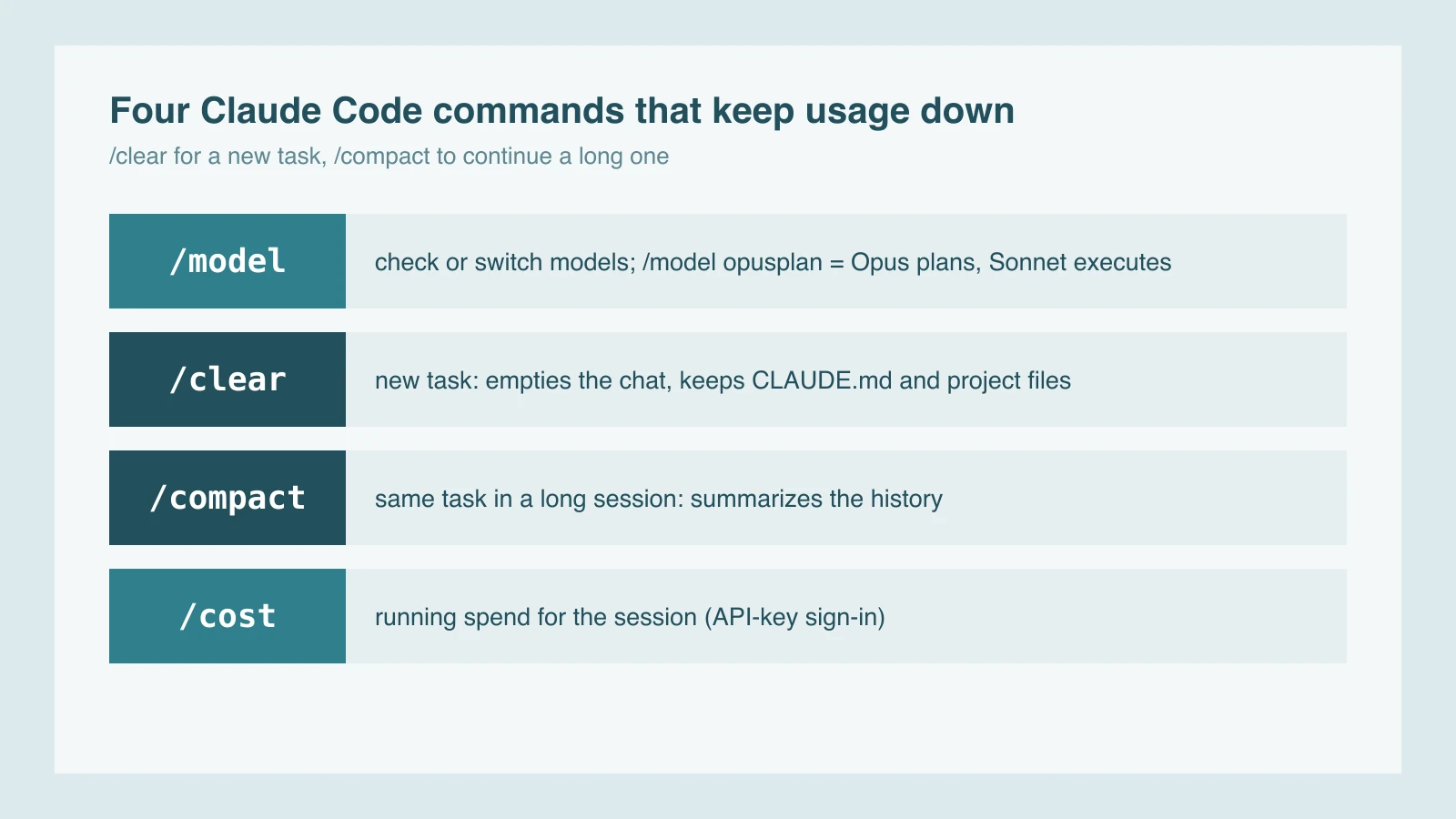
The guide’s other habits are practical. Reference files by path, because a bare path lets Claude read selectively, while an @ mention loads the whole file and its CLAUDE.md tree. Keep CLAUDE.md under roughly 200 lines, and ask for a plan before any change that touches more than two or three files.
How do length limits differ from usage limits?
Usage limits measure how much you use Claude over time. Length limits measure how much one conversation can hold. The context window is Claude’s working memory for a single chat. The limits article says the newest models on paid plans support up to 1M tokens, while others support 500K or 200K, and a portion of the window is always reserved for the response, so the longest possible conversation is slightly shorter than the full window.
As a conversation approaches the window, automatic context management summarizes earlier messages so the chat can continue. Your full history stays in the chat, and Claude can still refer back to it. The feature needs code execution enabled. Anthropic notes that longer conversations which trigger it use more of your usage limit, so a new chat is the better choice once a long one nears your limit.
You cannot enlarge the window on a plan, but you can use it better. Projects load only the relevant content into the window through retrieval. Keep project instructions short, remove project files you no longer need, turn extended thinking off when you do not need it, and lower the effort level for routine work. Anthropic also calls tools and connectors token-intensive, so disconnect the apps a conversation does not need.
How do Team seats and their limits work?
A Team plan starts at two members and supports up to 150 seats, and larger organizations move to Enterprise. Standard seats include 1.25x Pro’s per-session allowance. Premium seats include 6.25x, which is five times a Standard seat. Both seat types have a weekly limit across all models. Standard seats cost $25 a month billed monthly or $20 billed annually, and Premium seats cost $125 or $100.
Limits are per member, not pooled. Each seat has its own set, one person reaching theirs does not affect anyone else, and limits cannot be transferred or shared because each seat is for one named person. An organization can mix Premium and Standard seats, and it can enable usage credits so that every seat type keeps working after its included limit.
Team plans also include monthly API credits of up to $500, pooled across users. The credits can be used on any of Anthropic’s models, and the sources describe them as Claude Platform credit. They do not say the credits add to chat or Claude Code allowances, so do not count on them for those.
Subscription or API: how do the numbers compare?
A subscription is a fixed monthly price with usage limits. The API bills every token you send and receive. The Pro plan does not include API usage through the Claude Console, so paying for API calls means setting up Console access separately. As of October 2026, the list prices per million tokens (MTok) for the current models are:
| Model | Input | Output | Cache read |
|---|---|---|---|
| Opus 5.5 | $4 | $20 | $0.20 |
| Sonnet 5.5 | $2 | $10 | $0.10 |
| Haiku 5.5, prompts up to 100K tokens | $0.10 | $0.50 | $0.01 |
| Haiku 5.5, prompts over 100K tokens | $0.50 | $2.50 | $0.05 |
Several multipliers change these figures. A 5-minute cache write costs 1.25x the base input price and a 1-hour write costs 2x. A cache read costs 0.1x the base input price, or 0.05x on Opus 5.5 and Sonnet 5.5. Batch processing gives a 50% discount on input and output tokens, and US-only inference costs 1.1x the standard rate. Claude 4.7 and later models use a newer tokenizer that produces about 30% more tokens for the same text, so compare token counts, not only prices. For caching in more depth, see prompt caching and model routing.
Anthropic also made price changes in the same release. When Haiku 5.5 launched on October 7, 2026, Sonnet 5.5 cache reads fell by half, to $0.10 per million tokens. Anthropic says Haiku 5.5 costs around 75% less to run on average than Haiku 4.5 (Anthropic’s launch post). That is a vendor figure, not an independent benchmark.
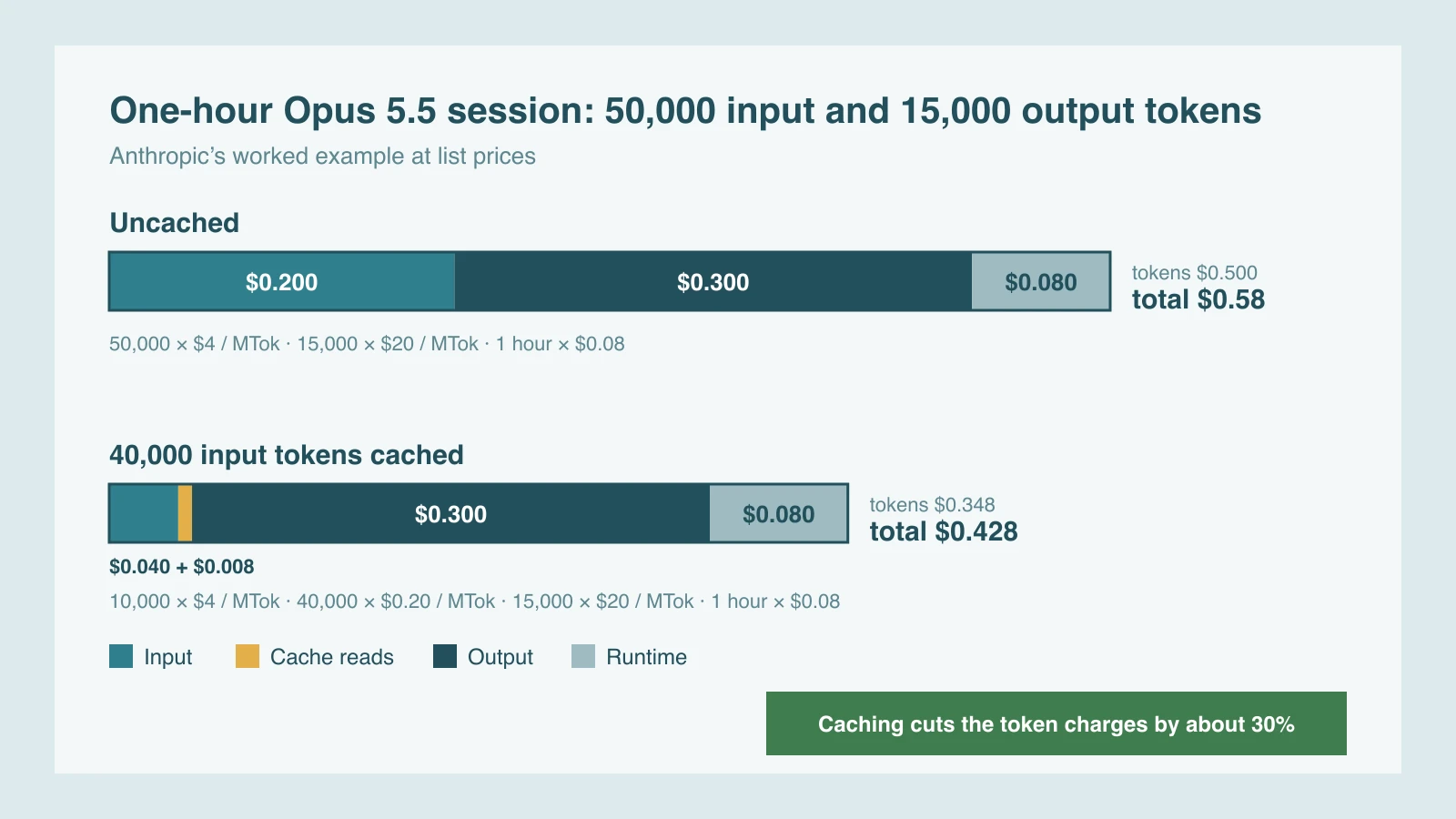
Anthropic’s worked example, in its pricing documentation, is a one-hour Managed Agents session on Opus 5.5 with 50,000 input tokens and 15,000 output tokens. At list prices the tokens cost $0.50, and the session runtime adds $0.08, for $0.58 in total. If 40,000 of the input tokens are cache reads, the token charges fall to $0.348 and the total to $0.428.
Max and Team credits change the arithmetic for a team that already builds on the API. Max 5x includes $100 of API credit a month, Max 20x includes $200, and Team includes up to $500 pooled across users. The sources describe these as Claude Platform credit for building tools, apps and agents that call the API, not as additions to chat or Claude Code allowances.
The sources give no token equivalent for a subscription allowance, so the only dependable comparison is your own token counts. Claude Code users on an API key can read them with /cost, and the Claude Console tracks API usage for other work. Then compare the usage patterns in the table below.
| Usage pattern | Likely fit | Why, according to the sources |
|---|---|---|
| Occasional questions and short documents | Free or Pro | Free covers everyday questions; Pro adds Claude Code and more usage |
| Long sessions most days in chat or Claude Code | Max 5x or 20x | Five or twenty times Pro’s session allowance, with priority at peak times |
| Several people sharing one workspace | Team seats | Per-member limits, admin controls and pooled API credits |
| Software or scripts that call the API | API, pay per token | Per-token prices, caching and batch discounts |
| High-volume summaries, classification or subagent work | Haiku 5.5 through the API | Anthropic positions Haiku 5.5 for high-volume, cost-sensitive work |
How can you stretch your limits?
Anthropic’s best-practice guide and its Claude Code guide agree on most of the levers. These are the ones that work for most people:
- Batch related requests. Put related questions in one message and give the background up front, which cuts back-and-forth turns.
- Keep reference material in Projects. Cached project content counts for less when reused, although caches expire after a period of inactivity.
- Clear and compact. Use /clear between unrelated tasks and /compact inside a long session that continues.
- Match the model to the job. Sonnet for most coding, Opus when you are stuck or the change is wide, Haiku for quick mechanical work.
- Trim the context. Lower the effort level for routine work, switch extended thinking off when it is not needed, and disconnect apps and connectors you are not using.
- Keep instructions lean. Keep CLAUDE.md under roughly 200 lines and reference files by path instead of pasting them.
- Watch the meter. Settings > Usage shows your session and weekly progress and the reset times.
The mechanics behind context growth are covered in context rot in long-running agents, and a ranked list of tools that cut coding-agent tokens is in the top 20 token-saving tools. The engineering review of Claude Code also covers the cost per developer.
Which plan should you pick?
Start with who will use the seat and how often a limit stops your work, and consider the API only if your code calls Claude. The diagram reads from left to right, and the first box that fits your situation points to the plan.

Pro is the sensible default for an individual, because it includes Claude Code, Projects and more usage than Free. Move up to Max when the session limit regularly interrupts your work: Max 5x gives five times Pro’s session allowance and Max 20x gives twenty times. Choose Team seats when several people share the work, since limits and billing stay per member. Use the API for software you build, and measure your token counts before you commit to it.
Prices and allowances change, and Anthropic reserves the right to change them, so check the pricing page before you buy. For the engineering side of building on these models, see my AI engineering work.
Sources
- Anthropic pricing page (claude.com/pricing)
- Claude Help Center: What is the Pro plan?
- Claude Help Center: What is the Max plan?
- Claude Help Center: What is the Team plan?
- Claude Help Center: Understanding usage and length limits
- Claude Help Center: Usage limit best practices
- Claude Help Center: Models, usage, and limits in Claude Code
- Claude Platform docs: pricing
- Anthropic: Introducing Claude Haiku 5.5 (7 October 2026)
- Claude blog: Claude Cowork is now Claude
Frequently asked questions
How much does Claude Pro cost?
Pro costs $20 a month billed monthly, or $17 a month on an annual subscription billed up front at $200. It includes Claude Code and more usage than Free. Prices exclude applicable tax and can change.
What is the difference between Max 5x and Max 20x?
Both are monthly plans, at $100 and $200. Max 5x includes five times Pro’s per-session usage allowance and Max 20x includes twenty times it. Each includes monthly API credits of $100 and $200, and the weekly limit applies across all models.
When do Claude’s usage limits reset?
The session limit resets every five hours. The weekly limit resets once a week at a fixed time assigned to your account, and Settings > Usage shows the next reset time.
Is Claude Code included in a paid plan?
Yes. Anthropic says Claude Code is included in all paid plans and shares the usage limits of the rest of the plan. Heavy coding sessions can also run on pay-as-you-go API credits through a Console account.
Does the Pro plan include API access?
No. The Pro plan does not include API usage through the Claude Console. You need to set up Console access and pay for API usage separately.