Tools/AI agents
E2B review: Firecracker sandboxes for agent code, billed per second
E2B runs each agent run in its own Firecracker microVM, with pause, resume and per-second billing. Where it fits, what the EU option costs and where self-hosting stops.
- Type
- Code execution sandbox
- Pricing
- Usage-based · Hobby free, Pro from $150 a month
Balázs Csorba··12 min read
- Code sandbox
- AI agents
- Firecracker
- Self-hosting
- EU data residency
Key takeaways
- E2B gives every agent run its own Firecracker microVM with its own Linux kernel, which is the isolation I want for code a model wrote.
- Compute is billed per second, at $0.000014 per vCPU-second and $0.0000045 per GiB-second, so the default 2 vCPU sandbox costs about $0.109 an hour.
- Pausing keeps files and memory and stops compute billing, and a paused sandbox never expires. A pause also resets the one-hour Hobby or 24-hour Pro runtime window.
- EU hosting needs the Pro plan at $150 a month and a support request, and the signed DPA and the sub-processor list should be in hand before personal data goes in.
- Self-hosting means E2B Embed on one Linux machine with KVM, which suits one internal workload and is not a platform.
E2B is a hosted service that runs code for AI agents in an isolated Linux sandbox, one per run, with Python and JavaScript SDKs to create, drive, pause and kill those sandboxes. Take it if your product executes code that a model wrote and you would rather not operate a microVM host yourself. Do not take it if you need a GPU, or if the data may never leave your own machines – then E2B Embed on one server is the honest answer. Against running Docker yourself you get a stronger boundary and far less operations work, and against Modal or Daytona the real difference is the sandbox model, not the meter. For the security side, the AI agent sandbox checklist is the place to start.
What it is
E2B provides sandboxes: isolated Linux virtual machines in which an agent can execute code, process data and run tools. The contracting entity is FoundryLabs, Inc., a Delaware corporation, and the managed service runs on Google Cloud.
- A Firecracker microVM per sandbox. Every sandbox is a Firecracker microVM, not a container. It boots its own kernel, and the hypervisor separates it from other sandboxes and from the host. E2B sandboxes run on an LTS 6.1 kernel, and templates built on or after 27 November 2025 run 6.1.158.
- Two SDK families. Install e2b-code-interpreter for Python or @e2b/code-interpreter for JavaScript when you want to run code, or e2b (pip or npm) for the sandbox SDK itself. The E2B SDK repository is Apache-2.0.
- CPU only. Sandboxes are sized by vCPU and RAM. There is no GPU option in the SDKs, the CLI, the API or a template definition.
- Three regions. US (us-west1) is the default on every plan. EU (europe-west1) and APAC (asia-southeast1) need the Pro plan or above and a support request.
- Compliance paperwork. E2B has a SOC 2 Type II report. The report, a DPA template and a penetration test are requested through the Trust Center's access form.
How it works
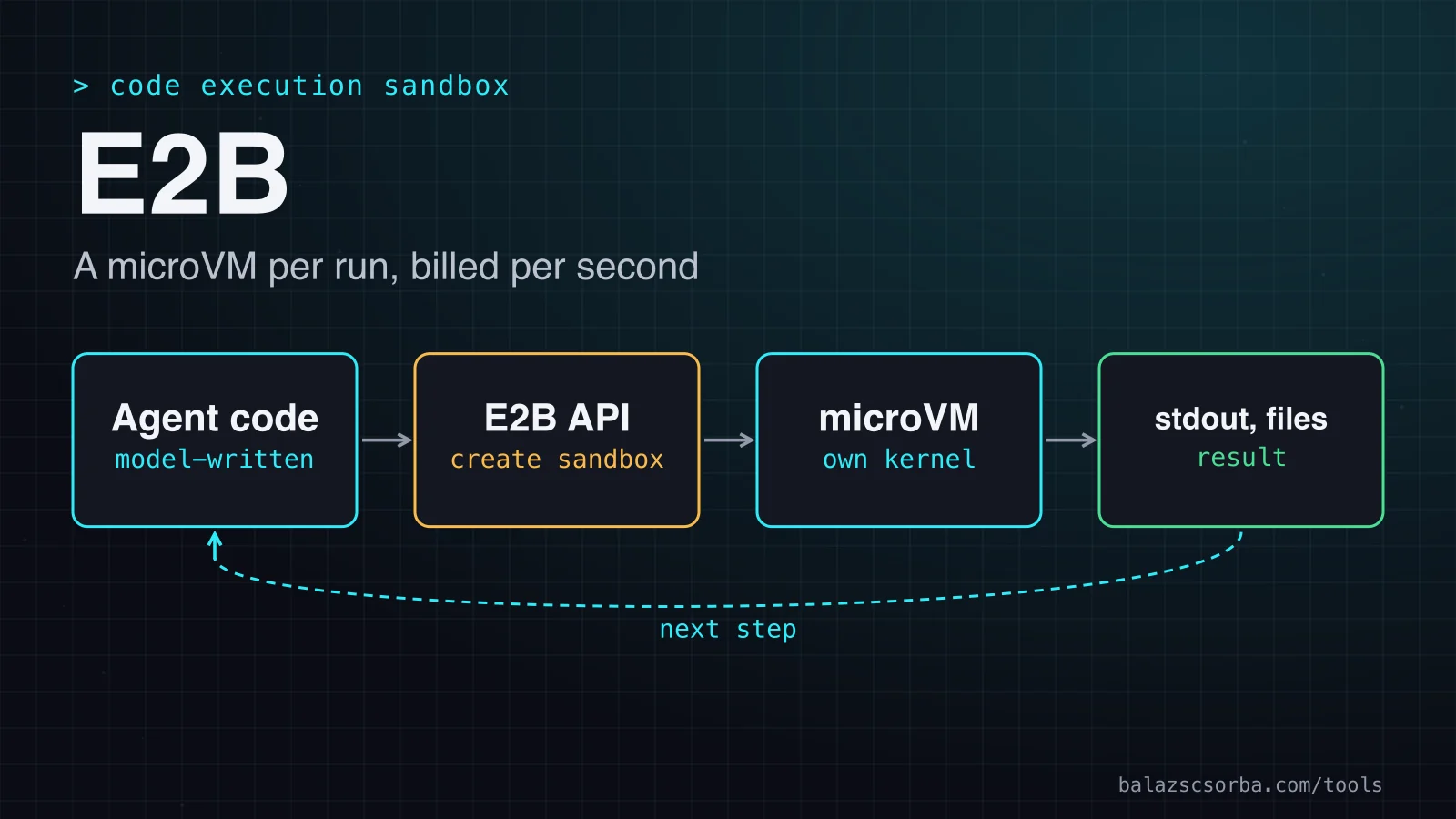
The agent's code never runs in your process. The SDK calls the E2B API, which places a sandbox on a node or resumes a paused one. Output, errors and files come back to the caller. The part that makes E2B more than a container host sits underneath: a pause saves the sandbox's memory and filesystem as a snapshot, so the next resume continues the same process.
Getting started
Set E2B_API_KEY in the environment, install e2b-code-interpreter and run this script. It executes one snippet, prints the output and kills the sandbox in a finally block, so an exception does not leave a sandbox billing until its timeout.
from e2b_code_interpreter import Sandbox

sbx = Sandbox.create(timeout=300)  # seconds; the default is 5 minutes
try:
    execution = sbx.run_code('print(sum([3, 5, 8]) / 3)')
    print(execution.logs)
finally:
    sbx.kill()                     # billing stops now, not at the timeout
The timeout is in seconds in Python and in milliseconds as timeoutMs in JavaScript. Without it a sandbox lasts five minutes, and at expiry it is killed by default, not paused. The execution object carries the logs and the text value of the last expression, which is what an agent reads back before its next step.
Pause, resume and templates
Lifecycle is where E2B differs from a container host. A sandbox has a timeout, five minutes by default, and the default action at expiry is kill. Inside lifecycle, set onTimeout to pause to keep the filesystem and memory instead (on_timeout in Python), and set autoResume to wake the sandbox on the next SDK call or HTTP request (auto_resume in Python). Auto-pause is persistent, so a sandbox that wakes and times out again pauses again.
- Pausing saves everything running. Files, running processes and loaded variables all survive. A pause takes about four seconds per GiB of RAM, and a resume about one second.
- A paused sandbox has no expiry. E2B keeps it indefinitely and never deletes it on its own. It is not billed for compute and does not count toward your concurrency limit. Only a kill removes it.
- A pause resets the runtime clock. The continuous runtime cap is one hour on Hobby and 24 hours on Pro. A pause and resume starts the window again, which is how a long-lived agent keeps one sandbox.
- Network connections do not survive a pause. A server inside the sandbox is unreachable while the sandbox is paused, and clients must reconnect after the resume.
- Filesystem-only pause. Pass mode='filesystem' to save only the disk. The next resume reboots the sandbox and the memory state is lost, which is fine when the state lives in files.
Templates are the other half. A template is a sandbox definition in code: base image, packages, environment variables, files and a start command. E2B builds it once into a snapshot. The start command runs during the build and is captured, so the process is already running when a sandbox is created from the template. The docs say a saved sandbox state loads in about 80 ms, and templates start faster than snapshots because the guest OS restarts before the long-running process is captured.
from e2b import Template, default_build_logger, wait_for_timeout

template = (
    Template()
    .from_base_image()
    .pip_install(['pandas', 'matplotlib'])
    .set_envs({'REPORT_DIR': '/home/user/reports'})
    .set_start_cmd('python -m http.server 8000', wait_for_timeout(5_000))
)

Template.build(
    template,
    'analytics-v1',
    cpu_count=2,
    memory_mb=1024,
    on_build_logs=default_build_logger(),
)
Start a sandbox from the name with Sandbox(template='analytics-v1') in Python or Sandbox.create('analytics-v1') in JavaScript. Builds can run for up to an hour, with 20 builds at a time on Hobby and Pro, and there is no limit on how many templates you keep. E2B says storage for templates may be priced later, so ask before you build hundreds of per-customer templates.
The code interpreter and its controls
The code interpreter is the use case E2B is built around. run_code executes code inside the sandbox and returns an execution. Code contexts let one sandbox run several executions at once, each in its own context. Security is the second half. Internet access is on by default, so pass allow_internet_access=False for code that must never call out, or use allow and deny lists to narrow it. For API keys, store the value as a secret: the egress proxy adds it to matching outbound HTTPS requests, and the sandbox only holds a reference. E2B's own warning applies: inject credentials only into destinations you trust, because the destination receives the value and could expose it in its response to the sandbox. The threat model behind this is in prompt injection patterns.
Cost and deployment
The price is per second for the vCPUs and RAM a sandbox was allocated, not for what it uses. The current rates are $0.000014 per vCPU-second ($0.0504 an hour) and $0.0000045 per GiB-second ($0.0162 per GiB-hour). Disk is included, and paused or killed sandboxes do not bill. The FAQ says the rates are shown for convenience and can change, and it names the pricing page as the source of truth, so check both on the day you buy.
| Feature | Hobby | Pro | Enterprise |
|---|---|---|---|
| Base price | $0 a month | $150 a month | Custom |
| Free credits | $100, one-time | None added on upgrade | Custom |
| Max vCPU and RAM | 8 vCPU, 8 GiB | 8 or more, on request | Custom |
| Max continuous runtime | 1 hour | 24 hours | Custom |
| Concurrent sandboxes | 20 | 100, up to 1,100 with add-ons | 1,100 or more |
| Sandbox creation rate | 1 per second | 5 per second | Custom |
| EU region | No | Yes, on request | Yes |
The arithmetic that matters is runs per day times seconds per run. The default sandbox is 2 vCPU and 512 MiB, which costs about $0.109 an hour, or $0.0027 for a 90-second run. A thousand such runs a day come to about $2.72 a day, roughly $82 a month, before the $150 Pro fee, which you need for EU hosting or for more than 20 concurrent sandboxes.
On list prices E2B is not the cheapest compute. Modal bills by physical core, which it describes as two vCPU equivalents, at $0.00003942 per core-second and $0.00000222 per GiB-second. Counting one core as two vCPUs, the same default sandbox costs about $0.146 an hour there, and Modal also bills GPU time. Daytona's pricing page lists $0.0504 per vCPU-hour and $0.0162 per GiB-hour, the same rates as E2B, so the choice between them is about the sandbox model, the regions and the paperwork.
Self-hosting is E2B Embed, an Apache-2.0 package in the runtime repository that the changelog announced on 14 September 2026. It runs the whole E2B stack on one machine: the control plane, the sandboxes, storage for templates and snapshots, and telemetry. You install it with Docker Compose on a Linux host you own, with Terraform for one VM on Google Cloud, AWS or Azure, or on one node of a Kubernetes cluster. Everything stays on one machine, and because every image and binary the stack pulls is public, it needs no E2B account or token. The effort is real, though.
- Linux with KVM. Embed needs Linux on x86-64 or arm64 with KVM, or a VM with nested virtualisation switched on. Ubuntu 24.04 is the recommended host, on kernel 6.8 or newer on x86-64.
- Sizing. E2B recommends 12 GiB of RAM and 20 GiB of free disk. A pause needs free disk as large as the sandbox's memory, plus 1 GiB of headroom, and the guide puts the stack at about two minutes on an 8-vCPU, 32 GiB VM, with smaller hosts taking longer.
- Operations. The node runs Redis and ClickHouse, plus databases that the setup migrates and seeds. Backups, upgrades, monitoring and the KVM host are yours.
- Plain HTTP. Embed answers without TLS of its own, so it belongs inside your network behind your own proxy.
- One machine. Embed is one machine, by design. When you need more, the README names three other ways to run E2B: a private cloud, BYOC and E2B Cloud.
For an EU company the data question has four parts, and the public docs answer only some of them. The wider GDPR picture for model APIs is in GDPR and LLM API data residency.
- Where sandboxes run. On Google Cloud: europe-west1 for EU customers on Pro and above, and us-west1 for everyone on Hobby, where an EU choice is not offered.
- Where the rest lives. The security FAQ says storage follows Google Cloud's default encryption at rest, and that E2B adds no encryption layer of its own. The BYOC comparison says templates, snapshots and runtime logs are stored in E2B Cloud on the managed plans, but none of the pages I read gives a region for the EU cluster's snapshots and logs.
- The paperwork. The DPA template, the SOC 2 report and the penetration test are requested through the Trust Center's access form. A signed DPA and changes to the standard terms go through support, and so does the sub-processor list. GDPR Article 28 requires a processor contract and the controller's prior specific or general written authorisation of sub-processors, so that list is required, not optional.
- Transfers. E2B's contracting entity is a Delaware corporation. If support or engineers outside the EU can reach personal data, you need a transfer mechanism under GDPR Article 46, usually the standard contractual clauses in the DPA.
Where it falls short
- Idle time is billed. A running sandbox bills whether or not code is executing. Set timeouts and auto-pause on purpose, and use lifecycle webhooks, which carry the execution time of killed and paused runs.
- Rate limits and creation speed. List endpoints allow 10 requests a second on Hobby and 20 on Pro, per endpoint and per project. Creation runs at one sandbox a second on Hobby and five on Pro, which sets how fast a fan-out can start. Requests over the limit return 429 with a Retry-After header, and SDK 2.49.1 and later retry automatically.
- A pause can be refused. The node running the sandbox may still be finishing its previous snapshot. Where E2B has enabled the change, the refusal is HTTP 503 and the sandbox keeps running with its state intact; elsewhere the pause fails with HTTP 500 until the rollout reaches that region, and E2B is rolling it out region by region. The JavaScript SDK raises ServiceBusyError and the Python SDK ServiceBusyException, so your code must retry.
- No fixed egress address. Outbound traffic leaves from rotating public IPs, and E2B publishes no range, even on Enterprise. An allowlist on the other side has nothing stable to match, so you need a proxy you control, with a fixed address.
- Volumes are a private beta. Volumes outlive sandboxes, but file locking can hang, mounts are fixed at creation, snapshots are not supported, and volumes exist only in the US and the EU.
- The SDK changes fast. E2B stopped accepting access tokens on 1 August 2026, so older code must authenticate with E2B_API_KEY. The changelog ships weekly, so pin SDK and CLI versions in production.
Verdict
Pick E2B when your product runs model-written code as a feature, you want a microVM per run without operating a hypervisor, and you need pause and resume with memory rather than restarts. It is the wrong tool for GPU work, for a script that runs once a day, and for data that must stay on machines you own, unless one Embed node is enough. Start on Hobby to learn the SDK and the pause model, then move to Pro before any personal data goes into a sandbox. For the wider design question, the AI agent sandbox checklist is the list I would run through first.
| Option | Isolation | About $ per hour, 2 vCPU and 512 MiB | EU option |
|---|---|---|---|
| E2B | Firecracker microVM with its own kernel | $0.109 on usage rates | Shared EU cluster, Pro and above |
| Modal | gVisor or a VM runtime with its own kernel | $0.146, counting one core as two vCPUs | An EU region code in its region docs, not confirmed for Sandboxes |
| Daytona | Dedicated kernel per sandbox, per its docs | $0.109 on the same hourly rates | Shared Europe region (eu) |
| Docker on your own hosts | Kernel namespaces and cgroups on the host kernel | Your VM price plus your time | Whatever you build |
- Modal, if your team already runs Python batch jobs and GPU work there. Its sandboxes run on gVisor or a VM runtime with their own kernel, and the default maximum lifetime is five minutes, which you can raise with a timeout of up to 24 hours.
- Daytona, if you want sandboxes in a shared Europe region, and you want to measure its sub-90 ms start claim on your own workload. Its documentation describes a dedicated kernel per sandbox.
- Docker on your own hosts, if you run a few agent jobs a day on a VM you already operate and the code is yours. Docker's security documentation builds the boundary from kernel namespaces, control groups and capabilities, and for code a model wrote I would not rely on that alone.
Sources
- E2B documentation: isolated sandboxes for agents
- E2B billing and limits: plans, rates and API rate limits
- E2B: how long a sandbox lives, timeouts and auto-pause
- E2B: sandbox persistence, pause and resume
- E2B: how template builds work, snapshots and kernel versions
- E2B: template quickstart, build limits and templates versus snapshots
- E2B: running your first sandbox
- E2B: run Python code in the code interpreter
- E2B: internet access controls
- E2B: secrets injected by the egress proxy
- E2B: is it SOC 2 compliant? Trust Center, DPA and sub-processors
- E2B: can I run sandboxes in the EU?
- E2B: egress IP ranges and regions
- E2B: does it support GPUs?
- E2B: how to calculate the price of a sandbox, with current rates
- E2B: Volumes beta limitations: file locking, mounts and regions
- E2B: bring your own cloud (BYOC)
- E2B changelog: E2B Embed, the access token change and weekly releases
- E2B Embed: self-hosting on one machine (README)
- E2B Embed: Docker Compose requirements and sizing
- E2B SDK repository, Apache-2.0
- Firecracker: lightweight microVMs on KVM
- Modal pricing: per-second CPU, memory and GPU
- Modal sandboxes: lifetime, gVisor and VM runtimes
- Modal region selection: region codes
- Daytona pricing: vCPU and GiB rates
- Daytona documentation: sandbox isolation and start time
- Daytona regions: shared United States and Europe
- Docker security: kernel namespaces, control groups and capabilities
- Regulation (EU) 2016/679 (GDPR), EUR-Lex
Frequently asked questions
How much does E2B cost?
Hobby is free with a one-time $100 credit and a one-hour limit on continuous runtime. Pro is $150 a month on top of usage, with a 24-hour limit and 100 concurrent sandboxes included, up to 1,100 with add-ons. Usage is $0.000014 per vCPU-second and $0.0000045 per GiB-second, and paused or killed sandboxes are not billed.
Can I keep data in the EU?
Yes, on Pro and above, after a support request. The EU cluster runs on Google Cloud's europe-west1 region. Hobby sandboxes run in the US. The docs say where sandboxes run, but none of the pages I read gives a region for the EU cluster's snapshots and logs, so ask that in writing.
Can I self-host E2B?
Yes, with E2B Embed, an Apache-2.0 package that runs the whole stack on one Linux machine with KVM, installed with Docker Compose, Terraform or Kubernetes. It is a single-machine product. The Embed README names three other ways to run E2B when you need more: a private cloud, BYOC and E2B Cloud.
Does E2B run GPU workloads?
No. E2B sandboxes are CPU-only, sized by vCPU and RAM, and there is no GPU option in the SDKs, the CLI, the API or a template definition.