Tools/AI agents
Gemini CLI review: open source, but no longer free for individuals
Gemini CLI stays Apache-2.0 and gets releases, but the free individual route closed on 18 June 2026. What remains: Code Assist, billed API keys and Vertex AI.
- Type
- Coding agent
- Pricing
- Apache-2.0 · free individual tier closed 18 June 2026
Balázs Csorba··9 min read
- Terminal agent
- Gemini
- MCP
- Sandboxing
- Data protection
Key takeaways
- Gemini CLI is still Apache-2.0 and still maintained (v0.63.0 on 6 October 2026), but since 18 June 2026 it no longer serves Google AI Pro or Ultra users or free individual Code Assist users.
- For a company, the realistic routes are a Code Assist Standard or Enterprise licence, with 1,500 or 2,000 requests per user a day, or a billed Gemini API or Vertex AI key.
- Your data terms follow the route: a billed key does not use prompts to improve products, Code Assist does not train on your data without permission, and the unpaid API tier may be used to improve Google's products.
- For EU residency, start from Vertex AI's EU multi-region endpoint, because an endpoint alone does not guarantee residency or in-region processing.
- The sandbox applies only when you switch it on, and the default macOS profile still allows broad file reads and network access.
Gemini CLI is Google's open-source terminal agent, and it is no longer the free tool that its README still describes. Use it if your company already holds a Code Assist Standard or Enterprise licence, or if your platform team runs Gemini through billed API keys, including Vertex AI in the EU. Do not use it as a free personal agent: since 18 June 2026, Google has moved individual users to Antigravity CLI.
This review covers what the CLI does, which routes still exist in October 2026, what each route does with your code, and how it compares with Claude Code and Codex CLI. I opened the Google, Anthropic and OpenAI pages on 10 October 2026. Where I could not confirm a figure – such as a Code Assist seat price – I left it out.
What it is
Gemini CLI is an npm package that runs an agent in your terminal. It reads your project, runs shell commands, edits files, searches the web through Google Search grounding and calls MCP servers. The code is Apache License 2.0, the latest stable release is v0.63.0 from 6 October 2026, and the README says the Gemini 3 models have a 1M-token context window.
- Install. npm install -g @google/gemini-cli, Homebrew or npx.
- Built-in tools. Google Search grounding, file operations, shell commands and web fetching.
- Extensions. MCP servers over stdio, SSE or Streamable HTTP, plus GEMINI.md context files.
- Automation. Headless mode with -p, a JSON output format and a GitHub Action.
How it works
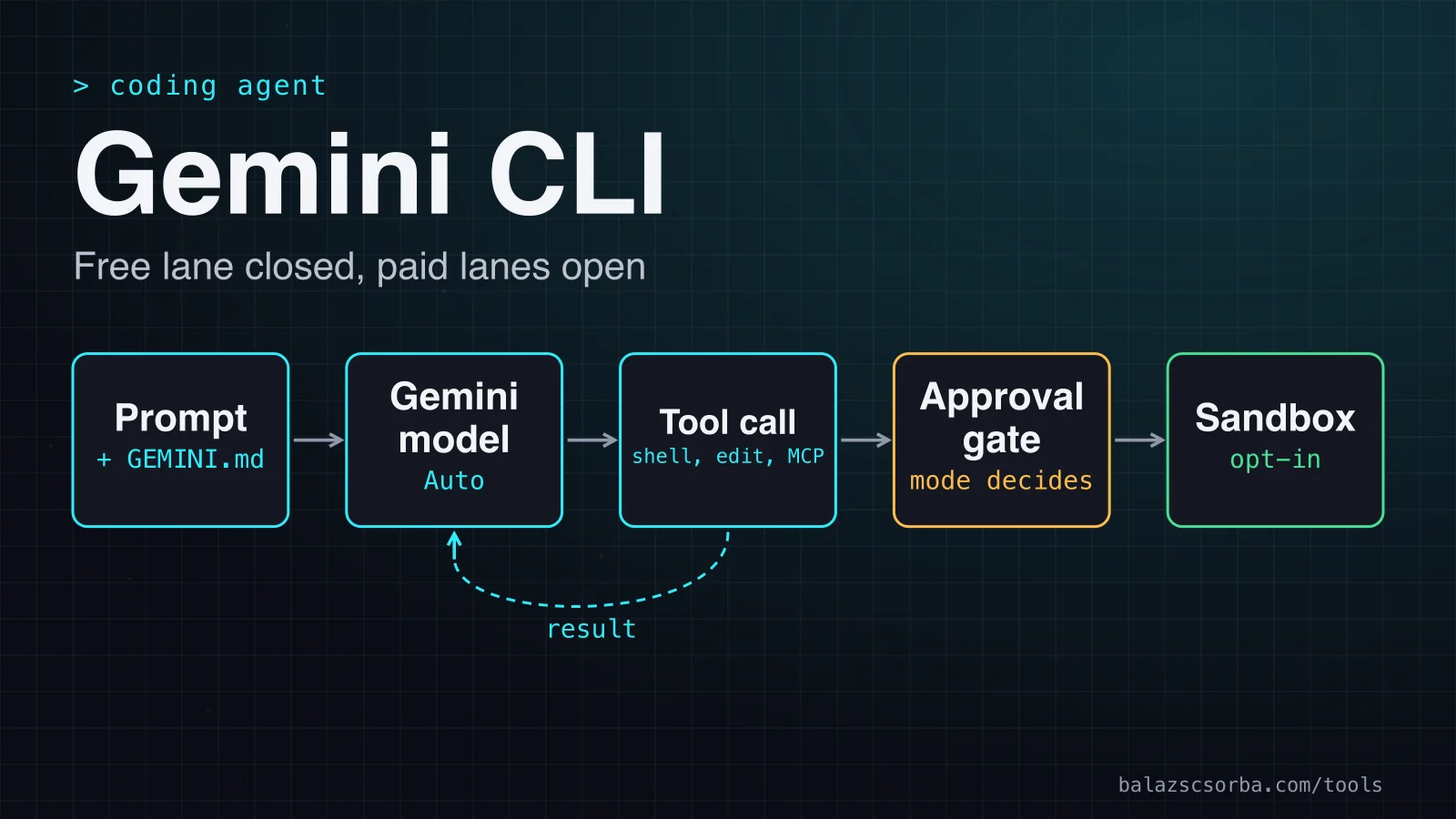
Each request follows one loop. The prompt goes to the model, which asks for tools when it needs them. The approval mode decides whether a tool call runs at once or waits for you, and if you switched the sandbox on, the call runs inside it before it touches the project. The result returns to the model, and the loop repeats until the answer is ready.
Two inputs sit beside that loop. GEMINI.md files are read from several locations and concatenated, so a global file and a project file both shape the model's behaviour. MCP servers add their tools to the same loop, as the next section explains.
Getting started
Start with a key from a Cloud project with active billing. The unpaid tier has been moved off the CLI, and billed access counts as a paid service under Google's terms. Set GEMINI_API_KEY, then run one task non-interactively with -s, which enables the sandbox that tools.sandbox names in settings.json.
npm install -g @google/gemini-cli
export GEMINI_API_KEY="key-from-a-billed-project"
gemini -s -p "Run the test suite and summarise the failures" --output-format json
The JSON output returns the response with usage statistics, so a script can record what each run used. Since v0.63.0, non-interactive runs can also carry out multi-step plans on their own. Keep the sandbox on for unattended runs.
Approval modes and the sandbox
The approval mode decides which tool calls run without asking. The yolo mode can be set only on the command line, and the older --yolo flag is deprecated in favour of --approval-mode=yolo.
- default: prompts for approval before tool actions.
- auto_edit: approves the edit tools automatically.
- plan: read-only, for research and planning before any change.
- yolo: approves everything, so use it only inside a sandbox.
The sandbox is opt-in. Switch it on with -s, the GEMINI_SANDBOX variable or tools.sandbox, and choose macOS Seatbelt (sandbox-exec), Docker, Podman, runsc or LXC. The default Seatbelt profile, permissive-open, denies operations by default and confines writes to the project directory, but it allows broad file reads and network access. Treat it as a write fence, not a network fence. For unattended runners, the AI agent sandbox checklist covers the rest.
Context, MCP and the GitHub Action
GEMINI.md is the cheapest way to keep rules in one place. The CLI reads context files from several locations, so a file under ~/.gemini and a file in the project both apply. Antigravity CLI keeps reading that file, and its migration guide also reads AGENTS.md, so existing project rules should carry over.
MCP servers are declared under mcpServers in settings.json, each with a command, arguments and environment variables. A server that can write to a ticket system or a repository is a case for default approval rather than yolo, and I would test which prompts it triggers before relying on it.
The run-gemini-cli action brings the CLI into GitHub workflows for pull request reviews, issue triage and @gemini-cli comments that ask for changes. On the Google side it accepts a Gemini API key or Workload Identity Federation; on the GitHub side, the default GITHUB_TOKEN or a custom GitHub App, which the README recommends. Its setup text still describes an AI Studio key with free quotas, so use a billed key instead. Code Assist for GitHub takes no new installs on GitHub organisations from 18 June 2026, but the version bought through Google Cloud is unchanged.
Cost and data protection
There is nothing to self-host. The CLI runs on your machine and sends each request to a Google endpoint, so the price and the data terms follow the route, not the tool. The table lists each route as Google's pages describe it in October 2026. Grounding with Google Search is metered separately on the API: 5,000 requests a month are free across Gemini 3 and newer models, then $14 per 1,000. Output prices include thinking tokens, and the pricing page changes rates with prompt size.
| Route | Price | Quota per user a day | Data use |
|---|---|---|---|
| Google account: AI Pro, Ultra or free individual | Ended for the CLI on 18 June 2026 | Not applicable | Moved to Antigravity CLI |
| Code Assist Standard | Per-user licence (price not verified) | 1,500 requests | No training without your permission |
| Code Assist Enterprise | Per-user licence (price not verified) | 2,000 requests | As Standard, under Google Cloud terms |
| Gemini API key, billed project | $2.00 in, $12.00 out per million tokens (Gemini 3.1 Pro Preview) | Varies | Prompts and responses not used to improve products |
| Vertex AI, billed | Pay per token, regional or multi-region endpoint | Varies | No training without prior permission; in-memory cache up to 24 hours unless disabled |
| Unpaid Gemini API key | Free | 250 listed on the quota page | Used to improve products; human review possible |
The data terms are where the routes really differ. Under the unpaid Gemini API terms, Google uses what you submit to provide, improve and develop products and machine-learning technologies. Human reviewers may read, annotate and process input and output after it is disconnected from your account, key and project, and Google asks you not to send sensitive, confidential or personal data there. The paid terms say prompts and responses are not used to improve products, and paid use is processed under Google's Data Processing Addendum.
Code Assist Standard and Enterprise follow Google Cloud's terms, and the FAQ says Google does not train its models on your data without permission. Vertex AI adds a training restriction for all managed models on Gemini Enterprise Agent Platform, including pre-GA models. Its data-residency page separates data at rest from ML processing. The EU multi-region endpoint keeps ML processing inside EU member states and excludes the UK and Switzerland.
Google's locations page says endpoints do not guarantee data residency or in-region ML processing, so choose the endpoint on purpose. Two Vertex defaults need a decision too. Published Gemini models cache inputs and outputs in memory for up to 24 hours by default, per project, and you can disable that. Standard Google Cloud terms allow prompt logging for abuse monitoring, and zero data retention needs an exception request. For the wider EU checklist, see GDPR LLM data residency: region controls, zero retention, EU options.
Where it falls short
The weaknesses are mostly about planning. The free route has gone, and the documentation lags behind it. The README still advertises a free personal login, the quota table still lists the closed rows, and the Action's setup still asks for a free key. Read the dated Google pages, not the README, and expect names to move: Vertex AI is now filed under Gemini Enterprise Agent Platform.
- The sandbox is a write fence. The default macOS profile allows broad reads and network access, so an agent that runs shell commands can still make network calls.
- Per-minute limits are not published. The quota page gives daily figures but no per-minute numbers, so you cannot size a burst from it.
- Token bills are hard to forecast. Thinking tokens count as output, prices change with prompt size and agent sessions make many calls.
- Two gaps remain. I did not confirm Antigravity CLI's limits or data terms, or a per-user price for Code Assist.
Verdict
Gemini CLI is worth adopting where a licence or a billed key is already in the budget. A company with Code Assist Standard or Enterprise gets an Apache-2.0 agent with approval modes, an opt-in sandbox, GEMINI.md, MCP and an Action. For a personal project the free route is gone, and I would not start there.
| Question | Gemini CLI | Claude Code | Codex CLI |
|---|---|---|---|
| Licence | Apache-2.0 | Public repository, all rights reserved | Apache-2.0 |
| Entry price | Billed key or Code Assist licence | Pro $17 a month billed yearly, $20 monthly; Max from $100 | Free tier; Plus $20 a month; Pro from $100 |
| Sandbox | Opt-in: Seatbelt, Docker, Podman, runsc, LXC | Seatbelt on macOS; bubblewrap and socat on Linux and WSL2 | On by default: Seatbelt, bubblewrap or the Windows sandbox |
| Approval modes | default, auto_edit, plan, yolo | acceptEdits, plan and auto modes | read-only, Auto, CI preset |
| Training on your data | Depends on the route | Consumer plans: used for training if the setting is on; commercial: no training unless you opt in | Not verified here |
- Adopt it if your company holds a Code Assist Standard or Enterprise licence and wants an Apache-2.0 agent with approval modes and an Action.
- Adopt it if a platform team already runs Gemini on Vertex AI in a billed project and needs an EU endpoint.
- Do not adopt it as a free personal agent. The individual route has closed, and Antigravity CLI is Google's path for that use.
- Pick Claude Code if you would rather pay a monthly plan than tokens. Its free plan does not include Claude Code, so budget from Pro.
- Pick Codex CLI if you already pay for ChatGPT Plus and want a sandbox that applies by default.
Sources
- Google Developers Blog: transitioning Gemini CLI to Antigravity CLI
- Gemini CLI: quotas and pricing
- Gemini CLI: licence, terms of service and privacy notices
- GitHub: google-gemini/gemini-cli, the repository and README
- Gemini CLI changelog: v0.63.0 released 6 October 2026
- Gemini CLI reference: flags and approval modes
- Gemini CLI configuration: settings.json and approval defaults
- Gemini CLI sandboxing
- Gemini CLI: context files (GEMINI.md)
- Gemini CLI: MCP servers
- Gemini API Additional Terms of Service
- Gemini Developer API pricing
- Gemini Code Assist FAQs
- Vertex AI data governance and zero data retention
- Vertex AI data residency
- Vertex AI locations and endpoints
- run-gemini-cli: the GitHub Action for Gemini CLI
- Antigravity CLI migration guide
- Claude pricing
- Claude Code: data usage
- Claude Code: setup and plan requirements
- Claude Code: permission modes
- Claude Code: sandboxing
- Claude Code licence (LICENSE.md)
- OpenAI Codex pricing
- OpenAI Codex CLI repository
- Codex: agent approvals and security
- Codex: sandboxing
Frequently asked questions
Can I still use Gemini CLI for free?
Not as an individual. The CLI's quota page says the unpaid tier and Google One users were replaced by Antigravity CLI on 18 June 2026, so the free rows it still lists are out of date. I did not verify Antigravity CLI's own limits, so check Google's pages before you plan around them.
Does Gemini CLI train on my code?
It depends on the route. Under Code Assist Standard and Enterprise, Google does not use your data to train its models without permission. Under a billed Gemini API key, prompts and responses are not used to improve products. Under the unpaid API tier, Google may use what you submit to improve products, and human reviewers may read it.
What does a call cost on the paid API?
On Google's pricing page, as of October 2026, Gemini 3.1 Pro Preview is listed at $2.00 per million input tokens and $12.00 per million output tokens, with thinking tokens billed as output. At that listed rate, a call with a 10,000-token prompt and a 1,000-token answer costs about $0.03, and an agent session makes many calls. The page sets separate rates around a 200,000-token prompt, so check the rate for your prompt size.
Is the CLI open source?
Yes. The code is licensed under the Apache License 2.0, as the LICENSE file states. The licence covers the code, not the models or the quotas, which Google sets separately.