Tools/AI agents
Temporal review: durable agents that survive crashes and wait for people
Temporal runs agent loops as durable workflows, so retries, approvals and timers survive crashes. Costs, data residency, determinism rules and when to skip it.
- Type
- Durable execution platform
- Pricing
- MIT · self-hosting free · Cloud pay-as-you-go from $0
Balázs Csorba··8 min read
- Durable execution
- Workflow orchestration
- Human in the loop
- AI agents
- Self-hosting
Key takeaways
- Temporal fits agent runs that last minutes to days, touch several systems and wait for a person. It is overkill for a chat reply that finishes in seconds.
- The server is MIT-licensed. Temporal Cloud is pay-as-you-go from $0 a month, with Actions at $50 per million for the first 5 million, and the Business plan starts at $500 a month.
- Workflow code must be deterministic. Model calls and tools belong in activities, and changing running workflow code needs versioning.
- Activities retry without a limit by default, so every model activity needs a retry policy and a list of error types that must never be retried.
- Cloud namespaces can run in EU regions such as Frankfurt and Ireland, under a data processing agreement with standard contractual clauses. Self-hosting moves that question to your own hosting.
Temporal is an open-source durable execution platform. You write the agent as ordinary code, and the platform records every step, so a run survives crashes, deploys and days of waiting. My verdict up front: it suits agent runs that last minutes to days, touch several systems and need a person to approve a step. It is overkill for a chat reply that finishes in two seconds.
It competes with two simpler things most teams already run: a graph checkpointer such as LangGraph's, and a job queue with a state table. Those are the right answer until a process dies halfway through a twelve-step run and the run has to resume where it stopped. Skip Temporal if nobody will own its workflow code or, when you self-host, its cluster.
What it is
- One command to try it.
temporal server start-devruns the service and the web UI on a laptop, with no external dependencies. - Two ways to run it. Self-host the server, or use Temporal Cloud, whose regions include AWS Frankfurt and Ireland. The server is MIT-licensed.
- Ordinary code. Workflows and activities are plain functions in Go, Java, Python, TypeScript, .NET, Ruby or PHP, depending on the SDK.
How it works
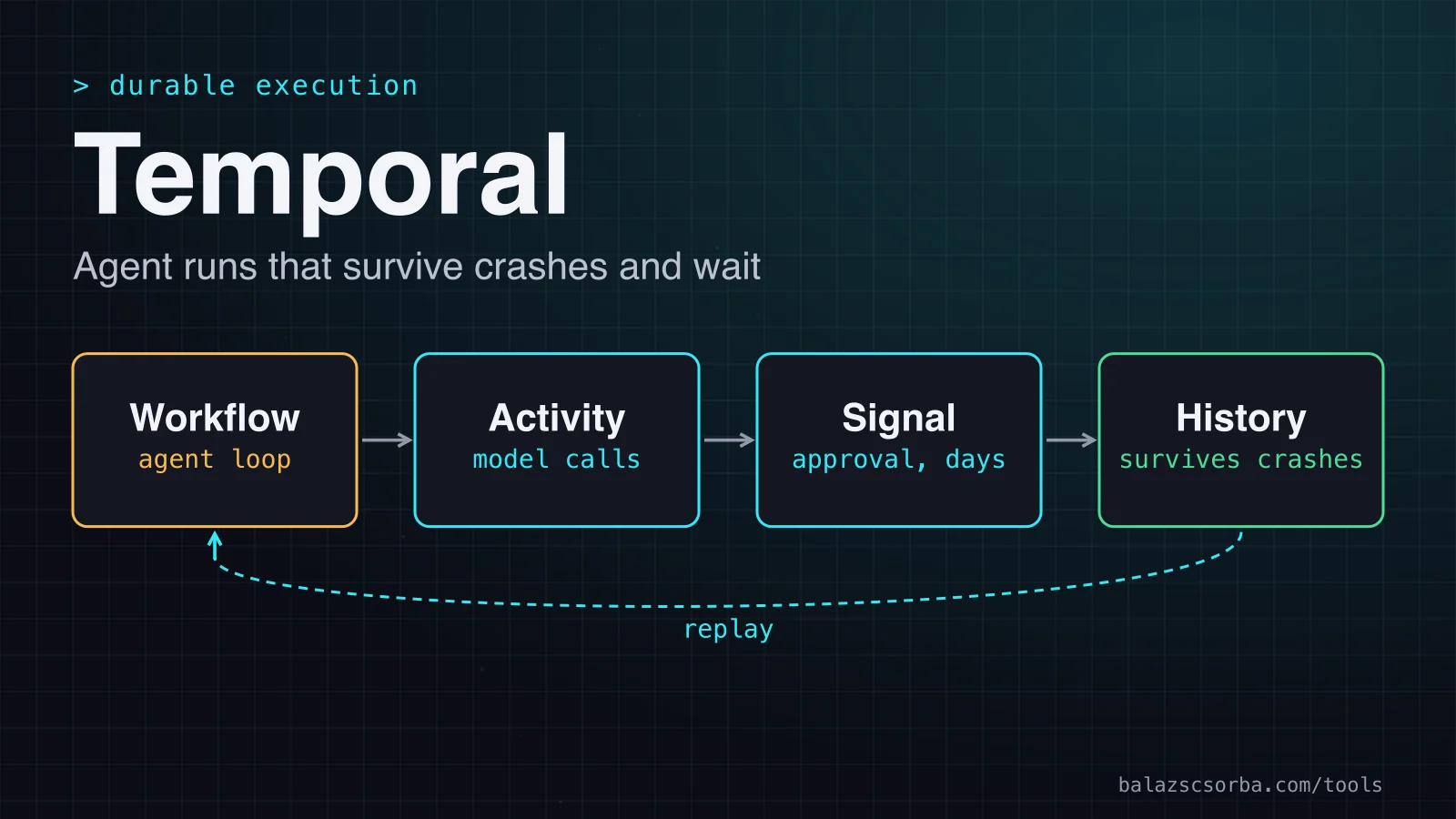
A workflow decides what happens next. An activity does the work: it calls a model, hits an API or writes a file. Temporal stores each decision and each activity result in the workflow's event history. After a crash, a worker replays the workflow code against that history, skips the finished activities and resumes at the first unfinished step. An agent maps onto that split cleanly: the loop, the tool choice and any handoffs live in the workflow, and every model or tool call is an activity.
Replay is the constraint. Workflow code must make the same calls in the same order on every replay, so calling an API, reading the clock or drawing random numbers inside it breaks replay. Put that work in activities, or use workflow.now() and workflow.random() in Python. Changing a workflow with running executions needs versioning. Changing an activity's type or ID is not safe, but its inputs and timeouts can change.
Getting started
The quickest start is the OpenAI Agents SDK integration, shipped as the temporalio-openai-agents package. You write the agent with the normal SDK inside a workflow, then attach OpenAIAgentsPlugin to the client and the worker. Each model call becomes an activity, so it retries durably and is not repeated during replay.
from datetime import timedelta
from agents import Agent, Runner
from temporalio import workflow
from temporalio.client import Client
from temporalio.openai_agents import ModelActivityParameters, OpenAIAgentsPlugin


@workflow.defn
class HelloWorldAgent:
    @workflow.run
    async def run(self, prompt: str) -> str:
        agent = Agent(name='Assistant', instructions='You only respond in haikus.')
        result = await Runner.run(agent, input=prompt)
        return result.final_output


# worker.py: the plugin sets the timeout for each model activity
client = await Client.connect(
    'localhost:7233',
    plugins=[
        OpenAIAgentsPlugin(
            model_params=ModelActivityParameters(
                start_to_close_timeout=timedelta(seconds=30)
            )
        ),
    ],
)

# starter.py: the same plugin, so payloads are converted the same way
client = await Client.connect('localhost:7233', plugins=[OpenAIAgentsPlugin()])
result = await client.execute_workflow(
    HelloWorldAgent.run,
    'Tell me about recursion in programming.',
    id='my-workflow-id',
    task_queue='openai-agents-basic-task-queue',
)
ModelActivityParameters sets how model activities are scheduled, and its start_to_close_timeout defaults to 60 seconds. For tools, activity_as_tool() runs I/O as an activity, while a plain @function_tool runs inside the workflow and must be deterministic. Integrations also exist for Google ADK, Pydantic AI, Mastra and the Vercel AI SDK. The LangGraph integration is in public preview.
Retries and timeouts
Retries are where durable execution earns its keep, and where the defaults bite. A failed activity is retried with exponential backoff, starting at one second and capped at 100 seconds between attempts, with no limit on attempts. A payment capture wants that. A request that can never succeed, such as a lookup for an order that does not exist, should not be retried at all. Three settings decide the behaviour:
- Start-to-close bounds one attempt. It has no default, and Temporal strongly recommends setting it.
- Schedule-to-close bounds the whole activity, retries included, so it caps how long one model step may run in total.
- Retry policy sets the attempt limit and the error types that must never be retried.
import httpx
from datetime import timedelta
from temporalio import activity
from temporalio.common import RetryPolicy
from temporalio.exceptions import ApplicationError
from temporalio.openai_agents import ModelActivityParameters

model_params = ModelActivityParameters(
    start_to_close_timeout=timedelta(seconds=60),
    schedule_to_close_timeout=timedelta(minutes=5),
    retry_policy=RetryPolicy(maximum_attempts=5),
)


@activity.defn
async def lookup_order(order_id: str) -> dict:
    async with httpx.AsyncClient() as client:
        response = await client.get(f'https://shop.example.com/api/orders/{order_id}')
    if response.status_code == 404:
        # Retrying cannot make a missing order appear.
        raise ApplicationError('Order not found', type='OrderNotFound', non_retryable=True)
    response.raise_for_status()
return response.json()Activity code also has to be idempotent, because Temporal expects activities to re-execute after a failure. A tool that sends an email needs an idempotency key that the receiving system honours.
Human approval with signals
This is where Temporal stops being a retry library. A signal is an asynchronous message to a running workflow. Temporal's human-in-the-loop sample stores the decision in a signal handler and waits for it with workflow.wait_condition. While it waits, the state lives in the event history and timers survive restarts. The sample's default timeout is five minutes, which suits a test. For an approval queue I would use days.
import asyncio
from datetime import timedelta
from typing import Optional
from temporalio import workflow


@workflow.defn
class ApprovalWorkflow:
    def __init__(self) -> None:
        self.decision: Optional[str] = None

    @workflow.signal
    async def approval_decision(self, decision: str) -> None:
        self.decision = decision

    @workflow.run
    async def run(self, request: str) -> str:
        # propose_action and execute_action are activities defined elsewhere
        proposal = await workflow.execute_activity(
            propose_action, request, start_to_close_timeout=timedelta(seconds=60)
        )
        try:
            await workflow.wait_condition(
                lambda: self.decision is not None,
                timeout=timedelta(days=3),
            )
        except asyncio.TimeoutError:
            return 'no decision within three days'
        if self.decision != 'approve':
            return 'rejected'
        return await workflow.execute_activity(
            execute_action, proposal, start_to_close_timeout=timedelta(seconds=60)
        )
A query reads state without changing it. An update is a request the caller waits on, and a validator can reject it before it is written to history. A rejected update still counts as an Action. Long sessions hit hard limits: an execution is terminated past 51,200 events, 2,000 updates or 10,000 signals, so chat-style workflows need Continue-As-New. workflow.info().is_continue_as_new_suggested() reports when the server suggests it. Where approval gates belong is a design question, which I cover in Human in the loop for AI agents.
Cost and deployment
Self-hosting carries no licence fee. Temporal Cloud is pay-as-you-go with no minimum spend, and new accounts get $150 of credit for 90 days. The table shows list prices as of October 2026.
| Option | Price | Included | What changes |
|---|---|---|---|
| Self-hosted | Free, MIT | Nothing from Temporal | You run the services, database, search store and upgrades |
| Cloud pay-as-you-go | $0 base plus 10% support | Nothing | Actions at $50 per million for the first 5 million a month |
| Cloud Business | Greater of $500 a month or 10% of usage | 2.5M Actions, 2.5 GB active, 100 GB retained | SAML included, SCIM $500 a month extra |
| Cloud Enterprise | Annual, contact sales | 10M Actions, 10 GB active, 400 GB retained | SCIM included, P0 response under 30 minutes |
| Cloud Mission Critical | Annual, contact sales | 10M Actions, 10 GB active, 400 GB retained | Dedicated platform architect, P0 response under 15 minutes |
Usage rules move the bill more than the headline. Actions count every activity start and retry, and every signal, timer, update, query and workflow start. My example run is 18 Actions, so 100,000 such runs come to about $90 in Actions before storage and support. One GB of active storage held for a month costs about $31, and one GB of retained storage about 78 cents. With Fairness enabled, each hour's Actions rise by 10 percent.
Business pays off through its support, SCIM and commitment discounts more than through its Actions. The $500 minimum includes 2.5 million Actions, which covers more than 130,000 runs like my example.
Where the data goes. A namespace is created in one region. The regions list includes AWS Frankfurt (eu-central-1), Ireland (eu-west-1) and London (eu-west-2), plus GCP Frankfurt (europe-west3). Payloads can be encrypted on your workers with the Data Converter before they leave, and a Codec Server lets your team read histories in the web UI without sharing keys. Retained history is kept for up to 90 days in Cloud, so longer retention means exporting. For the wider questions, see GDPR LLM data residency.
The data processing agreement. Temporal's agreement, effective 10 October 2024, includes standard contractual clauses and a UK addendum. Its subprocessor list names AWS for infrastructure, Google Cloud for namespaces in GCP regions, and Datastax, Auth0, Elastic and WorkOS for specific services. You may object to a new subprocessor within 15 days of publication. Backups are kept for 30 days, and customer data is deleted on termination. Temporal says it is SOC 2 Type 2 certified and compliant with GDPR and HIPAA. Treat this as the start of your review, not as legal advice.
Self-hosting. That moves those questions to your own hosting provider, and you carry the database, the search store, backups and upgrades. The server has four services that scale independently: frontend, history, matching and worker. Elasticsearch or OpenSearch is recommended once you run more than a few executions, and the Docker Compose sample runs PostgreSQL with Elasticsearch. Temporal recommends upgrading one minor version at a time, and releases can arrive every two weeks. The shard count is fixed at build time, and there is no RBAC or audit logging out of the box. The vendor's checklist calls staffing a significant cost. I have not priced hardware, because it depends on shard count and load.
Where it falls short
- Determinism is a habit. Editing code under running executions can break replay, and versioning leaves old code paths to maintain.
- Hard history ceilings. Executions terminate past 51,200 events, 2,000 updates or 10,000 signals, so long sessions need Continue-As-New from the start.
- Retries are a budget. The unlimited default suits infrastructure and suits model calls badly.
- Preview parts. The OpenTelemetry and LangGraph integrations are in public preview, sandbox support is pre-release and streaming is experimental.
- Not everything is durable. MCP servers run outside the workflow, and each MCP call runs as an activity.
LocalShellTool,ComputerToolandSQLiteSessionare not supported.
Verdict
Temporal is the right default for long-running agents that touch several systems and wait for people, provided someone will own the workflow code and, if you self-host, the cluster. It is the wrong default for one model call behind an HTTP request.
- Adopt it if a run lasts hours or days, and a restart must not repeat a payment, an email or a model call.
- Adopt it if a person approves steps that may come days later, and the wait must survive restarts.
- Skip it if the agent answers in seconds. A timeout and a retry around the model call are enough.
- Self-host it only if someone will run the cluster through frequent upgrades. Otherwise use Temporal Cloud.
Three alternatives cover most cases where Temporal is overkill:
- LangGraph checkpoints LangGraph when the agent is one Python graph, the state is small and PostgreSQL is already there. Its interrupts pause a graph for human approval.
- A job queue with a state table when the pipeline is a fixed sequence of idempotent steps. You build the retries and timers yourself, which is fine for five steps and tedious for fifty.
- The OpenAI Agents SDK alone OpenAI Agents SDK when each run is short, stays in one process and never needs to survive a restart.
Sources
- Temporal Cloud pricing
- Temporal Cloud pricing documentation
- OpenAI Agents SDK integration for Python
- Workflow definition and determinism
- Retry policies
- Activity timeouts
- Cloud actions reference
- Event history limits
- Message passing in Python: signals, queries and updates
- Human-in-the-loop AI agent sample
- Cloud security model
- Cloud service regions
- Data processing agreement
- Self-hosted deployment guide
- Self-hosted production checklist
- Self-hosted visibility stores
- Temporal Server architecture
- Temporal server LICENSE file
- Temporal integrations index
- LangGraph integration with Temporal
- LangGraph persistence
- LangGraph interrupts
- Self-hosted guide and development server
- Python SDK reference: workflow.wait_condition
- Python SDK reference: ApplicationError
Frequently asked questions
Is Temporal free to self-host?
The server is MIT-licensed, and Temporal's pricing page says the platform can run on your own infrastructure at no cost from Temporal. The database, the search store, the machines and the people who run them are still yours to pay for.
What does one agent run cost on Temporal Cloud?
A run with one start, twelve activity starts, two retries, an update, a signal and a timer is about 18 Actions. At $50 per million that is under a tenth of a cent in Actions, before storage and the 10 percent support charge.
Does a crash repeat my model calls?
Completed ones, no. Temporal replays the workflow from its recorded history and skips activities that already finished. An activity that was running when its worker died is retried once its start-to-close timeout expires, which is why activity code must be idempotent.
Temporal or LangGraph?
LangGraph is less to run when the agent is one graph in one Python process and a PostgreSQL checkpointer is enough. Temporal fits runs that last days, span several services or need retries and timers recorded by the platform. The two can also combine, because LangGraph can run inside a Temporal workflow, which is in public preview.