Tools/AI agents
OpenCode review: the open-source coding agent for any model
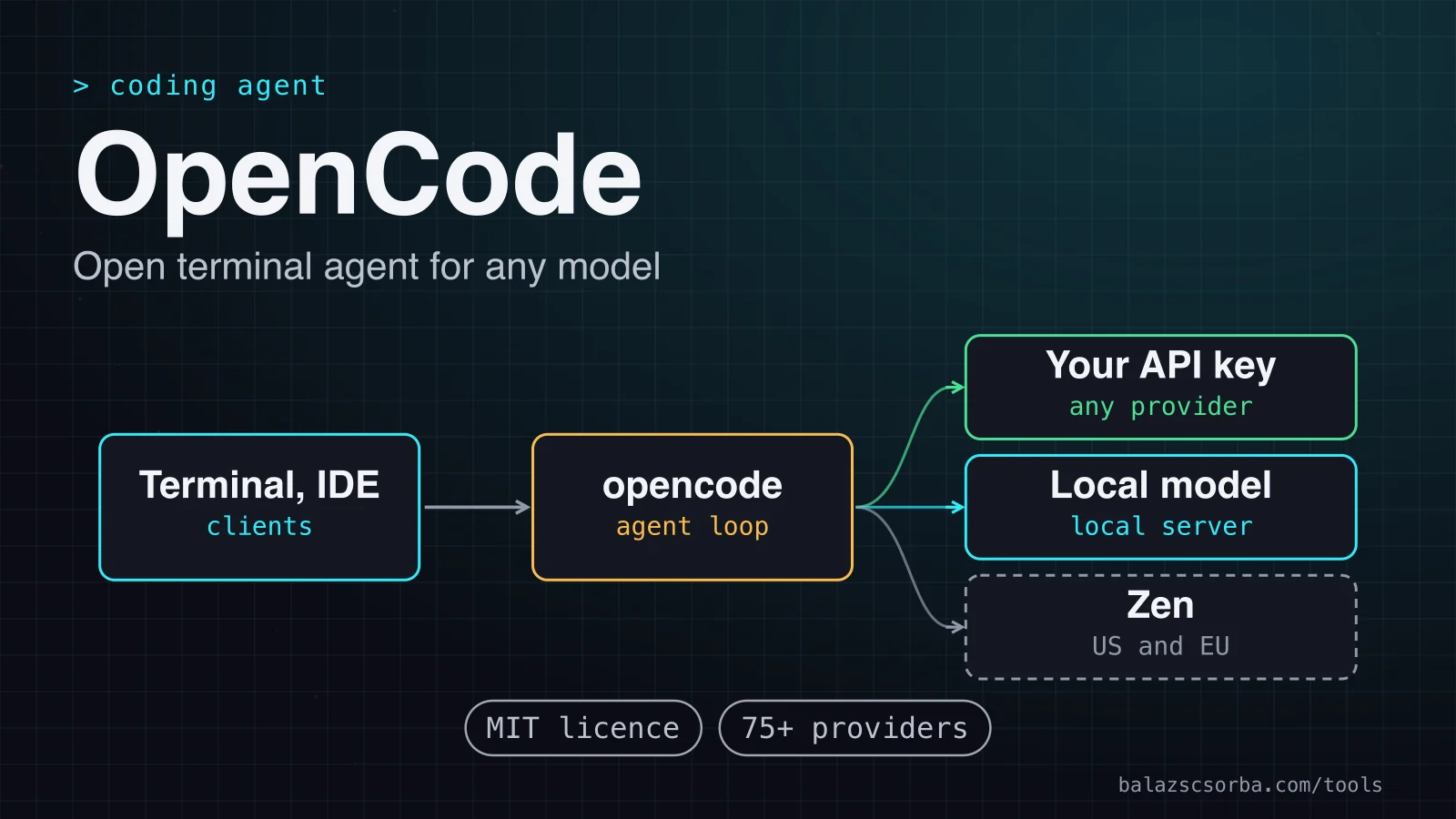
OpenCode is an MIT-licensed terminal coding agent for any model, hosted or local. Agents, permissions, MCP and LSP, plus the data-protection trade-offs.
- Type
- Coding agent
- Pricing
- MIT · free, you pay the model provider
Balázs Csorba··8 min read
- AI coding agent
- Terminal
- Open source
- Local models
- MCP
Key takeaways
- OpenCode is MIT-licensed and free to install. You pay for the model, through your own provider key, a local model or the optional Zen and Go plans.
- Its provider layer reaches more than 75 providers through the AI SDK and Models.dev, and local models through Ollama, LM Studio or llama.cpp.
- The Build and Plan agents separate doing from planning, but most permissions default to allow, so you must write your own approval rules before the first real run.
- MCP servers and LSP diagnostics extend the agent. Each MCP server adds to the context you pay for, so enable them one at a time.
- With your own provider, code goes straight from your machine to that provider. The exception is /share, which publishes a public link on opencode.ai.
OpenCode is an open-source AI coding agent for the terminal, also available as a desktop app and an IDE extension. The verdict up front: take it if you want one agent that can run whichever model you can connect, including a model on your own machine, and you are prepared to write its permission rules. Leave it alone if you want one vendor's model under one subscription, or if you expect safe defaults out of the box.
This review rests on the official OpenCode docs, the GitHub repository and the v1.18.35 release, published on 6 October 2026. I did not benchmark it, so the comparison covers features, licences and prices, not output quality.
What it is
OpenCode is a terminal interface, a desktop app and an IDE extension. The source is at anomalyco/opencode on GitHub under the MIT licence, and the repository showed about 212.5k stars when I checked on 10 October 2026. The docs also carry a banner for a v2 release. The v2 page I opened had no details, so the specifics below refer to the v1.18 line.
- Install: a shell script, npm (opencode-ai), Bun, pnpm or Yarn, Homebrew through the anomalyco tap, and AUR or Nix packages.
- Models: more than 75 providers through the AI SDK and Models.dev, plus any OpenAI-compatible endpoint you configure.
- Clients: the terminal UI, the desktop app, IDE extensions, a browser interface from opencode web, and ACP-compatible editors such as Zed and JetBrains IDEs.
- Project rules: an AGENTS.md file, which the /init command creates or updates, is added to the model's context.
How it works
The docs describe a client and server split. The commandopencode serve runs a headless HTTP server with an OpenAPI endpoint that any OpenCode client can use, so the interface and the agent can run in separate processes. Every tool call is checked against the permission rules before it runs.
Tools do the actual work. Built-in tools read, write and patch files, run shell commands and fetch web pages, and each has its own permission key. The language server layer passes diagnostics from the project's language servers back to the agent, which the docs present as feedback for the agent.
MCP and LSP
MCP servers sit under the mcp key. A local server is a command that OpenCode starts. A remote server is a URL, with optional headers, an OAuth block and a timeout that defaults to 5 seconds for fetching its tool list. The docs warn that every MCP server adds to the context you pay for, and that some, such as the GitHub MCP server, can exceed the context limit on their own. LSP works differently. OpenCode ships configurations for more than 30 language servers, from TypeScript, Rust and Python (pyright) to Go (gopls) and Terraform, and setting lsp to true enables all of them. Some install themselves; others need the toolchain on your path.
Getting started
Install with the shell script or npm install -g opencode-ai, then run opencode in the project directory. Inside the TUI, /connect adds provider keys and /init writes the AGENTS.md file. The configuration below points OpenCode at a model served by LM Studio on the same machine, sets the default permission to ask and turns sharing off. Put it in opencode.json at the project root, or in ~/.config/opencode/opencode.json for every project.
{
  "$schema": "https://opencode.ai/config.json",
  "model": "lmstudio/google/gemma-3n-e4b",
  "provider": {
    "lmstudio": {
      "npm": "@ai-sdk/openai-compatible",
      "name": "LM Studio (local)",
      "options": { "baseURL": "http://127.0.0.1:1234/v1" },
      "models": { "google/gemma-3n-e4b": { "name": "Gemma 3n-e4b (local)" } }
    }
  },
  "permission": { "*": "ask", "bash": "ask" },
  "share": "disabled"
}
A local model keeps prompts on your machine, but the quality of the result is the model's, not the agent's. Run the first tasks on a scratch branch and read every diff before you accept it.
Agents and permissions
Two primary agents do the main work. Build is the default, with every tool enabled, and suits development. Plan is restricted to analysis and review, and the docs say it makes no code changes. Press Tab to switch between them. OpenCode also has three built-in subagents. Explore is a fast, read-only agent for finding files and answering questions about the code, Scout is read-only and researches external docs and dependency source, and General is the third. You can call any of them with an @ mention.
Permissions are where you should spend your first hour. Each key accepts allow, ask or deny, and the object form can match on the tool input. The keys that matter most are edit (which covers write, edit and apply_patch), bash, webfetch, external_directory and doom_loop. A * key sets the default for everything else, and explicit deny rules still apply under --auto.
Providers and local models
This is the main reason to pick OpenCode. It uses the AI SDK and the Models.dev catalogue to cover more than 75 providers, /connect stores the keys you add, and the baseURL option points any provider at a proxy or a private endpoint. The provider directory lists local options such as Ollama, LM Studio and llama.cpp, and any other OpenAI-compatible server can be added with the @ai-sdk/openai-compatible package.
Provider-agnostic does not mean equally good. The agent is only as reliable as the model behind it, especially for tool calls in a large repository. Keep a second model configured, so you can switch when one struggles, and compare the diffs they produce on the same task before you commit to either.
Cost and deployment
The software costs nothing. You pay for the model, and the bill depends on where that model runs. As of October 2026 the published options are these.
| Option | Price | What it covers |
|---|---|---|
| OpenCode | Free, MIT | Install and run; you pay your model provider directly |
| Zen | Pay as you go, per 1M tokens | Tested models hosted in the US and EU; zero retention except some free models |
| Go | $10 a month | Open coding models with monthly dollar limits |
| Go Plus | $40 a month | Higher monthly limits at the same token prices as Go |
| Enterprise | Per seat, quoted | Central config, SSO, and your own LLM gateway with no token charge |
Self-hosting here means running the model on your side, because the agent already runs on your machine. The data-protection question is who processes your code. OpenCode's enterprise page says it does not store any of your code or context data, and that all processing happens locally or through direct API calls to your AI provider. That makes the provider the party you need a contract with.
Under Article 28(3) of the GDPR, processing by a processor must be governed by a contract that binds the processor. If your repositories or test data contain personal data, get that contract, the processing region and the retention terms in writing from the provider you connect. Zen's published policy is a useful benchmark: its models are hosted in the US and EU, its providers follow zero retention and do not train on your data, with named exceptions for free models during their free period. The wider residency checklist is in the GDPR LLM data residency guide.
Where it falls short
Most of the weak points are defaults and upkeep rather than missing features.
- Permissive defaults. Most permissions start at allow, and --auto removes the prompts altogether, so the safe setup is one you write and test yourself.
- Context cost from MCP. Each enabled server adds to the context. Enable one server at a time and measure what it costs before you add the next.
- Configuration keeps moving. The legacy tools boolean was merged into permission in v1.1.1, and the old key still works. Check examples against the version you run.
- Shares are public. Anyone with the link can read a shared conversation until someone unshares it.
- Team controls sit behind a quote. Central config, SSO and gateway enforcement are enterprise features, priced per seat.
- A version question. The docs point to a v2 release. Pin the version your team tests and retest after each upgrade.
Verdict
OpenCode is the open option for teams that must keep the choice of model open. Pick it when you want an MIT-licensed agent, when code should go only to a provider you have contracted, or when local models are part of the plan. Do not pick it if you want safe behaviour without writing the rules yourself, or if one vendor's model is the requirement.
| Tool | Licence | Models | Price, as of October 2026 |
|---|---|---|---|
| OpenCode | MIT | 75+ providers and local models | Free software; you pay the provider, or Zen and Go |
| Claude Code | Anthropic commercial terms | Claude models; no non-Claude models through gateways | Pro $17 a month billed yearly, $20 monthly; Max from $100 |
| Codex CLI | Apache-2.0 | OpenAI models, plus custom providers in config.toml | Included in ChatGPT plans, Free to Enterprise |
| Aider | Apache-2.0 | Almost any LLM, including local models | Free software; you pay the provider |
- Claude Code if you already work with Claude models and accept a commercial licence in return for Anthropic's own agent. The review is Claude Code review.
- Codex CLI if your team already has ChatGPT plans and wants an Apache-2.0 agent. Its review is Codex CLI review.
- Aider if you want a smaller, git-first tool that commits each change with a sensible message and reaches almost any model. Its review is Aider review.
Sources
- OpenCode docs: intro and installation
- OpenCode docs: providers, Models.dev and local models
- OpenCode docs: agents, Build, Plan and subagents
- OpenCode docs: permissions and defaults
- OpenCode docs: MCP servers
- OpenCode docs: LSP servers
- OpenCode docs: server and web interface
- OpenCode docs: config and precedence
- OpenCode docs: Zen, pay-as-you-go models
- OpenCode docs: Go subscription plans
- OpenCode docs: share and data retention
- OpenCode docs: enterprise and data handling
- GitHub: anomalyco/opencode, MIT licence and README
- OpenCode release v1.18.35 (6 October 2026)
- Claude Code licence file (LICENSE.md)
- Claude pricing: plans and Claude Code access
- Claude Code docs: connect to an LLM gateway
- OpenAI Codex CLI repository (Apache-2.0)
- ChatGPT pricing: Codex included in plans
- Codex configuration: model providers and config.toml
- Aider website: git integration and LLM support
- Aider licence file (Apache-2.0)
- GDPR, Regulation (EU) 2016/679, Article 28
Frequently asked questions
Is OpenCode free?
The software is free under the MIT licence. You pay your model provider for tokens, pay as you go through Zen, or subscribe to Go at $10 a month or Go Plus at $40 a month. Prices are as of October 2026.
Can OpenCode run without a cloud provider?
Yes. The provider directory covers local options such as Ollama, LM Studio and llama.cpp. Prompts and code stay on your machine, but web tools and remote MCP servers still send requests out, and output quality depends on the model you run.
Does OpenCode store my code?
According to its enterprise page, OpenCode does not store any of your code or context data, and processing happens locally or through direct API calls to your AI provider. Using /share is the exception, because the conversation is then published through opencode.ai.
How does it compare with Claude Code?
OpenCode is open source and provider-agnostic. Claude Code is under Anthropic's commercial terms, and Anthropic says it does not support routing Claude Code to non-Claude models through any gateway.